


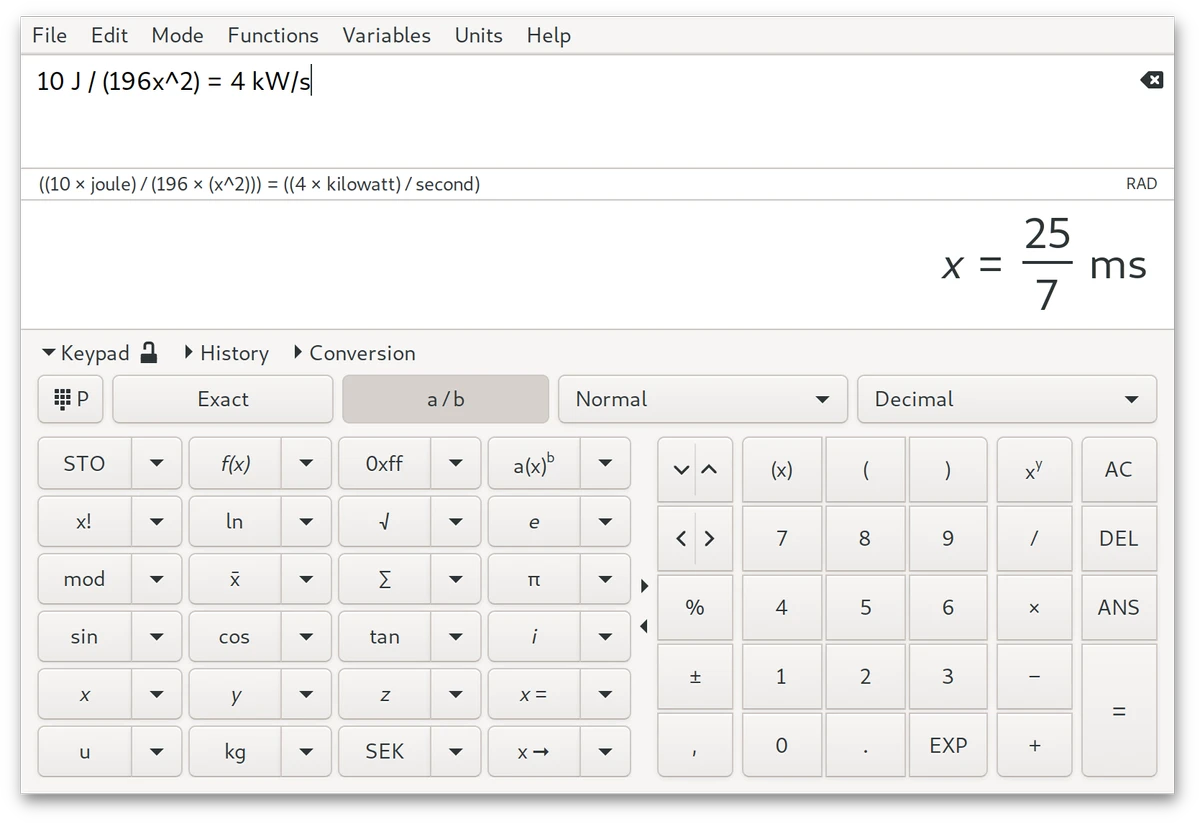

Qalculate! is a comprehensive mathematics application designed to handle everything from everyday arithmetic to advanced scientific and symbolic calculations. It combines the simplicity of a standard calculator with an extensive collection of mathematical tools, making it suitable for students, engineers, scientists, programmers, and anyone who frequently works with numbers.
Unlike traditional calculators that rely on rigid syntax, Qalculate! accepts mathematical expressions in a natural writing style. You can enter formulas much as you would write them on paper, and the software interprets the expression automatically after pressing Enter. When an expression is incomplete, ambiguous, or contains mistakes, the application provides informative warnings or error messages that help identify the issue. If a complete solution is not possible, it simplifies the expression as much as it can instead of failing outright.
Beyond standard calculations, Qalculate! supports symbolic mathematics, unit conversions, currency conversion, physical constants, percentage calculations, arbitrary precision arithmetic, uncertainty propagation, interval arithmetic, and basic plotting capabilities. Expressions can include variables, functions, units, numbers, and operators, all of which are easy to access through auto-completion, menus, object managers, and the built-in calculator keypad. Although it is designed to make simple calculations accessible, the included documentation remains valuable for exploring its more advanced mathematical capabilities.
Features of Qalculate!
- Natural mathematical expression input similar to handwritten formulas
- Currency conversion tools
- Percentage calculation support
- Extensive library of customizable mathematical functions
- Unit calculations and unit conversions
- Built-in physical constants
- Symbolic calculations, including integrals and equations
- Arbitrary precision arithmetic
- Uncertainty propagation
- Interval arithmetic
- Automatic expression simplification when complete evaluation is not possible
- Helpful warnings and error messages for ambiguous expressions
- Support for variables, functions, units, numbers, and arithmetic operators
- Auto-completion for faster expression entry
- Object managers and calculator keypad for easy navigation
- Number-based conversion dialog
- Simple plotting interface
Interface and Usability
After spending time with Qalculate!, I found that its interface strikes a practical balance between accessibility and advanced functionality. The expression editor allows calculations to be entered naturally instead of forcing strict calculator syntax, which makes routine calculations feel more intuitive.
The automatic completion feature helps locate variables, units, and functions without requiring extensive memorization. For more specialized operations, the menu system, object managers, and calculator keypad provide convenient access to the software's large collection of mathematical tools.
One aspect I appreciated is how forgiving the software is when entering expressions. Rather than immediately rejecting partially recognized input, it explains what went wrong and provides helpful feedback whenever an expression is ambiguous. If an expression cannot be fully evaluated, Qalculate! still attempts to simplify it, making the workflow smoother than many traditional scientific calculators. Although basic calculations are straightforward, users interested in symbolic mathematics, interval arithmetic, or advanced functions will benefit from consulting the included manual to fully understand the available capabilities.
Who Should Use Qalculate!?
- Students studying mathematics, physics, or engineering
- Scientists and researchers performing advanced calculations
- Engineers working with units and physical constants
- Developers who need precise mathematical computations
- Financial users performing currency and percentage calculations
- Anyone looking for a calculator that goes far beyond basic arithmetic
Conclusion
Qalculate! successfully bridges the gap between a simple desktop calculator and a comprehensive mathematical toolkit. Its support for natural expression input makes everyday calculations approachable, while advanced capabilities such as symbolic mathematics, arbitrary precision, unit conversion, interval arithmetic, and plotting provide enough depth for technical users.
The software avoids being intimidating by offering helpful feedback whenever expressions are incomplete or ambiguous, making it accessible even for users who are still learning more advanced mathematics. At the same time, experienced users can take advantage of its extensive library of functions and mathematical tools.


