


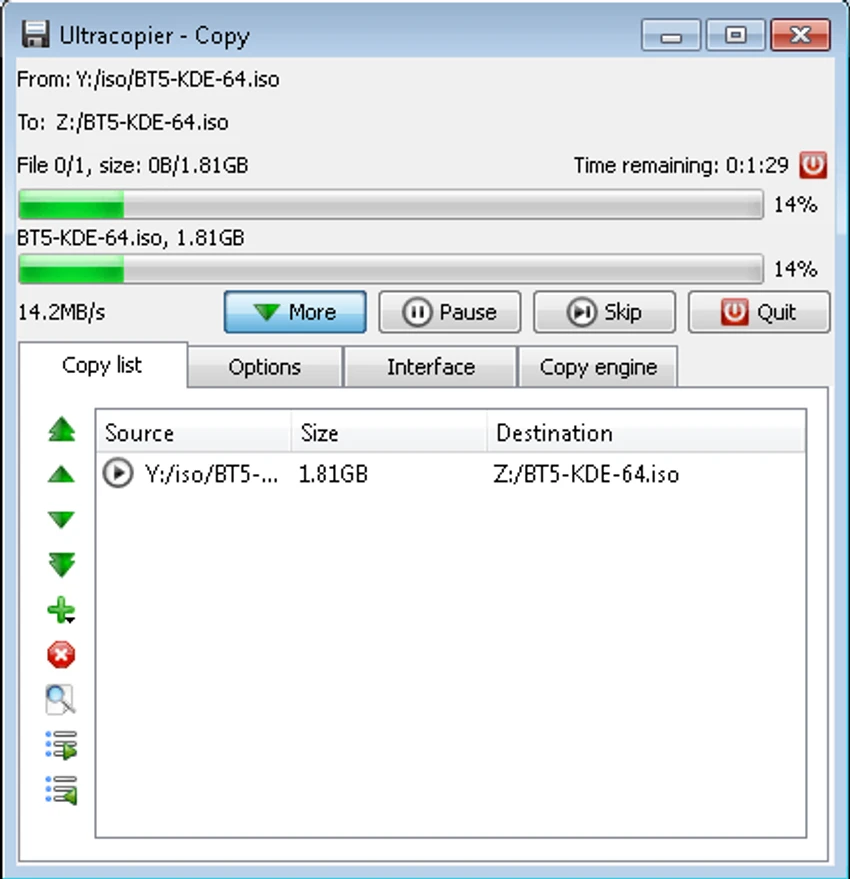

UltraCopier is an advanced file copy and move utility designed to improve upon the default file transfer tools available in Windows. It offers greater control over copying operations with features such as transfer queue management, speed limitation, error handling, and collision management. After using the application, I found it to be much more flexible than the standard Windows copy dialog, especially when working with large batches of files. Its support for plugins, skins, multiple languages, and cross-platform compatibility makes it a practical solution for users who regularly manage file transfers and want more customization and reliability.
Features of UltraCopier
- Copy and move files and folders
- Resume interrupted copy processes
- Adjustable copy speed limitation
- Advanced error management
- File collision management
- Search within the copy list
- Detailed transfer information dialogs
- Plugin support
- Customizable skins
- Multiple language support
- Cross-platform compatibility (Windows, Linux, and macOS)
- Community-driven development
- Designed for improved transfer performance
Interface and Usability
UltraCopier provides an interface that is straightforward enough for everyday use while offering advanced controls for more experienced users. Starting a file transfer is simple, and the additional options become available when needed instead of getting in the way.
I particularly appreciated the transfer management features, which make it easier to monitor ongoing copy operations and respond to issues without restarting the entire process. Error and collision dialogs present useful options for handling conflicts, such as overwriting files or keeping newer versions, helping users make informed decisions during file transfers. Customization is another strong point. With support for skins, plugins, and multiple languages, users can tailor the application to suit their workflow without sacrificing performance.
Who Should Use UltraCopier?
- Users who frequently copy or move large numbers of files
- IT professionals and system administrators
- Content creators managing large media libraries
- Users who want more control than the default Windows copy tool provides
- Anyone looking for customizable file transfer software
Conclusion
UltraCopier successfully enhances the file transfer experience by offering better control, improved reliability, and flexible customization. Whether you're copying a handful of documents or transferring thousands of files, it provides tools that simplify the process and reduce interruptions caused by errors or file conflicts.


