


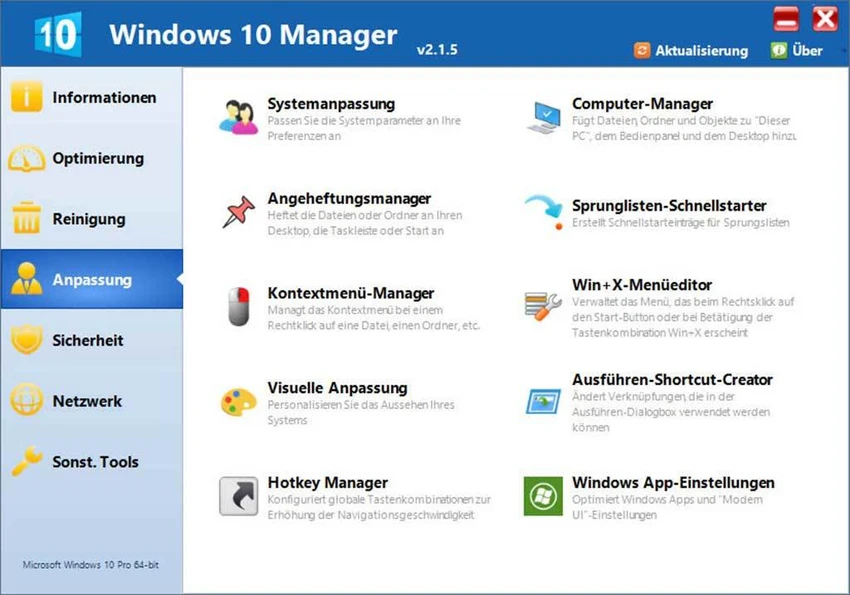

Yamicsoft Windows Manager is an all-in-one system optimization and maintenance suite designed specifically for Windows 10 and Windows 11. Combining more than 40 utilities into a single application, it helps users improve performance, clean unnecessary files, enhance security, customize Windows settings, and troubleshoot common system issues. Rather than focusing on a single aspect of PC maintenance, Windows Manager provides a broad collection of tools covering system information, optimization, cleaning, security, networking, and customization.
Features of Yamicsoft Windows Manager
Information Tools
- Create system restore points manually
- View detailed hardware and system information
- Retrieve Microsoft Windows and Microsoft Office product keys
- Monitor running processes and threads
- Diagnose and repair system problems through Repair Center
- One-click system cleanup
- Optimization Wizard for less experienced users
Optimization Tools
- Improve system performance through advanced tweaks
- Configure and manage the Windows boot menu
- Startup Manager for controlling startup applications
- Repair startup entries altered by malware
- Optimize services and drivers
- Manage and optimize scheduled tasks
Cleaning Tools
- Disk Analyzer with graphical disk usage reports
- Secure WinSxS folder cleanup
- Smart Uninstaller for complete software removal
- Desktop Cleaner for organizing unused items
- Junk file removal
- Duplicate file finder and remover
- Registry Cleaner
- Registry Defrag and optimization
Customization Tools
- Customize File Explorer, Desktop, Start Menu, Taskbar, and notifications
- Add files, folders, and system items to This PC and Desktop
- Pin items to Desktop, Start Menu, and Taskbar
- Customize Jump Lists
- Manage right-click context menus
- Edit Win + X menu shortcuts
- Modify system appearance settings
- Customize Run dialog shortcuts
- Adjust Windows Apps and Modern UI settings
Security Tools
- Enhance Windows security settings
- Manage User Account Control (UAC) options
- Restrict access to drives and programs
- Encrypt files and secure folders
- Move system folders to safer locations
- Privacy cleanup and activity track removal
- Recover deleted or formatted files
- Lock selected Windows features
Network Tools
- Optimize internet and network settings
- Manage URLs and IP addresses
- Switch between multiple network configurations
- Edit the Hosts file
- Manage Wi-Fi connections
- Access built-in networking utilities
- Monitor network traffic activity
Miscellaneous Utilities
- Create scheduled tasks and automated actions
- Access built-in Windows utilities
- Split and merge files
- Automated file copying and backup tasks
- Advanced Registry management tools
User Experience
After using Yamicsoft Windows Manager, it becomes clear that the software is designed as a centralized control center for Windows maintenance. Instead of installing multiple utilities for cleaning, optimization, security, and customization, users can access a wide range of functions from a single interface. The software organizes tools into logical categories, making navigation easier despite the large number of available features. Users can quickly move between performance optimization, privacy protection, startup management, disk analysis, and network configuration without leaving the application.
The Optimization Wizard is particularly useful for less technical users who may not be familiar with advanced Windows settings. More experienced users, however, will appreciate the deeper customization options and granular system controls.
The cleaning and maintenance tools are among the strongest parts of the suite. Features such as duplicate file removal, disk analysis, registry maintenance, and software uninstallation help users manage storage and system clutter efficiently. For advanced users, the networking, security, and customization modules provide extensive control over Windows behavior, allowing a level of personalization not available through standard Windows settings.
Who Should Use Yamicsoft Windows Manager?
- Power users and PC enthusiasts
- IT professionals and technicians
- Users seeking all-in-one PC maintenance software
- Individuals looking to optimize Windows performance
- Users who enjoy customizing Windows behavior and appearance
- Home users wanting simplified maintenance tools
- Small business users managing Windows workstations
Conclusion
Yamicsoft Windows Manager successfully combines optimization, cleaning, security, networking, and customization tools into a single package. With more than 40 utilities covering nearly every aspect of Windows maintenance, it provides a convenient and comprehensive solution for improving system performance and management.


