Photo Pos Pro logo

Photo Pos Pro 4.21 Build 51

  • User Rating:
    ★★★★★
    ★★★★★
    0.0 0Votes
  • Requirements:
    Windows
  • Version: 4.21 Build 51
  • Latest updated: 3 days ago
  • License: Freeware  
  • Publisher: PhotoPos
  • Size: 57 MB
× app stores

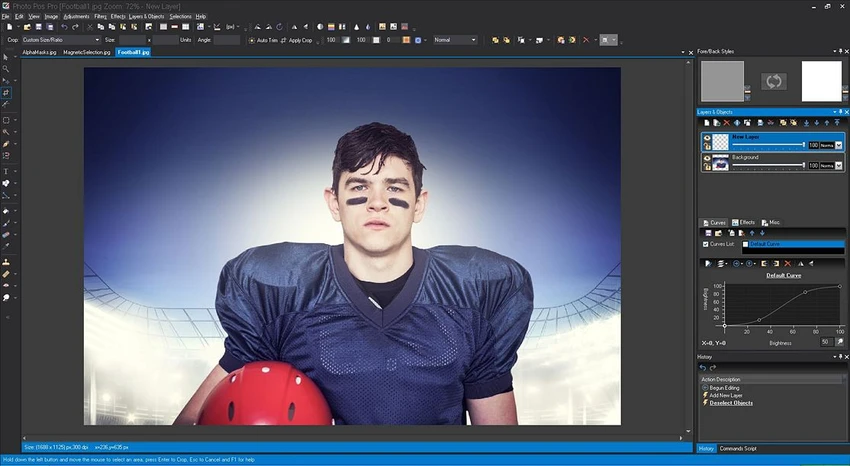
Photo Pos Pro is a feature-rich photo editing and graphic design software designed for both beginners and advanced users. It offers a wide range of tools for image enhancement, creative editing, and computer graphics design. With support for multiple file formats including RAW images, the software allows users to perform everything from simple photo corrections to complex, layered compositions. The application combines professional-level editing capabilities with a guided learning approach, making it accessible even for users who are new to image editing.

Features of Photo Pos Pro

  • Supports a wide range of image formats, including RAW files.
  • Compatible with scanners and digital cameras.
  • Advanced image enhancement and editing tools.
  • Layer and mask support for non-destructive editing.
  • Selection tools including smart selection and magnetic selection.
  • Image correction tools for fixing poor-quality photos.
  • Background removal, replacement, and object removal tools.
  • Frames, collages, and creative photo compositions.
  • Advanced text tools and rich text effects.
  • Gradient, pattern, and texture support.
  • Batch operations and script automation.
  • Built-in filters and special effects.
  • Color correction tools including:
    • White balance adjustments
    • Temperature and color enhancement
    • Histogram adjustments
  • Brush tools including recovery and facial correction brushes.
  • Vector-based editing capabilities alongside raster editing.
  • Support for creating complex graphic design projects.

User Experience

Photo Pos Pro feels like a hybrid between a beginner-friendly editor and a professional-grade graphics tool. The interface is structured to help new users learn step-by-step while still providing deep control for advanced editing tasks. Basic editing tasks such as cropping, color correction, and applying filters are easy to perform. At the same time, more advanced features like layers, masks, and vector tools allow for detailed photo manipulation and design work.

The software’s guided help system is particularly useful for beginners, helping them understand editing concepts while working on real projects. However, due to its wide range of tools, the interface can feel dense at first and may require some time to fully explore.

Who Should Use Photo Pos Pro?

  • Beginners learning photo editing.
  • Hobby photographers improving their images.
  • Users who need advanced editing tools without expensive software.
  • Designers working with layered compositions.
  • Users who want both raster and vector editing capabilities.

Conclusion

Photo Pos Pro is a versatile photo editing solution that bridges the gap between beginner-friendly tools and advanced graphic design software. With support for RAW images, layers, masks, and a wide variety of enhancement tools, it provides everything needed for creative and technical photo editing.

Pros & Cons

Pros

  • Extensive set of professional editing tools.
  • Supports RAW files and multiple image formats.
  • Layer and mask-based editing.
  • Strong selection and retouching tools.
  • Includes both raster and vector editing features.
  • Beginner-friendly learning system.
  • Supports batch processing and scripting.

Cons

  • Interface can feel complex for new users.
  • Requires time to learn advanced tools effectively.

Frequently Asked Questions

What is Photo Pos Pro used for?

Photo Pos Pro is used for photo editing, image enhancement, and graphic design, supporting both simple edits and advanced compositions.

Does Photo Pos Pro support RAW files?

Yes. It supports RAW file formats as well as images from scanners and digital cameras.

Is Photo Pos Pro good for beginners?

Yes. It includes a step-by-step help system designed to guide beginners through editing tasks.

Does Photo Pos Pro support layers?

Yes. It supports layers and masks for advanced, non-destructive editing.

Which operating systems are supported?

It supports Windows XP through Windows 11, and can also run on Mac systems using a Windows emulator.

Recommended apps [Freeware]:
  • BitTorrent 7.11.0.47255 BitTorrent logo peer-to-peer file sharing client for fast, decentralized downloads with bandwidth control and resume support
  • DefenderUI 2.10 DefenderUI logo enhances Microsoft Defender on Windows 10/11 with advanced security profiles and easier system protection control
  • LAV Filters 0.82 LAV Filters logo a free DirectShow codec package that enables broad audio and video format support on Windows
  • PointerStick 7.17 PointerStick logo a virtual pointer to Windows desktops, helping presenters highlight mouse movements on large screens
  • MSI Dragon Center 2.0.156.0 MSI Dragon Center logo monitor CPU, GPU, and RAM, optimize gaming performance, and control RGB and system settings on MSI PCs
  • Winstep Nexus 26.6 Winstep Nexus logo customizable desktop dock for Windows with app launch shortcuts, widgets, and multi-monitor support
Recommended apps [Shareware]:
  • VueScan 9.8.56 VueScan logo Enhance scanner functionality with advanced tools for scanning documents, photos, videos, and slides.
  • All Video Downloader Pro 10.4.7 All Video Downloader Pro logo Download videos, playlists, subtitles, and audio from popular sites with built-in conversion and playback tools
  • Adobe Media Encoder 2026 Adobe Media Encoder logo a powerful video encoding and media management tool for exporting and transcoding
  • Allavsoft 3.29.3.9669 Allavsoft logo video downloader and converter for batch downloads, HD quality, and audio extraction on Windows.
  • Diffchecker 7.1.4 Diffchecker logo offline tool for comparing text, images, PDFs, spreadsheets, and folders securely on Windows
  • Adobe Audition 2026 v26.3 Adobe Audition logo professional audio editor for recording, mixing, restoration, podcasting, and sound design