WinSnap logo

WinSnap 6.2.4

  • User Rating:
    ★★★★★
    ★★★★★
    0.0 ★ 0Votes
  • Requirements:
    Windows
  • Version: 6.2.4
  • Latest updated: 2 weeks ago
  • License: Free Trial  
  • Publisher: NTWind Software
  • Size: 4 MB
× app stores

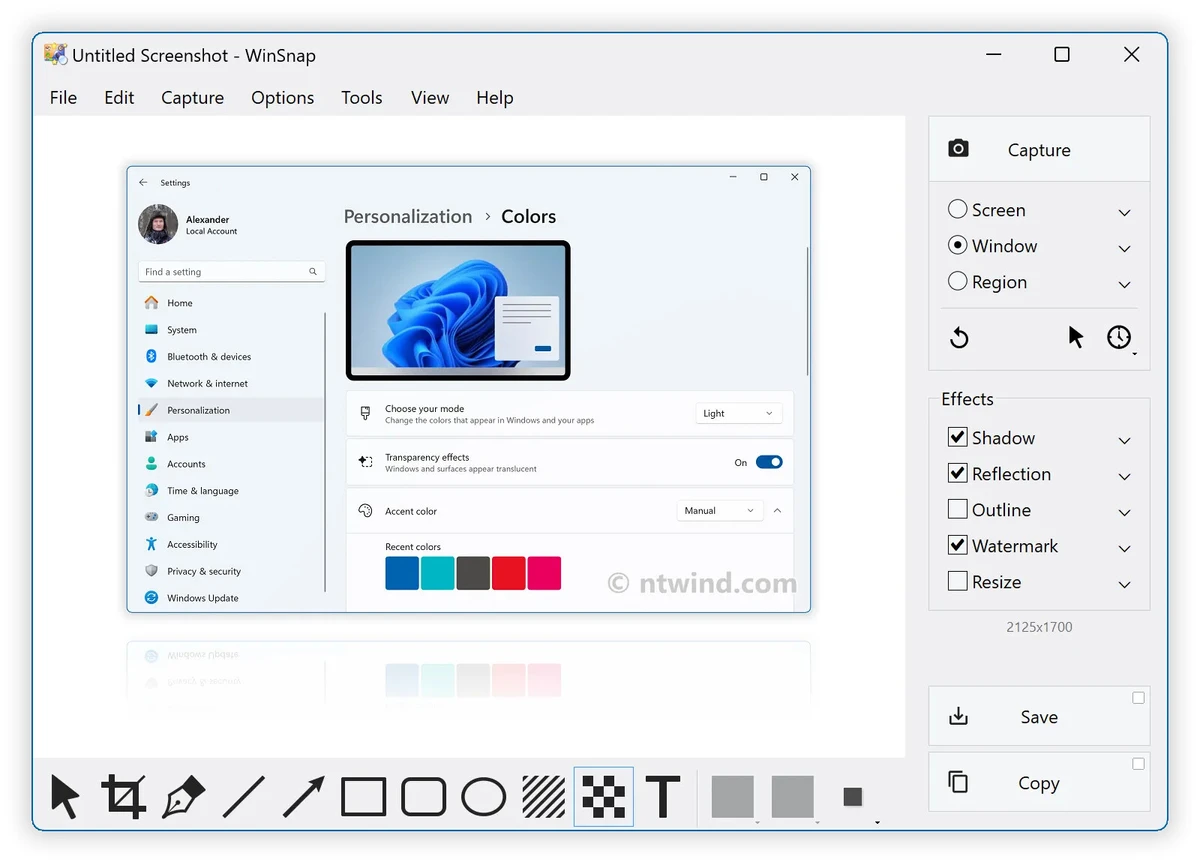
WinSnap is a lightweight screenshot and image editing utility designed to make capturing and enhancing screen images easier. The software focuses on automating tasks that would normally require additional image editing tools, allowing users to capture windows, apply visual effects, and prepare screenshots quickly.

Originally developed to capture non-rectangular windows, including Windows XP-style interfaces and skinned applications, WinSnap has expanded into a more complete screenshot enhancement tool. It provides professional-looking shadows, coloring effects, canvas adjustments, and support for multiple image formats.

The application is designed for users who need more than basic screen capture. Along with flexible capture options, WinSnap includes features such as Aero Glass window capturing, transparency support, multi-object capture, and advanced save and copy options. These tools make it suitable for creating screenshots for documentation, presentations, websites, emails, and general image sharing.

Despite offering image processing features, WinSnap remains a small and fast application. Its combination of quick operation and visual enhancement tools makes it a practical choice for users who want polished screenshots without relying on complex image editors.

Features of WinSnap

  • Flexible screen capture options
  • Captures non-rectangular windows
  • Professional shadow effects
  • Image processing and coloring effects
  • Basic canvas transformations
  • Aero Glass capture with transparency effects
  • Alpha channel and PNG transparency support
  • Multi-object capture mode
  • Configurable external tools
  • Web publishing and email sharing options
  • Advanced save and copy settings
  • Keyboard and mouse controls
  • Multilingual user interface
  • Lightweight and fast performance

Interface and Usability

After using WinSnap, I found the application focused on speed and efficiency. The interface is designed around quick screenshot creation rather than complex editing workflows, making it easy to capture images and apply enhancements without unnecessary steps.

The screenshot tools provide more flexibility than a standard screen capture utility, especially when working with window shapes, shadows, and transparency effects. Features such as keyboard and mouse controls also help speed up frequent screenshot tasks.

While WinSnap includes image processing capabilities, it is not designed to replace a full image editor. Instead, it works well as a specialized screenshot tool for users who want professional-looking results with minimal editing.

Who Should Use WinSnap?

  • Users who frequently capture screenshots
  • Software reviewers and technical writers
  • Designers creating interface images
  • Users preparing screenshots for websites or presentations
  • Anyone who wants enhanced screenshots without using complex editing software

Conclusion

WinSnap is a practical screenshot enhancement tool that combines fast capture features with useful image processing options. Its ability to add shadows, manage transparency, and capture complex windows makes it more versatile than basic screenshot utilities.

Pros & Cons

✓

Pros

  • Lightweight and fast
  • Easy screenshot capture workflow
  • Professional shadow and visual effects
  • Supports transparency and PNG images
  • Captures multiple objects
  • Includes useful sharing and saving options
  • Requires fewer editing steps than traditional image editors
✕

Cons

  • Not a full replacement for advanced image editing software
  • Focused mainly on screenshots rather than general image creation

Frequently Asked Questions

What is WinSnap used for?

WinSnap is used to capture and edit screenshots on Windows computers. It allows users to take screen captures and apply effects such as shadows, colors, and transparency.

Can WinSnap capture transparent windows?

Yes. WinSnap supports Aero Glass capturing, transparency effects, and Alpha Channel support for PNG images.

Is WinSnap an image editor?

WinSnap includes image processing features, but it is primarily a screenshot capture and enhancement tool rather than a complete image editor.

Does WinSnap support multiple screenshot objects?

Yes. WinSnap includes a Multi-Object capture mode that allows users to capture multiple objects together.

Can WinSnap save screenshots in different formats?

Yes. WinSnap supports saving images in various formats and provides advanced save and copy options.

Who should use WinSnap?

WinSnap is best suited for users who need fast screenshot creation with professional visual effects, including writers, designers, developers, and general Windows users.

Recommended apps [Freeware]:
  • FluentCleaner 26.07.03 FluentCleaner logo a lightweight Windows cleaning tool designed to remove unnecessary files using a modern, minimal WinUI 3 interface
  • Windows 10 Debloater 3.0.3 Windows 10 Debloater logo customize Windows 10 by disabling unwanted features and generating PowerShell scripts
  • OcenAudio 3.20.0 OcenAudio logo a fast and easy-to-use audio editor with real-time effects, spectrogram analysis, and VST plugin support
  • Jux 4.900 Jux logo fractal explorer for Mandelbrot and Julia sets with advanced coloring, lighting effects, and high-resolution rendering tools
  • Krita 6.0.2.1 Krita logo a free digital painting software for artists, offering advanced brushes, layers, and professional drawing tools
  • KILHO AutoClick 1.5.3 KILHO AutoClick logo Automate repetitive mouse clicks with customizable timing, click patterns, and hotkeys for gaming, productivity, and repetitive workflows.
Recommended apps [Shareware]:
  • Mountain Duck 5.3.1.29526 Mountain Duck logo mounts cloud storage and servers as local drives with smart sync, offline access, and seamless file integration
  • Ant Download Manager 2.17.6 Ant Download Manager logo a Windows tool that speeds up downloads, captures streaming media, supports torrents, and integrates with browsers
  • MobiKin Assistant for Android 5.1.47 MobiKin Assistant for Android logo back up, restore, and manage Android data, contacts, apps, and files from a PC
  • O&O Defrag Professional 31.3.26064 O&O Defrag Professional logo optimizes HDDs and SSDs with intelligent defragmentation, automatic maintenance, startup management, and disk cleanup tools
  • Soda PDF 15.0.12.24792 Soda PDF logo all-in-one PDF tool to edit, convert, compress, secure and manage documents on Windows
  • Ashampoo Driver Updater 2.6.2 Ashampoo Driver Updater logo Automatically scan, update, and manage outdated drivers to improve Windows system stability, hardware compatibility, and performance.