NoMachine logo

NoMachine 9.8.2

  • User Rating:
    ★★★★★
    ★★★★★
    0.0 0Votes
  • Requirements:
    Windows
  • Version: 9.8.2
  • Latest updated: 2 weeks ago
  • License: Freeware  
  • Publisher: NoMachine S.à r.l.
  • Size: 99 MB
× app stores

NoMachine is a remote desktop application designed to provide fast and convenient access to computers from virtually anywhere. The software allows users to connect to another NoMachine-enabled computer and interact with it as if they were sitting directly in front of the machine. With a focus on speed, accessibility, and secure connections, NoMachine helps users access their desktop environments, applications, and important data remotely.

The application can turn a computer into a personal remote workspace, allowing users to reach their desktop and files whether they are at home, in the office, or away from their primary device. This makes it useful for remote work, accessing personal computers while traveling, and managing systems from different locations.

NoMachine provides a private remote access solution with features designed around secure connections and controlled sharing. Users can connect to their own computers or share access with selected people when needed. The software aims to deliver a smooth remote desktop experience while keeping access simple through a straightforward connection process. With support for Windows systems and a relatively small installation size, NoMachine offers a lightweight approach to remote computer access. It is suitable for users who need a practical way to connect to computers remotely without relying on complex enterprise remote management solutions.

Features of NoMachine

  • Fast remote desktop access
  • Connect to computers from different locations
  • Turn a computer into a personal remote workspace
  • Secure and private remote connections
  • Access desktop files and applications remotely
  • Share computer access with selected users
  • Simple connection process
  • Suitable for home and office remote access

Interface and Usability

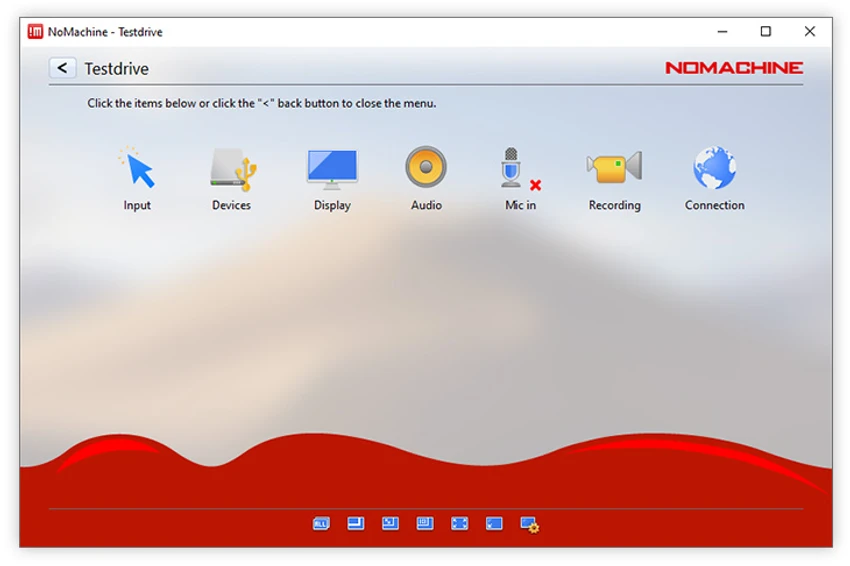
NoMachine focuses on making remote desktop access simple and accessible. The connection process is designed to require only a few steps, allowing users to quickly reach another computer and begin working remotely. The software provides a straightforward experience for accessing a remote desktop environment, with the goal of making the connected computer feel like a local machine. This approach is useful for users who need access to their own desktop, applications, or files while away from their main workstation.

The simple setup makes NoMachine approachable for everyday remote access tasks, while its remote connection capabilities also support users who need more flexible ways to work across different locations.

Who Should Use NoMachine?

  • Remote workers accessing office computers
  • Users who need access to their home PC while away
  • Professionals managing remote desktops
  • People looking for a personal remote workspace solution
  • Users who need secure computer access from different locations

Conclusion

NoMachine provides a convenient way to access and control computers remotely with a focus on speed and simplicity. Its ability to transform a computer into a personal remote workspace makes it useful for users who need access to their files, applications, and desktop environment from different locations.

Pros & Cons

Pros

  • Fast remote desktop performance
  • Simple setup and connection process
  • Allows access from different locations
  • Provides private remote access options
  • Useful for personal and professional remote work
  • Lightweight installation size

Cons

  • Requires NoMachine to be installed on connected computers
  • Best suited for users who understand basic remote access concepts
  • Advanced enterprise management features are not described in the provided data

Frequently Asked Questions

What is NoMachine used for?

NoMachine is used for remote desktop access, allowing users to connect to another computer and use its desktop, applications, and files from a different location.

Can NoMachine access a computer from anywhere?

Yes. NoMachine is designed to allow users to access NoMachine-enabled computers from different locations, depending on the available connection setup.

Is NoMachine suitable for remote work?

Yes. NoMachine can be used for remote work by allowing users to access their workplace computer and continue working from another location.

Can I share my computer access with other people using NoMachine?

Yes. NoMachine includes sharing capabilities that allow users to provide access to selected people when needed.

What operating systems does NoMachine support?

According to the provided information, NoMachine supports Windows 7, Windows 8, and Windows 10.

How much storage space does NoMachine require?

The provided system requirements indicate that NoMachine requires at least 200 MB of available hard disk space.

Recommended apps [Freeware]:
  • K-Lite Codec Pack Full 19.8.2 K-Lite Codec Pack Full logo Play all audio and video formats on Windows with K-Lite Codec Pack Full, a lightweight and reliable codec package
  • Windows 10 Debloater 3.0.3 Windows 10 Debloater logo customize Windows 10 by disabling unwanted features and generating PowerShell scripts
  • Daum PotPlayer 1.7.22979 Daum PotPlayer logo a free media player for Windows with broad format support, built-in codecs, subtitles, and customization
  • Diffractor 126.3 Diffractor logo Organize, view, and manage photos and videos easily with Diffractor, a fast media management tool for Windows
  • NETworkManager 2026.7.7.0 NETworkManager logo Manage network connections, diagnose issues, scan devices, and access essential troubleshooting tools with this open-source utility.
  • TKO Auto Clicker 2.0 TKO Auto Clicker logo Automate mouse clicks and record macros on Windows with customizable intervals, hotkeys, and precise cursor controls.
Recommended apps [Shareware]:
  • Charles 5.2.0 Charles logo HTTP proxy tool for web debugging, allowing developers to inspect, modify, and analyze network traffic in real time
  • EF CheckSum Manager 26.07 EF CheckSum Manager logo creates and verifies MD5, SHA, and SFV checksums to ensure file integrity and detect corruption.
  • Output Messenger 3.0.0 Output Messenger logo secure team chat, video calls, file sharing, task management, and remote desktop access
  • SysTools EDB Converter 7.0 SysTools EDB Converter logo Convert Exchange database files into multiple formats, recover mailbox data, preview items, and preserve folder structure with ease.
  • StartAllBack 3.9.23.5370 StartAllBack logo Customize Windows 11 with a familiar interface, improved taskbar controls, classic menus, and enhanced desktop usability options.
  • Neo Lighting Control 4.3.0 Neo Lighting Control logo Manage LED and architectural lighting systems with flexible control software designed for scalable production and professional environments.