


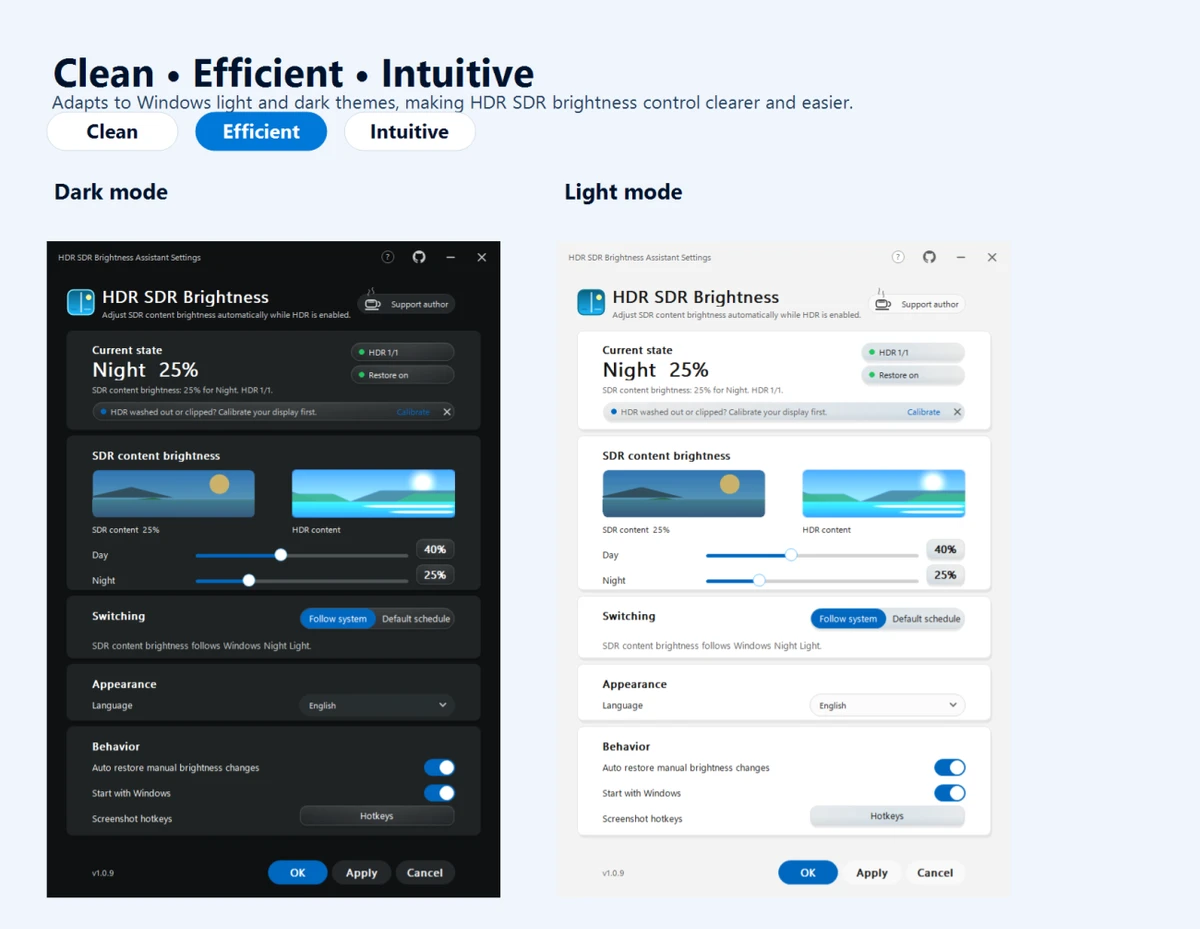

HDR SDR Brightness is a lightweight Windows utility designed to help users maintain consistent brightness levels when viewing SDR (Standard Dynamic Range) content while HDR (High Dynamic Range) mode is enabled. The application runs quietly in the Windows system tray and focuses on improving the balance between SDR applications and HDR-enabled displays.
When HDR is activated in Windows, some SDR content may appear incorrectly balanced, with brightness levels that are too high, too low, or with reduced color impact. HDR SDR Brightness is designed to address these inconsistencies by allowing users to control SDR brightness settings and create a more predictable viewing experience.
The application is built specifically for modern display technologies, including OLED, QD-OLED, and MiniLED panels, as well as HDR monitors, televisions, and laptop displays. It provides separate SDR brightness settings for different environments, allowing users to configure preferred levels for both daytime and nighttime use.
HDR SDR Brightness also supports synchronization with Windows Night Light settings, helping automatically adjust SDR brightness preferences based on system changes. The software can detect manual brightness adjustments and adapt accordingly. The application operates entirely from the system tray and supports Windows light and dark themes for a consistent interface experience. A live SDR/HDR preview is available in the settings window, making it easier to fine-tune brightness adjustments.
Features of HDR SDR Brightness
- Maintains consistent SDR brightness when Windows HDR is enabled
- Designed for OLED, QD-OLED, and MiniLED displays
- Supports HDR monitors, TVs, and laptop panels
- Runs quietly from the Windows system tray
- Allows separate SDR brightness settings for day and night
- Supports Windows Night Light synchronization
- Detects manual brightness changes and adjusts settings accordingly
- Provides a live SDR/HDR preview in the settings window
- Supports Windows light and dark themes
- Stores settings locally for the current Windows user
- Does not require additional drivers, services, browser components, or extra software installation
Interface and Usability
HDR SDR Brightness focuses on simplicity and convenience. After installation, the application runs from the Windows system tray, allowing users to access settings without keeping a large window open. This design makes it suitable for users who want background brightness management without interrupting their normal workflow.
The settings interface includes a live SDR/HDR preview, helping users understand how brightness adjustments affect their display experience. The ability to configure different brightness preferences for daytime and nighttime use adds flexibility, especially for users who regularly switch between different lighting conditions. The application also integrates with Windows visual settings by adapting to the system light or dark theme. Since settings are stored locally and no account is required, setup remains straightforward.
Who Should Use HDR SDR Brightness?
- Users with HDR-enabled Windows displays
- Owners of OLED, QD-OLED, or MiniLED monitors and TVs
- Laptop users with HDR panels
- People who notice brightness inconsistencies when switching between HDR and SDR content
- Users who want a simple background utility for display brightness management
Conclusion
HDR SDR Brightness provides a focused solution for a common HDR display issue: inconsistent SDR brightness when HDR mode is active in Windows. Its lightweight system tray operation, display-focused design, and brightness customization options make it a convenient utility for modern HDR display users.


