


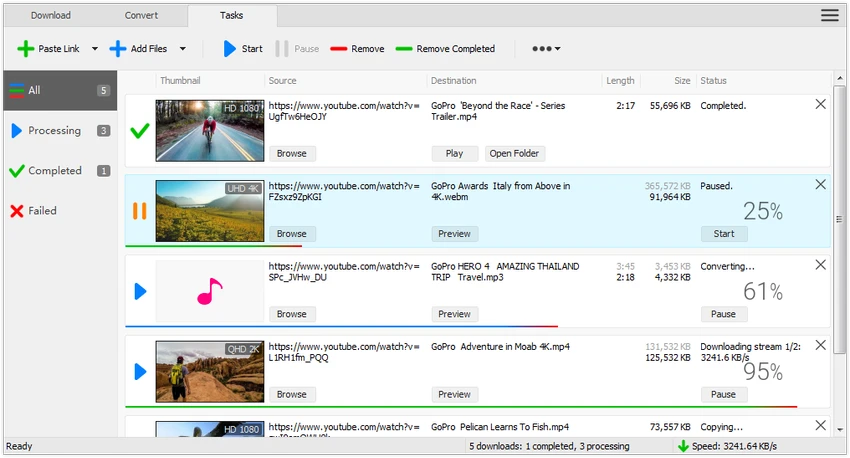

All Video Downloader Pro is a Windows-based video downloading and conversion tool designed to help users save videos from popular video-sharing websites for offline viewing. The software combines downloading, media conversion, audio extraction, playlist downloading, subtitle support, and media playback into a single application. With support for multiple video resolutions, simultaneous downloads, download scheduling, and device optimization, All Video Downloader Pro aims to provide a complete media management solution for users who frequently download online content.
Features of All Video Downloader Pro
- Download videos from YouTube, Facebook, Dailymotion, and hundreds of other video-sharing websites
- Download videos for offline viewing
- Multithreaded download acceleration with speeds up to 5 times faster
- Download videos in 4K, 2K, Full HD 1080p, HD 720p, and lower resolutions
- Support for 3D video downloads
- Download audio-only streams from YouTube and save as MP3
- Download entire YouTube playlists automatically
- Simultaneous downloads for multiple videos
- Download subtitles in selected languages and formats
- Pause and resume downloads
- Preview incomplete videos during downloads
- Convert downloaded videos into multiple video formats
- Extract audio from video files
- Convert audio and video files stored locally
- Device optimization for smartphones, tablets, gaming consoles, and media devices
- Ready-made video and audio conversion presets
- Custom output format settings
- Schedule downloads and automatic shutdown after completion
- Drag-and-drop URL support
- Includes All Video Player for media playback
- Supports Windows 11, Windows 10, Windows 8, and Windows 7 (64-bit)
User Experience
After reviewing All Video Downloader Pro, it becomes clear that the software is designed as more than just a video downloader. It combines downloading, converting, and playback features into a unified workflow that reduces the need for multiple applications. The download process is straightforward. Users can paste video URLs, drag and drop links directly into the application, or download entire playlists with minimal effort. The ability to process multiple downloads simultaneously is particularly useful for users managing large media collections.
The multithreaded download engine helps improve efficiency, especially when downloading high-resolution videos. Support for pause and resume functionality also adds flexibility when dealing with unstable internet connections or large files. One of the most practical features is playlist downloading. Instead of downloading videos individually, users can save complete playlists automatically, making the software especially useful for educational content, tutorials, and media collections.
The integrated conversion tools further expand the application's usefulness. Downloaded videos can be converted into numerous formats and optimized for various devices without requiring additional software. Audio extraction is equally convenient. Users who only need music, podcasts, interviews, or other audio content can save media directly in popular audio formats. The inclusion of All Video Player adds extra value by allowing playback of downloaded files within the same application, particularly for formats that may not be supported by Windows Media Player.
Who Should Use All Video Downloader Pro?
- Users who frequently download online videos
- Students saving educational content for offline viewing
- Travelers who need media access without internet connectivity
- Content creators collecting reference material
- Music listeners extracting audio from videos
- Users who want downloading, conversion, and playback in a single application
Conclusion
All Video Downloader Pro goes beyond basic downloading by integrating playlist support, subtitle downloads, media conversion, audio extraction, scheduling tools, and a built-in media player. This all-in-one approach creates a streamlined experience for users who frequently work with online media.


