TapinRadio logo

TapinRadio 2.17.00

  • User Rating:
    ★★★★★
    ★★★★★
    0.0 ★ 0Votes
  • Requirements:
    Windows
  • Version: 2.17.00
  • Latest updated: 3 weeks ago
  • License: Free Trial  
  • Publisher: Raimersoft
  • Size: 32 MB
× app stores

TapinRadio is a straightforward internet radio player designed for Windows users who want quick access to a wide range of online radio stations. It focuses on simplicity and reliability while offering a solid set of practical listening and recording tools. The software supports multiple internet radio formats and allows users to search, switch stations smoothly, and even record live audio. With built-in features like an equalizer, alarm, and sleep timer, TapinRadio goes beyond basic streaming and becomes a flexible listening companion for everyday use.

Features of TapinRadio

  • Access to a large selection of internet radio stations
  • Supports multiple audio streaming formats including MP3, WMA, OGG Vorbis, and AAC+
  • Quick and reliable station search functionality
  • Smooth switching between radio stations
  • Record live radio streams while listening
  • Option to save recordings as separate song files or continuous recordings
  • Automatic checking for software and station list updates (if enabled in settings)
  • Organize favorite stations into groups
  • Built-in graphic equalizer for audio tuning
  • Alarm feature for scheduled playback
  • Sleep timer to stop playback or shut down the computer

Interface and Usability

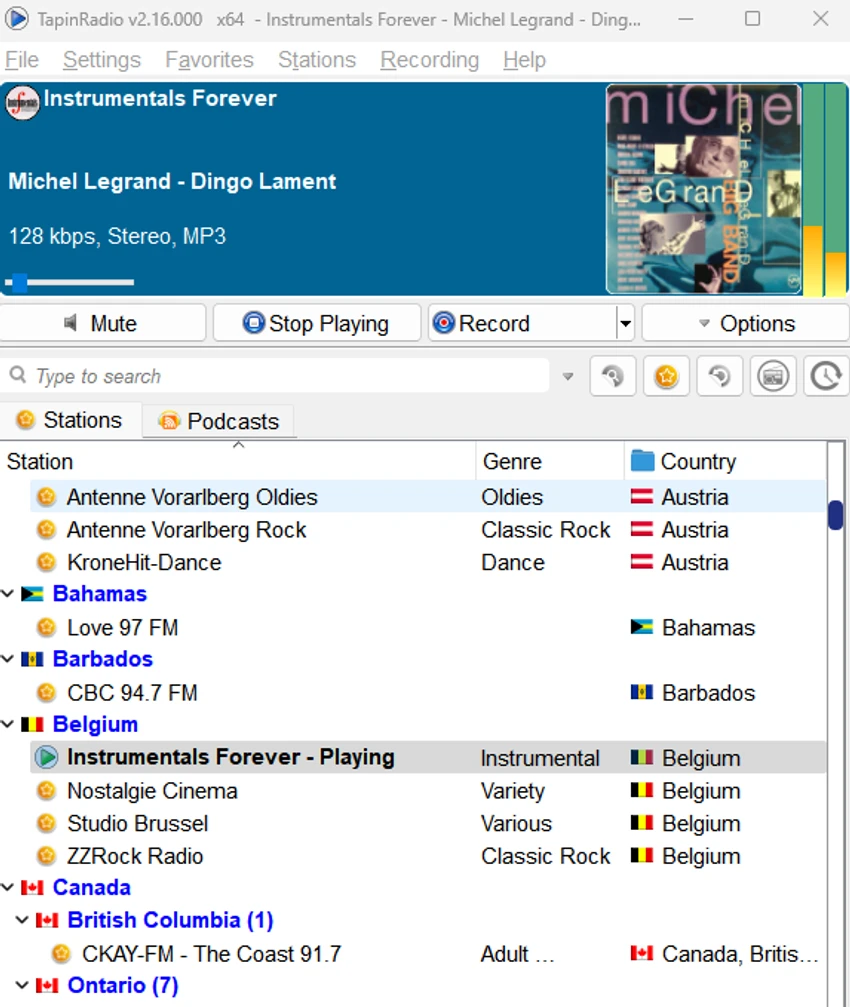
TapinRadio is designed with a simple and functional interface that prioritizes ease of use over complex design elements. Station navigation and search are straightforward, allowing users to quickly find and play their preferred streams. Switching between stations is smooth, and core features like recording, favorites, and scheduling are accessible without deep configuration. While it does not focus on visual complexity, its layout supports practical daily use, especially for users who prefer minimalistic media software.

Who Should Use TapinRadio?

TapinRadio is a good fit for users who enjoy listening to internet radio on Windows and want additional control over playback. It is especially useful for those who want to record live radio streams, manage station favorites, or schedule listening sessions with alarms and timers.

Conclusion

TapinRadio delivers a practical internet radio experience with useful enhancements like recording, scheduling, and station management. It remains focused on core functionality, making it a dependable choice for everyday streaming and audio capture on Windows systems.

Pros & Cons

✓

Pros

  • Supports multiple internet radio formats
  • Built-in recording with flexible output options
  • Simple and easy-to-use interface
  • Useful features like alarm and sleep timer
  • Smooth station switching and quick search
✕

Cons

  • Interface is minimal and lacks modern visual design
  • Advanced customization options are limited compared to more complex media tools

Frequently Asked Questions

What is TapinRadio used for?

TapinRadio is designed for listening to internet radio stations on Windows. It also includes extra tools like recording, alarms, and station organization to enhance the listening experience.

Can TapinRadio record live radio streams?

Yes. TapinRadio can record what you are listening to in real time. It supports saving recordings either as separate track files or as continuous audio.

Which audio formats does TapinRadio support?

The software supports multiple internet radio streaming formats, including MP3, WMA, OGG Vorbis, and AAC+.

Does TapinRadio include a sleep timer?

Yes. TapinRadio includes a sleep timer that can automatically stop playback or even shut down the computer after a set duration.

Can I organize my favorite radio stations in TapinRadio?

Yes. Users can group favorite stations, making it easier to manage and quickly access preferred channels.

What operating systems are compatible with TapinRadio?

TapinRadio supports a wide range of Windows versions, including Windows 11, 10, 8.1, 8, 7, Vista, XP, and several Windows Server editions, in both 32-bit and 64-bit systems.

Recommended apps [Freeware]:
  • WinScan2PDF 9.77 WinScan2PDF logo scan documents and save them as PDFs or JPEGs with minimal setup and low CPU usage.
  • CheckMail 5.23.7 CheckMail logo a POP3 email checker that lets users preview, manage, and delete emails before downloading them
  • Red Burner 19.7 Red Burner logo a portable disc burning tool for CD, DVD, and Blu-ray with fast ISO handling and a simple interface
  • Total Commander Ultima Prime 9.4 Total Commander Ultima Prime logo enhanced file manager package with plugins and tools for advanced file and system management on Windows.
  • Dism++ 10.1.1002.2 Dism++ logo a lightweight Windows optimization tool for cleaning system files, managing startup items, updates, and system images
  • MuseScore 4.7.4 MuseScore logo Create, edit, print, and share professional sheet music with free notation tools, MIDI support, and cross-platform compatibility.
Recommended apps [Shareware]:
  • ViewCompanion Pro 17.10.0.1204 ViewCompanion Pro logo View, convert, annotate, and compare PDF, DWF, CAD, and technical drawing files with powerful batch tools
  • Duplicate Photos Fixer Pro 1.3.1086.1158 Duplicate Photos Fixer Pro logo finds and removes duplicate and similar photos to organize your library and save space
  • Tomabo MP4 Downloader 6.4.9 Tomabo MP4 Downloader logo downloads videos, playlists, subtitles, and audio while offering format conversion tools.
  • DiskBoss 17.0.14 DiskBoss logo powerful Windows file management tool for disk analysis, duplicate cleanup, file synchronization, and data migration
  • FlexiPDF 2025.420.0626 FlexiPDF logo Windows PDF editor for editing text, images, OCR scanning, and converting PDFs into Word and other formats
  • UFS Explorer Professional Recovery 10.21.1 UFS Explorer Professional Recovery logo Professional data recovery software with RAID reconstruction, file system analysis, and advanced recovery tools for complex storage devices.