


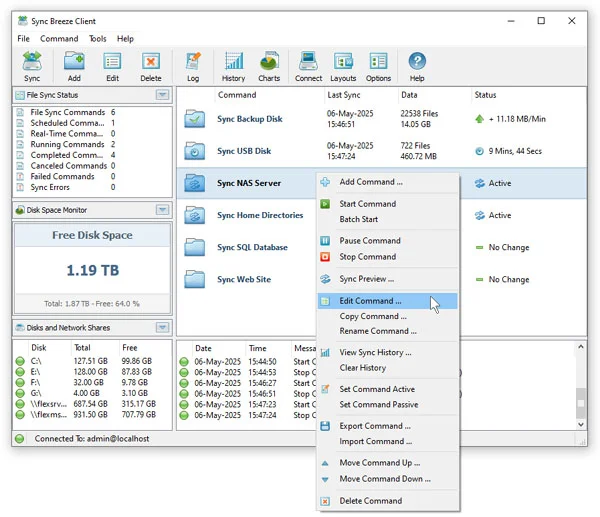

SyncBreeze is a professional file synchronization solution designed to help users and IT professionals efficiently manage and synchronize files across local drives, network shares, NAS devices, and enterprise storage systems. With a range of synchronization modes, scheduling options, and advanced features, it provides full control over file replication and backup processes.
Overview
SyncBreeze stands out for its speed, reliability, and flexibility in synchronizing files for both individual users and large-scale enterprise environments. The software supports multiple one-way and two-way synchronization modes, real-time and periodic sync, and advanced features such as bit-level and multi-stream synchronization. Users can preview file operations before executing them or use streaming mode for handling millions of files efficiently. SyncBreeze also allows detailed customization through file synchronization rules, directory exclusions, and optional synchronization of file attributes and security descriptors. For power users, IT administrators, and enterprise clients, SyncBreeze provides a command-line utility, a dedicated synchronization server, and a web-based management interface, enabling automated and network-controlled operations.
Features of SyncBreeze
- One-Way and Two-Way Sync Modes: Flexible synchronization optimized for different workflows.
- File Synchronization Preview: Preview planned actions and select which files to synchronize.
- Streaming Mode: Efficient on-the-fly synchronization for large file systems.
- Scheduled and Real-Time Sync: Automate file synchronization tasks periodically or in real time.
- Advanced Sync Options: Control copy modes, verification, parallel streams, and recoverable operations.
- File Matching Rules: Include or exclude files based on types, patterns, or regular expressions.
- Directory Exclusions: Exclude specific folders or groups of directories using macros or patterns.
- Attribute and Security Sync: Synchronize file attributes, ACLs, DACLs, and perform bit-level sync.
- Command-Line Utility: Automate tasks via scripts or batch files for advanced users.
- SyncBreeze Server: Background service for fully automatic and unattended enterprise synchronization.
- Web-Based Management Interface: Manage multiple servers remotely using a web browser.
User Experience
SyncBreeze offers a robust and professional user experience. For smaller file systems, the preview mode provides clear insight into actions before execution, reducing the risk of errors. For enterprise-scale environments, the streaming mode ensures smooth synchronization without performance bottlenecks. The scheduling and real-time sync options are intuitive and allow users to automate repetitive tasks effectively. The software’s command-line utility and server-based setup cater to IT professionals who need full control over complex synchronization workflows.
While the interface is functional, new users may need some time to become familiar with all advanced features, particularly the server and scripting capabilities. Overall, SyncBreeze balances professional-level power with practical usability.
Who Should Use SyncBreeze?
SyncBreeze is ideal for IT administrators, system integrators, enterprise users, and any professional who requires automated, reliable, and flexible file synchronization across multiple storage systems. It is also suitable for power users managing large volumes of data across local and networked drives.
Conclusion
SyncBreeze is a powerful and versatile file synchronization tool that covers both simple and complex use cases. From everyday file syncing to enterprise-grade server deployments, it provides speed, reliability, and extensive customization. If you need a professional solution for managing and automating file synchronization across desktops, NAS devices, or enterprise storage systems, SyncBreeze is an excellent choice.


