


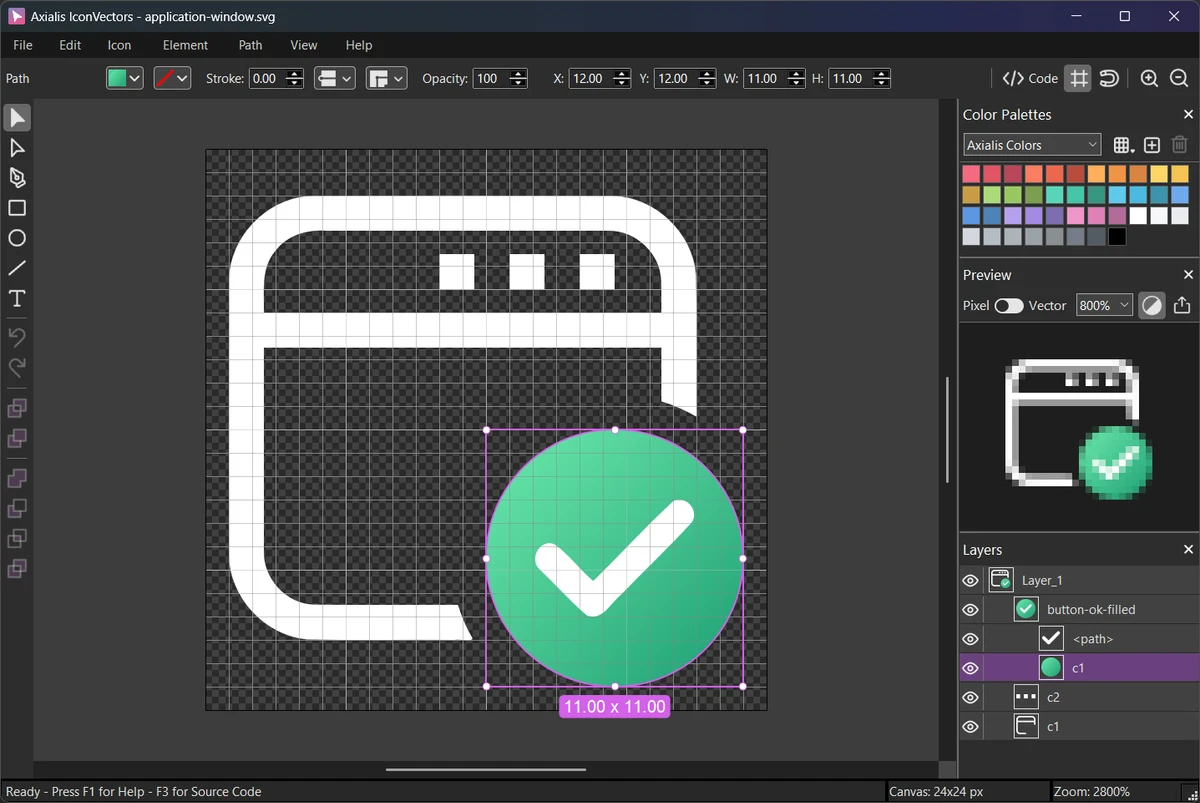

Axialis IconVectors is a specialized SVG icon editor built specifically for developers who need to create, edit, and optimize vector icons efficiently. Unlike traditional graphic design software that includes a wide range of illustration tools, IconVectors focuses on delivering the essential features required for modern UI and application icon development.
Its lightweight design, responsive performance, and real-time code generation make it an attractive solution for developers working with SVG assets in web, desktop, and cross-platform applications. With support for SVG, ReactTS, VueTS, XAML, and C++ code generation, Axialis IconVectors bridges the gap between graphic design and software development workflows.
Features of Axialis IconVectors
- Lightweight and fast SVG icon editor
- Create and edit SVG vector icons
- Developer-focused interface and workflow
- Real-time code previews for:
- SVG
- ReactTS
- VueTS
- XAML
- C++
- Integration with development environments
- Compatible with Visual Studio
- Compatible with VS Code
- Compatible with Adobe Illustrator workflows
- Advanced icon customization tools
- Add overlays and shadows
- Create icon cutouts
- Generate UI state color variants
- One-click dark theme icon colorization
- Layer management system
- Group, rename, and organize artwork
- Visibility controls for layers
- Advanced path editing tools
- Bezier curve editing
- Anchor point manipulation
- Path conversion tools
- Geometric shape creation
- Rectangle, ellipse, and polyline tools
- Boolean vector operations:
- Union
- Subtract
- Intersect
- Adjustable zoom and canvas controls
- Grid and snap-to-grid support
- Dark and light user interface themes
- Multiple document windows
- Windows shell extension for SVG thumbnails and previews
What's New in Axialis IconVectors
Element Library
A new Element Library allows users to insert reusable SVG artwork from local folders, including both filled and outlined icon variations.
Enhanced SVG Properties
Users can now edit SVG output size, preserveAspectRatio settings, and metadata such as SVG IDs, titles, and descriptions.
Pixel-Align Selection
Artwork can be aligned automatically to the pixel grid, helping create sharper and cleaner icon output.
Improved Editor Shortcuts
New keyboard shortcuts improve workflow efficiency by allowing users to switch tools quickly and perform alignment operations directly from the keyboard.
Additional Improvements
Several bug fixes and usability enhancements contribute to a smoother editing experience.
User Experience
During testing, Axialis IconVectors stands out because of its focus on simplicity and productivity. The application launches quickly and remains responsive even when working with multiple projects simultaneously. Unlike larger vector design suites, the interface is streamlined around SVG icon creation. This makes it easier for developers to concentrate on producing interface assets without navigating through unnecessary illustration features.
The live code viewer is one of the software's strongest features. Seeing SVG, ReactTS, VueTS, XAML, or C++ output update in real time significantly speeds up development workflows and reduces manual conversion work. The vector editing tools provide sufficient precision for professional icon design. Path editing, Boolean operations, layer management, and pixel alignment tools make it possible to create clean, scalable assets suitable for modern applications and websites. Support for multiple windows and shell integration further improves usability for developers managing large icon libraries.
Who Should Use Axialis IconVectors?
- Front-end developers
- UI/UX designers
- Software developers
- Web application teams
- React developers
- Vue developers
- Desktop application developers
- Designers creating SVG icon libraries
Conclusion
Axialis IconVectors takes a practical approach to SVG icon creation by focusing on what developers need most: speed, precision, and seamless integration with coding workflows. The real-time code preview system, efficient editing tools, and lightweight design help streamline icon development without the complexity of larger graphic design applications.


