TreeSize logo

TreeSize 9.8.1.2302

  • User Rating:
    ★★★★★
    ★★★★★
    0.0 0Votes
  • Requirements:
    Windows
  • Version: 9.8.1.2302
  • Latest updated: 3 days ago
  • License: Freeware  
  • Publisher: JAM Software
  • Size: 15.5 MB
×

TreeSize is a powerful disk space management tool designed for Windows users who need deep visibility into how storage is being used. It helps identify large folders, analyze file distribution, and reclaim valuable disk space through detailed scanning and reporting.

This software is especially useful for users managing large drives, servers, or network storage environments where manual cleanup would be time-consuming and inefficient.

Overview

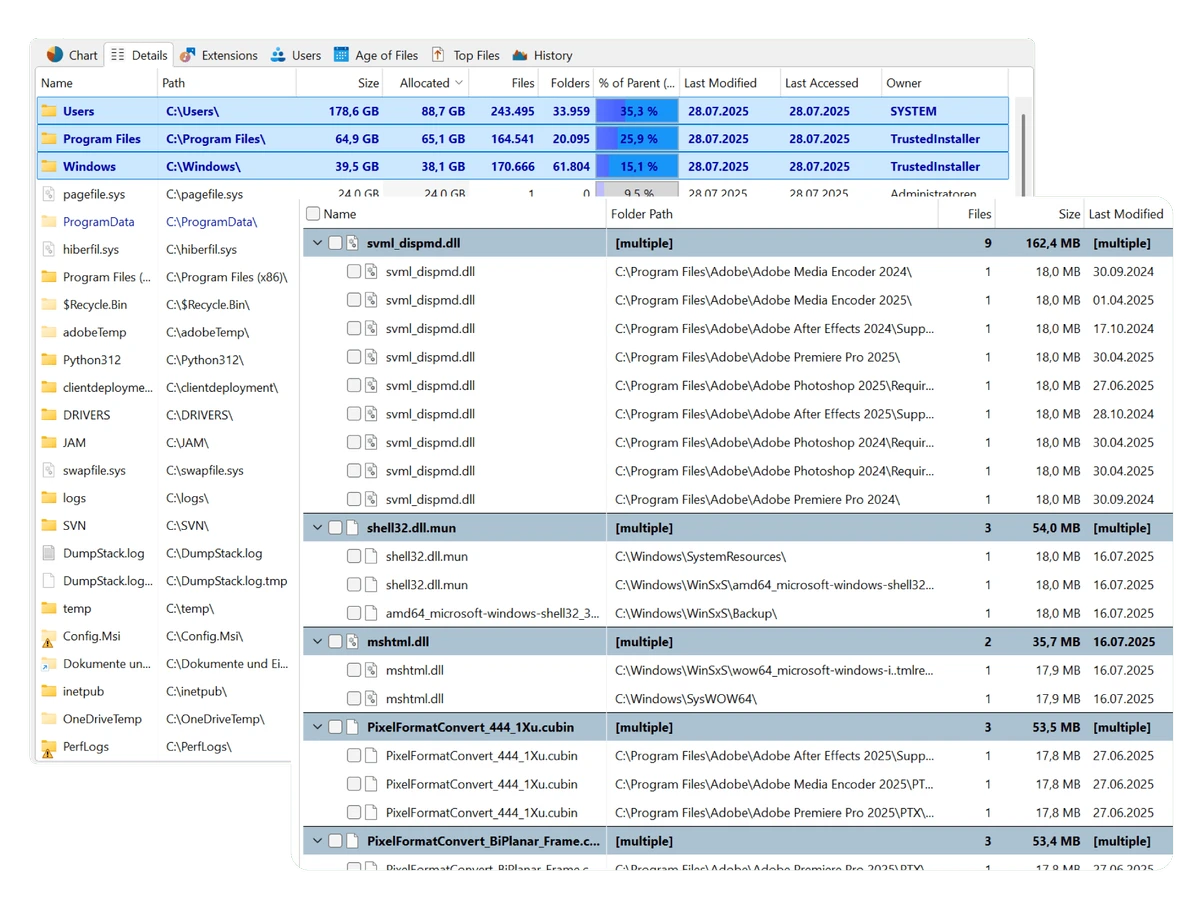
TreeSize provides an Explorer-like interface that lets users drill down into folders and files to understand exactly what is consuming storage. It goes beyond simple size reporting by offering detailed insights such as allocated space, file ownership, permissions, last access dates, and NTFS-specific attributes.

It is designed for both individual PCs and enterprise environments, supporting local drives, network paths, FTP, WebDAV, and SharePoint scans. The software is optimized for performance with multithreaded scanning and allows users to interact with results even while scans are still running.

Features of TreeSize Professional

  • Scan and analyze disk space usage across drives, servers, and networks
  • Identify largest folders and files quickly
  • Visual disk usage reports with charts and tree maps
  • Detect old, large, temporary, and duplicate files
  • Advanced duplicate file search with checksum support (MD5, SHA256)
  • Export reports to Excel, XML, CSV, HTML, TXT, and more
  • Compare snapshots to track storage growth over time
  • Schedule automated scans using Windows tasks
  • Full NTFS support including permissions, compression, and ADS
  • Scan FTP, WebDAV, and SharePoint storage systems
  • Context-menu integration with Windows Explorer
  • Multi-threaded scanning for faster performance

User Experience

Using TreeSize Professional feels similar to navigating Windows File Explorer, which makes it easy for both beginners and advanced users to get started quickly. During scanning, users can already browse partial results, which is helpful when working with large drives. The visual charts and tree maps make it easier to understand storage distribution at a glance, especially when identifying space-heavy directories. The interface is data-rich but remains organized, focusing more on analysis depth than visual simplicity. Export options are highly flexible, making it suitable for IT administrators who need reports or documentation.

Who Should Use TreeSize Professional?

TreeSize Professional is ideal for:

  • IT administrators managing servers and network storage
  • Businesses monitoring disk usage across systems
  • Power users cleaning large or cluttered drives
  • Anyone needing detailed storage analysis and reporting
  • Users managing NTFS-based systems with advanced file attributes

Conclusion

TreeSize Professional is a robust and feature-rich disk space analyzer built for users who need deep control over storage management. Its combination of detailed scanning, visual analytics, and export capabilities makes it especially valuable in professional and enterprise environments. If you regularly struggle with low disk space or need structured storage reporting, this tool is a strong candidate for your workflow.

Pros & Cons

Pros

    • Detailed and accurate disk space analysis
    • Strong visualization tools (charts, tree maps)
    • Advanced duplicate file detection
    • Wide export and reporting options
    • Supports network and server scanning
    • Fast multithreaded performance

Cons

    • Interface can feel complex for beginners
    • Focused more on analysis than simple cleanup tools
    • Advanced features may require technical understanding

Frequently Asked Questions

What is TreeSize Professional used for?

TreeSize Professional is used to analyze disk usage, identify large files and folders, and optimize storage space on Windows systems.

Can it find duplicate files?

Yes, it includes a duplicate file search feature that can use checksum methods like MD5 and SHA256 to accurately detect duplicates.

Does it support network drives?

Yes, it can scan network drives, servers, FTP, WebDAV, and SharePoint locations.

Can I export scan results?

Yes, results can be exported to formats such as Excel, XML, HTML, CSV, and text files.

Is TreeSize Professional suitable for business use?

Yes, it is designed for both individual and enterprise environments, especially for IT administration and storage management tasks.

Recommended apps [Freeware]:
  • Simple IP Config 2.9.7 Simple IP Config logo a lightweight, portable tool for quickly changing Windows IP, DNS, and network settings
  • IObit Driver Booster 13.4.0.234 IObit Driver Booster logo updates outdated drivers automatically to boost system stability and gaming performance.
  • EarthView 7.16.4 EarthView logo dynamic wallpapers and screensavers with day, night, and weather effects
  • EarthTime 6.33.4 EarthTime logo displays world clocks, weather, and local times for 120,000+ cities with customizable alarms and maps.
  • Stretchly 1.21.0 Stretchly logo reminds you to take breaks while working on your computer, promoting better health and productivity.
  • Android Studio 2026.1.1.9 Android Studio logo Google’s official IDE for Android, offering intelligent coding, fast emulators, and cloud integration.
Recommended apps [Shareware]:
  • Coolutils Print Maestro 4.2.0.0 Coolutils Print Maestro logo print folder contents, export directory trees, and generate detailed file reports quickly
  • iBackup Viewer 4.3.14.2 iBackup Viewer logo extract contacts, messages, photos, and app data from iPhone backups
  • Internet Download Manager (IDM) 6.42 Build 64 Internet Download Manager (IDM) logo boosts download speeds up to 5x, schedules downloads, and supports all major browsers and protocols
  • Adobe Photoshop 2026 Adobe Photoshop logo powerful image editing and graphic design tool for creating, enhancing, and transforming photos, illustrations
  • Adobe Acrobat Pro DC 2026 Adobe Acrobat Pro DC logo create, edit, and secure PDFs easily. Professional PDF solution for individuals and businesses.
  • Adobe After Effects 2026 Adobe After Effects logo advanced motion graphics, visual effects, compositing, and animation tools for creators.