FBackup logo

FBackup 9.9.1044

  • User Rating:
    ★★★★★
    ★★★★★
    0.0 0Votes
  • Requirements:
    Windows
  • Version: 9.9.1044
  • Latest updated: 2 months ago
  • License: Freeware  
  • Publisher: Softland
  • Size: 101.7 MB
×

FBackup is a free backup software for Windows designed to help users protect personal and professional data from loss. It allows you to create full backups or mirror copies of files and store them on local drives, external devices, network locations, or cloud services. With features like scheduling, encryption, and automatic backups, FBackup focuses on making data protection simple and accessible for both beginners and everyday users.

Overview

FBackup provides a straightforward approach to data backup by guiding users through a wizard-based setup. You define what to back up, where to store it, how the backup should be created, and when it should run. The software supports both compressed ZIP backups and exact mirror copies, giving users flexibility depending on whether they prefer storage efficiency or direct file replication. It also integrates with cloud services and external drives, ensuring backups can be stored safely outside the main system.

Features of FBackup

  • Free for both personal and commercial use
  • Automatic scheduled backups with simple setup
  • Full backups using ZIP compression (including ZIP64 support for large files)
  • Mirror backups for exact file duplication
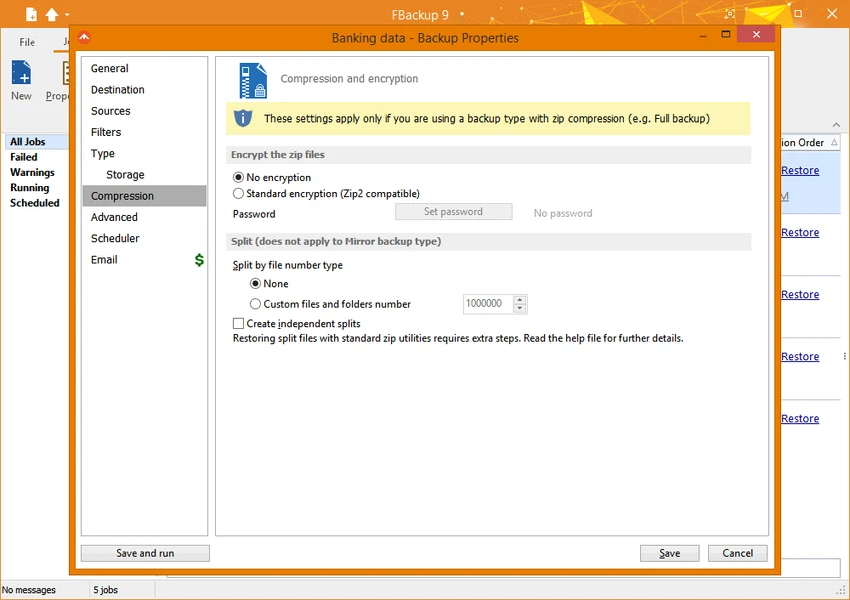
  • Backup encryption and password protection
  • Cloud backup support via Google Drive and Dropbox
  • Protection against ransomware through external/offsite backups
  • Backup of open files using Windows Volume Shadow Service
  • Pre- and post-backup actions (shutdown, sleep, logging tasks)
  • Backup plugins for application-specific data (e.g., emails, game saves)
  • Multiple storage destinations including USB, network drives, and optical media
  • Automatic update checking

User Experience

FBackup is designed with simplicity in mind. The setup process is guided by a step-by-step wizard that makes it easy for non-technical users to configure backups without confusion. Even first-time users can quickly define backup jobs and schedule them. Once configured, the software runs quietly in the background and performs backups automatically. The restore process is also straightforward, using a similar wizard-based interface. While it does not offer the advanced control found in enterprise backup tools, its ease of use and automation make it highly practical for everyday backup needs.

Who Should Use FBackup?

FBackup is suitable for users who want a simple and free way to protect their data, including:

  • Home users backing up personal files and photos
  • Office users protecting documents and work data
  • Students safeguarding assignments and projects
  • Small businesses needing basic backup automation
  • Users who prefer cloud-based or external drive backups

Conclusion

FBackup is a reliable and easy-to-use backup solution that focuses on simplicity and accessibility. While it may not include advanced enterprise-level features, it performs its core function—protecting data—very effectively.

Pros & Cons

Pros

    • Completely free for personal and commercial use
    • Easy-to-use wizard interface
    • Supports both full and mirror backups
    • Cloud integration with Google Drive and Dropbox
    • Automatic scheduling and background operation
    • Backup of open files using system-level tools

Cons

    • Lacks advanced enterprise backup customization
    • Interface is functional but not modern or visually advanced
    • Limited control compared to professional backup suites

Frequently Asked Questions

What is FBackup used for?

FBackup is used to create backups of personal or business files to prevent data loss.

Does FBackup support cloud storage?

Yes, it supports Google Drive and Dropbox for cloud-based backups.

Can FBackup back up open files?

Yes, it uses Windows Volume Shadow Service to back up files even while they are in use.

Is FBackup really free?

Yes, it is free for both personal and commercial use.

Recommended apps [Freeware]:
  • Simple IP Config 2.9.7 Simple IP Config logo a lightweight, portable tool for quickly changing Windows IP, DNS, and network settings
  • EarthTime 6.33.4 EarthTime logo displays world clocks, weather, and local times for 120,000+ cities with customizable alarms and maps.
  • DirPrintOK 7.61 DirPrintOK logo fast and portable tool to print or export directory contents in XLS, HTML, CSV, or TXT formats.
  • StaxRip 2.52.4 StaxRip logo powerful Windows GUI for video/audio encoding using FFmpeg, x265, AviSynth+, VapourSynth, and more.
  • Android Studio 2026.1.1.9 Android Studio logo Google’s official IDE for Android, offering intelligent coding, fast emulators, and cloud integration.
  • Winhance 26.06.12 Winhance logo Windows optimization tool to debloat apps, tweak settings, and customize Windows 10/11
Recommended apps [Shareware]:
  • iBackup Viewer 4.3.14.2 iBackup Viewer logo extract contacts, messages, photos, and app data from iPhone backups
  • SketchUp Pro 2026 SketchUp Pro logo powerful 3D modeling software for architects, designers, and engineers with intuitive tools.
  • Wondershare Filmora 15.3.20.18660 Wondershare Filmora logo a powerful, user-friendly video editor with effects, transitions, and 4K support.
  • Adobe After Effects 2026 Adobe After Effects logo advanced motion graphics, visual effects, compositing, and animation tools for creators.
  • Foxit PDF Editor 2026.1.1.36485 Foxit PDF Editor logo complete PDF solution for businesses, offering advanced editing, collaboration, and document security features.
  • Wondershare PDFelement Professional 12.1.23 Wondershare PDFelement Professional logo a PDF editor for editing, converting, signing, and managing documents easily.