AppCheck Anti-Ransomware logo

AppCheck Anti-Ransomware 3.1.45.8

  • User Rating:
    ★★★★★
    ★★★★★
    0.0 ★ 0Votes
  • Requirements:
    Windows
  • Version: 3.1.45.8
  • Latest updated: 1 week ago
  • License: Freemium  
  • Publisher: CheckMAL Inc.
  • Size: 14 MB
× app stores

AppCheck Anti-Ransomware is a security utility designed to protect Windows systems against ransomware attacks through real-time behavioral monitoring. Rather than relying solely on traditional signature-based detection, the software monitors system activity for behavior commonly associated with ransomware. When suspicious activity is detected, it can immediately block the threat, quarantine the malicious file, and help prevent encrypted files from being permanently damaged.

One of the software's standout capabilities is its rollback technology. If ransomware begins modifying files, AppCheck Anti-Ransomware can automatically reverse those unauthorized changes using protected backups, allowing users to recover affected data. This proactive approach helps minimize data loss while reducing the impact of ransomware infections.

The application runs quietly in the system tray during normal use, continuously monitoring the system without requiring constant user interaction. When malicious behavior is detected, it displays a notification containing useful information such as the detection time, ransomware type, file type, and affected location. AppCheck Anti-Ransomware is designed to complement traditional antivirus software rather than replace it, providing an additional layer of defense against modern ransomware threats.

Features of AppCheck Anti-Ransomware

  • Real-time ransomware protection
  • Behavior-based threat detection
  • Context-aware monitoring
  • Automatically blocks ransomware activity
  • Rolls back unauthorized file changes
  • Quarantines detected ransomware
  • Creates protected backups for file recovery
  • Displays detailed detection information
  • Silent background monitoring through the system tray
  • Manual system scanning
  • Automatic updates
  • Designed to work alongside traditional antivirus software

Interface and Usability

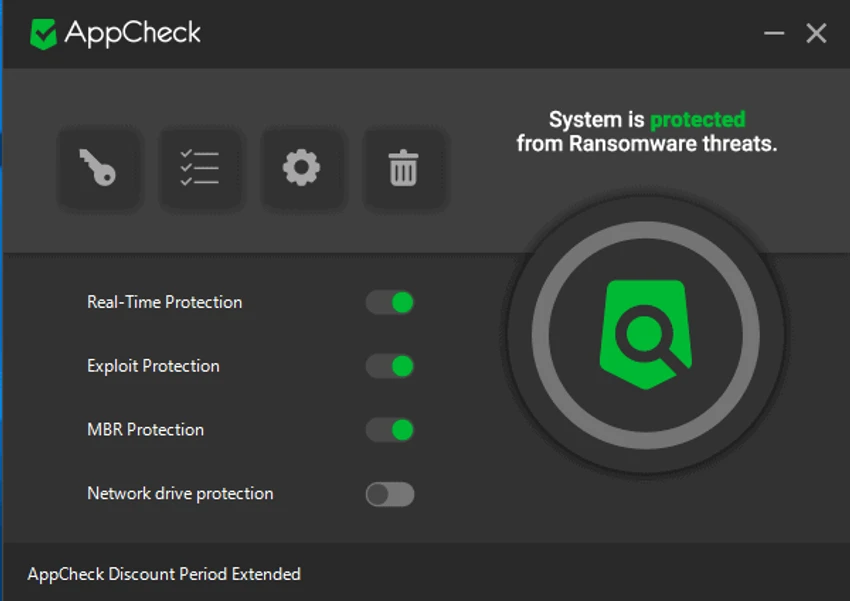
AppCheck Anti-Ransomware features a clean and familiar interface that focuses on making essential security functions easy to access. The dashboard presents the main protection tools without unnecessary complexity, making it suitable for users with varying levels of technical experience.

During everyday use, the software operates quietly in the background from the system tray, continuously monitoring system activity. If ransomware-like behavior is detected, an alert appears immediately with details about the threat, allowing users to review detection information while the software automatically quarantines the suspicious file. Because most protection functions are automated, users rarely need to intervene unless they want to perform a manual scan or review detected threats.

Who Should Use AppCheck Anti-Ransomware?

  • Windows users seeking additional ransomware protection
  • Individuals storing important personal documents and photos
  • Small businesses protecting valuable data
  • Users who want real-time behavioral threat detection
  • Anyone looking to supplement an existing antivirus solution
  • Users concerned about file encryption attacks

Conclusion

AppCheck Anti-Ransomware provides an additional layer of defense against one of today's most damaging cybersecurity threats. Its real-time behavioral monitoring, automatic rollback technology, and protected file backups help reduce the impact of ransomware attacks before permanent damage occurs. Running quietly alongside existing antivirus software, it focuses specifically on preventing file encryption and assisting with recovery if malicious activity is detected.

Pros & Cons

✓

Pros

  • Real-time ransomware monitoring
  • Behavior-based detection instead of signature-only scanning
  • Automatically rolls back unauthorized file changes
  • Quarantines detected threats
  • Creates backups to help recover files
  • Lightweight background operation
  • Designed to work alongside existing antivirus software
✕

Cons

  • Free version protects files but cannot remove ransomware infections
  • Focused specifically on ransomware rather than broader malware protection

Frequently Asked Questions

What is AppCheck Anti-Ransomware used for?

AppCheck Anti-Ransomware is designed to detect, block, and help recover from ransomware attacks by monitoring suspicious behavior and preventing unauthorized file encryption.

How does AppCheck Anti-Ransomware detect ransomware?

The software uses behavior-based monitoring to identify ransomware-like activity. When suspicious actions are detected, it can block the process, quarantine the threat, and help reverse unauthorized file changes.

Can AppCheck Anti-Ransomware recover encrypted files?

The software includes rollback technology that can restore unauthorized file changes using protected backups when supported. Recovery depends on detecting the ransomware activity before irreversible damage occurs.

Does AppCheck Anti-Ransomware replace antivirus software?

No. AppCheck Anti-Ransomware is designed to work alongside traditional antivirus software, providing an additional layer of protection specifically against ransomware.

What information is displayed when a threat is detected?

When ransomware activity is detected, the software displays details such as the detection time, ransomware type, affected file type, and target path while quarantining the suspicious file.

Does the free version remove ransomware infections?

No. According to the available information, the free version helps protect files from ransomware but does not remove existing ransomware infections. Users may need the Pro version or separate antivirus software to remove an active infection.

Recommended apps [Freeware]:
  • Directory Opus 13.24 Directory Opus logo a powerful Windows file manager with dual-pane navigation, FTP support, file tagging, and Explorer replacement
  • InstallerClean 2.0.1 InstallerClean logo removes unnecessary Windows installer leftovers safely to free disk space with a simple cleanup process
  • MSI Center 2.0.71.0 MSI Center logo a system utility for MSI devices that manages performance, gaming modes, monitoring, RGB, and hardware optimization tools
  • RapidRAW 1.5.9 RapidRAW logo a lightweight, GPU-accelerated RAW photo editor with advanced masking, non-destructive editing, and AI tools
  • ChrisPC Free VideoTube Downloader 15.26.0718 ChrisPC Free VideoTube Downloader logo a Windows tool for downloading, recording, and converting online videos
  • Mp3tag 3.35.1 Mp3tag logo Edit, organize, and manage audio tags easily with Mp3tag. Supports MP3, FLAC, M4A, WMA, and online tag lookup
Recommended apps [Shareware]:
  • Wondershare PDFelement Professional 12.1.24 Wondershare PDFelement Professional logo a PDF editor for editing, converting, signing, and managing documents easily.
  • Roboform 9.9.8.0 Roboform logo a secure password manager using AES-256 encryption, autofill, and cross-device sync for safer login management
  • Auslogics ChillMate 1.1.0.6 Auslogics ChillMate logo Monitor CPU and GPU temperature, optimize battery life, and reduce overheating with Auslogics ChillMate for Windows laptops
  • Secure Delete 2026 v221 Secure Delete logo a Windows tool that permanently erases files and folders, making them unrecoverable with multiple security levels
  • Lossless Extract 3.0.1 Lossless Extract logo Extract high-resolution audio from Blu-ray, SACD, MKV, and DVD-Audio while preserving lossless quality and immersive audio formats.
  • Batch It Ultra 6.77 Batch It Ultra logo Process thousands of images with batch resizing, conversion, effects, watermarking, captions, and advanced automation tools.