Pano2VR logo

Pano2VR 8.0.4

  • User Rating:
    ★★★★★
    ★★★★★
    0.0 0Votes
  • Requirements:
    Windows
  • Version: 8.0.4
  • Latest updated: 4 days ago
  • License: Free Trial  
  • Publisher: Garden Gnome Software
  • Size: 272 MB
× app stores

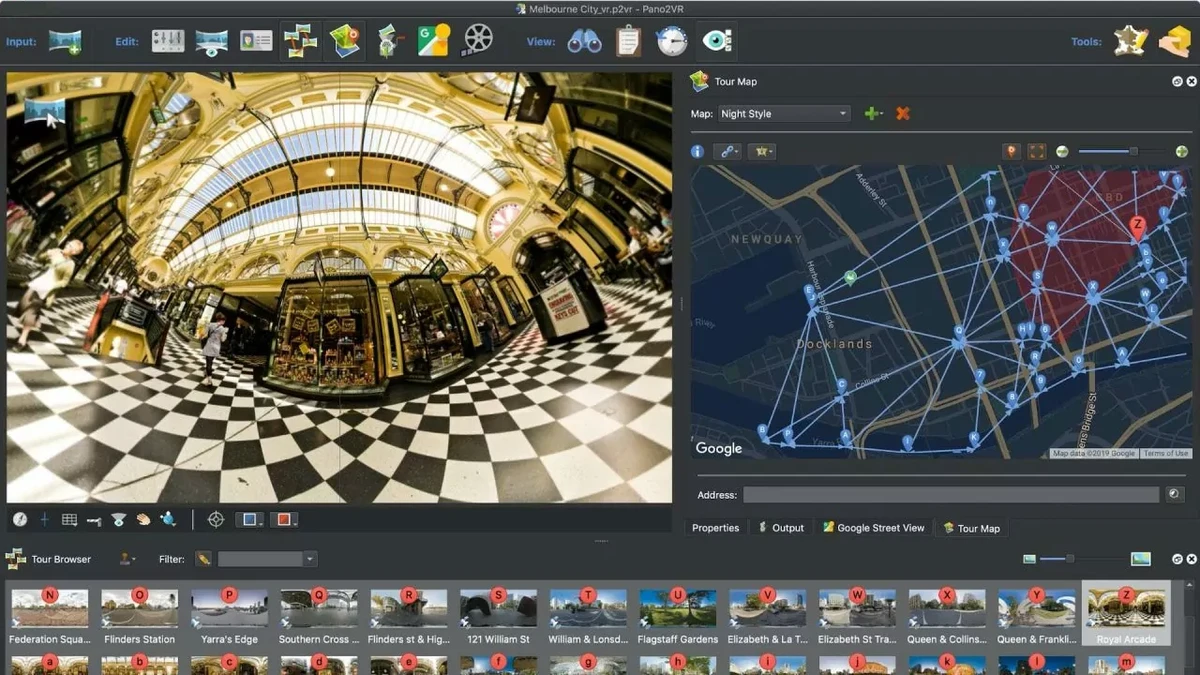
Pano2VR is a professional panorama and virtual tour creation tool that allows users to transform panoramic images into interactive experiences. It supports everything from single gigapixel panoramas to large-scale virtual tours with multiple nodes, making it ideal for photographers, real estate professionals, and digital creators.

Overview

Pano2VR is designed to convert static panoramic images into immersive, interactive environments. It enables users to publish panoramas quickly while offering advanced customization options for navigation, interaction, and presentation. The software is capable of handling complex projects, including tours with hundreds of connected nodes. It also supports cross-platform output, allowing projects to run smoothly on both desktop and mobile devices. One of its standout strengths is its flexibility. Users can enhance panoramas with interactive elements such as hotspots, audio, video, and custom UI controls without needing coding knowledge.

Features of Pano2VR

  • Create interactive virtual tours from panoramic images
  • Support for gigapixel panoramas and large multi-node tours
  • Automatic linking and tour map generation
  • Horizon leveling and tripod removal tools
  • Built-in skin editor for custom UI design
  • Responsive design for desktop and mobile viewing
  • Add hotspots, directional sound, and video elements
  • Smooth projection switching (spherical, little planet, rectilinear)
  • Create guided animation paths through tours
  • Export walkthroughs as video files
  • Support for HTML5 export
  • Integration with WordPress, Joomla, and Drupal
  • Compatibility with Google Street View uploads
  • Multi-project management and filtering tools
  • Support for different panorama projection formats

User Experience

Using Pano2VR feels like working with a complete virtual tour production studio. Importing panoramic images is straightforward, and the software quickly organizes them into navigable scenes. The skin editor provides a powerful way to design custom interfaces, allowing users to build branded and interactive navigation systems without writing code. This makes it accessible to both technical and non-technical users.

Creating virtual tours with multiple nodes is efficient thanks to automatic linking and tour mapping features. Even large projects remain manageable due to structured navigation tools. The ability to preview and adjust projections in real time adds flexibility when refining the final output, especially for professional presentations or real estate showcases.

Who Should Use Pano2VR?

  • Real estate professionals creating property tours
  • Photographers working with panoramas
  • Tourism and travel agencies
  • Museums and exhibition designers
  • Web developers building interactive visual content
  • Marketing teams creating immersive presentations

Conclusion

Pano2VR is a powerful solution for turning panoramic images into fully interactive virtual environments. Its combination of automation, customization, and multi-platform support makes it a top-tier choice for immersive visual storytelling.

Pros & Cons

Pros

  • Excellent virtual tour creation capabilities
  • Supports large and complex panorama projects
  • No coding required for interactivity
  • Powerful skin and UI customization tools
  • Cross-platform output (desktop and mobile)
  • Google Street View integration
  • Supports multimedia elements (audio, video, hotspots)

Cons

  • Learning curve for advanced features
  • Focused mainly on panorama use cases
  • Interface may feel technical for beginners
  • Requires high-quality source images for best results

Frequently Asked Questions

What is Pano2VR used for?

Pano2VR is used to create interactive virtual tours and panoramic presentations from panoramic images.

Can Pano2VR create virtual tours?

Yes. It supports multi-node virtual tours with automatic linking and interactive navigation.

Does Pano2VR support mobile devices?

Yes. It exports responsive tours that work on both desktop and mobile devices.

Can I add videos and audio in Pano2VR?

Yes. You can add directional sound, video, and interactive hotspots to panoramas.

Does Pano2VR require coding skills?

No. It includes a skin editor that allows users to create interactive elements without coding.

Can Pano2VR export to Google Street View?

Yes. It supports integration and uploading to Google Street View.

What file formats does Pano2VR support?

It supports HTML5 export and multiple panorama projection formats including spherical and rectilinear views.

Recommended apps [Freeware]:
  • Garmin Express 7.29.0.0 Garmin Express logo manage Garmin GPS devices with map updates, backups, software updates, and device registration
  • Automatic Email Processor 4.1.0 Automatic Email Processor logo Automatically save, archive, print, and process Outlook emails and attachments with customizable rules.
  • PortKiller 3.3.3 PortKiller logo a network utility for monitoring TCP ports, managing processes, and handling tunnels on Windows.
  • NirLauncher Package 1.30.24 NirLauncher Package logo a portable Windows utility suite with 180+ NirSoft tools for system, network, and recovery tasks
  • Process Monitor 4.04 Process Monitor logo a Windows tool that tracks real-time file, registry, and process activity for system troubleshooting and malware analysis
  • Prime95 31.06 Build 1 Prime95 logo CPU stress testing tool used for overclocking stability checks and Mersenne prime number calculations
Recommended apps [Shareware]:
  • VueScan 9.8.56 VueScan logo Enhance scanner functionality with advanced tools for scanning documents, photos, videos, and slides.
  • Total PDF Converter 6.5.0.171 Total PDF Converter logo converts PDF to DOC, XLS, images, TXT, PDF/A and more with batch processing and advanced tools.
  • Mountain Duck 5.3.0.29446 Mountain Duck logo mounts cloud storage and servers as local drives with smart sync, offline access, and seamless file integration
  • Lyric Video Studio 1.5.49 Lyric Video Studio logo a Windows app for creating lyric videos with AI tools, subtitles, motion tracking, and 4K video editing
  • Your Uninstaller! 7.5.3.1287 Your Uninstaller! logo powerful Windows uninstaller tool with deep scan, leftover removal, and system cleanup utilities for Windows PC
  • FastStone Image Viewer 8.5 FastStone Image Viewer logo a fast and user-friendly tool for viewing, editing, converting, and managing images on Windows