UnHackMe logo

UnHackMe 18.50.2026.708

  • User Rating:
    ★★★★★
    ★★★★★
    0.0 ★ 0Votes
  • Requirements:
    Windows
  • Version: 18.50.2026.708
  • Latest updated: 2 weeks ago
  • License: Free Trial  
  • Publisher: Greatis Software
  • Size: 44 MB
× app stores

UnHackMe is a security utility designed to detect and remove rootkits, hidden Trojans, spyware, keyloggers, and other types of malware that may avoid detection by traditional antivirus software. The program focuses on identifying threats that attempt to hide their files, processes, registry entries, and network activity from users and security tools.

Rootkits are a type of malware designed to provide unauthorized access to a computer while remaining hidden. UnHackMe is built to scan for these hidden threats and help users remove them from their systems. The software uses multiple detection methods and regularly updated algorithms to identify suspicious programs and potentially dangerous activity.

In addition to rootkit detection, UnHackMe provides protection against other unwanted software, including intrusive advertising programs, unwanted installations, spyware, and Trojans. Users can perform system scans, schedule regular checks, and remove detected threats to help maintain a cleaner and safer computer environment.

Designed as an additional security layer, UnHackMe can be useful alongside existing antivirus protection, especially when dealing with difficult-to-detect malware that hides deep within the operating system.

Features of UnHackMe

  • Detects and removes rootkits
  • Finds hidden Trojans and malware
  • Removes spyware and keyloggers
  • Helps protect against unauthorized access
  • Uses updated detection algorithms
  • Provides multiple scanning options
  • Supports scheduled system scans
  • Blocks unwanted pop-up advertisements
  • Helps remove junk files and unwanted programs
  • Protects against threats that may attempt to steal data

Interface and Usability

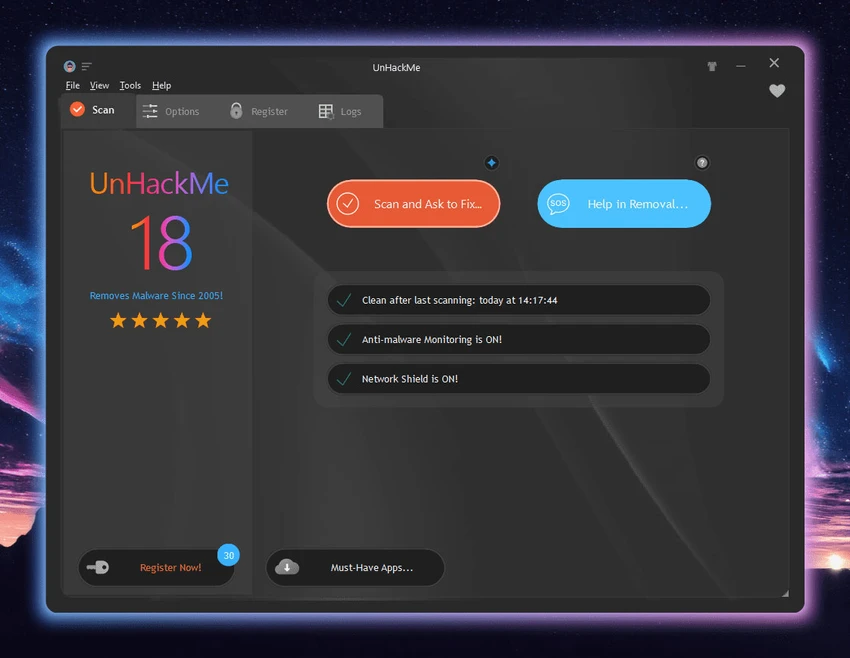
After using UnHackMe, I found the software focused primarily on security scanning and threat removal rather than providing a large number of unnecessary features. The application guides users through scanning processes designed to identify hidden threats and suspicious programs.

The ability to schedule scans makes it easier to maintain regular system checks without manually starting the process each time. The security-focused design is suitable for users who want an additional malware detection tool, especially for investigating possible rootkit infections.

Because rootkits and advanced malware can be complex threats, some scanning results may require users to review detected items carefully before removal. Overall, UnHackMe provides a specialized approach for users who need deeper system analysis beyond standard antivirus scanning.

Who Should Use UnHackMe?

  • Users dealing with suspected rootkit infections
  • People looking for additional malware detection tools
  • Users experiencing unusual system behavior
  • Security-conscious users wanting deeper system scans
  • Anyone needing protection against spyware and hidden threats

Conclusion

UnHackMe is a specialized security tool designed for detecting and removing hidden threats such as rootkits, Trojans, spyware, and other malware that may avoid traditional detection methods. Its focus on deep system scanning makes it a useful addition for users who need extra protection beyond standard antivirus software.

Pros & Cons

✓

Pros

  • Specialized rootkit detection capabilities
  • Detects hidden malware threats
  • Supports spyware and Trojan removal
  • Includes scheduled scanning options
  • Helps block unwanted programs and advertisements
  • Provides an additional security layer alongside antivirus software
✕

Cons

  • Focused on advanced threats rather than everyday antivirus protection
  • Users may need security knowledge when reviewing detections

Frequently Asked Questions

What is UnHackMe used for?

UnHackMe is used to detect and remove rootkits, Trojans, spyware, keyloggers, and other hidden malware threats from Windows computers.

Can UnHackMe remove rootkits?

Yes. UnHackMe is specifically designed to identify and remove rootkits that attempt to hide files, processes, and system activity.

Is UnHackMe an antivirus program?

UnHackMe is a security tool focused on rootkit and malware detection. It can work as an additional protection layer alongside traditional antivirus software.

Does UnHackMe scan for spyware and Trojans?

Yes. The software can detect and remove spyware, Trojans, viruses, and other types of malware.

Can UnHackMe run scheduled scans?

Yes. UnHackMe includes options for scheduling scans to help users regularly check their systems for threats.

Who should use UnHackMe?

UnHackMe is suitable for users who suspect hidden malware infections or want specialized protection against rootkits and advanced security threats.

Recommended apps [Freeware]:
  • VidCoder 12.23 VidCoder logo Convert, encode, and rip DVDs and Blu-rays with VidCoder, a powerful open-source video transcoding tool for Windows
  • Jailer 17.2 Jailer logo database subsetting and data browsing tool for exporting consistent relational datasets and navigating database relationships
  • RSS Guard 5.2.2 RSS Guard logo Read RSS, RDF, and Atom feeds with RSS Guard, an open-source feed reader featuring online synchronization and podcast support.
  • 360 Total Security 11.0.0.1314 360 Total Security logo 360 Total Security provides antivirus protection, malware detection, system cleanup, and online security tools
  • Secret Video Downloader 1.1.7 Secret Video Downloader logo Download online videos with a simple interface, built-in browser, and high-quality downloads without complicated settings or login.
  • Mullvad Browser 15.0.18 Mullvad Browser logo Browse with enhanced privacy using a Firefox-based browser that minimizes tracking, removes telemetry, and supports VPN connections.
Recommended apps [Shareware]:
  • SketchUp Pro 2026 SketchUp Pro logo powerful 3D modeling software for architects, designers, and engineers with intuitive tools.
  • Smart Game Booster 6.0.0.1164 Smart Game Booster logo Optimize Windows, monitor FPS and temperatures, and reduce lag with one click
  • FTPie 2026.7.2 FTPie logo Manage FTP, cloud storage, and files easily with FTPie, featuring quick upload, sharing, and document editing tools
  • YoloX 1.11 YoloX logo a lightweight crosshair overlay tool for Windows featuring custom designs, animations, audio reactions, and game profiles
  • QILING Disk Master Professional 8.8 QILING Disk Master Professional logo a backup and recovery tool for Windows offering system imaging, restore, and disk management
  • QILING Disk Master Server 8.8 QILING Disk Master Server logo a Windows server backup and recovery tool with system imaging, RAMDisk, and AES encryption