


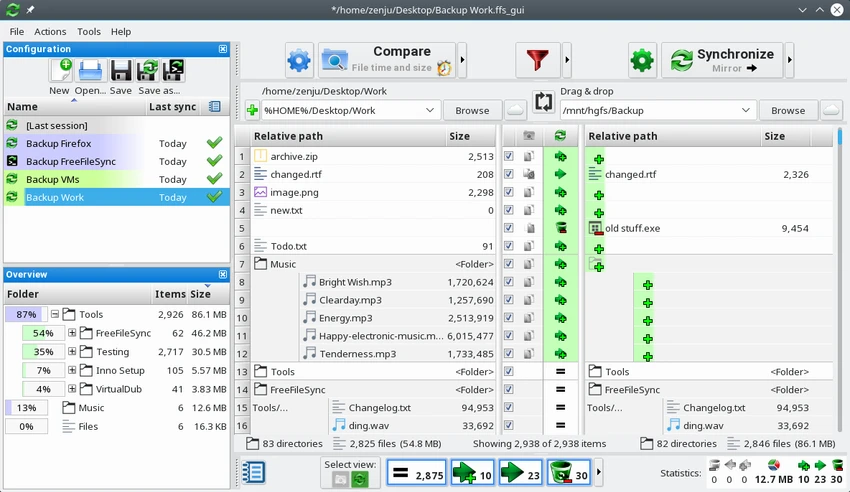

Keeping files synchronized across multiple locations is essential for backups, collaboration, and data protection. FreeFileSync is an open-source synchronization tool that helps users compare folders, detect changes, and transfer only the files that need updating instead of copying everything repeatedly. Supporting local folders as well as cloud and network storage, FreeFileSync offers flexible synchronization modes that make it suitable for both personal backups and more advanced file management tasks.
Overview
FreeFileSync is an open-source folder comparison and synchronization application available for Windows, macOS, and Linux. It compares files between source and destination folders, identifies differences, and transfers only the necessary changes. The software supports multiple synchronization methods, allowing users to create mirrored backups, perform two-way synchronization, or define custom synchronization rules. It also includes folder comparison tools based on file size, modification time, or file contents. Support for Google Drive, FTP, and SFTP connections makes FreeFileSync suitable for synchronizing files across local drives, external storage, and remote servers.
Features of FreeFileSync
Multiple Synchronization Modes
- Two-way synchronization
- Mirror synchronization
- Update synchronization
- Custom synchronization rules
- Automatic conflict detection
- Detects moved and deleted files
Folder Comparison
- Compare folders using:
- Modification time
- File size
- File contents
- Quickly identify differences between folders
Cloud and Remote Storage Support
- Google Drive
- FTP
- SFTP
- Local folders
- External storage devices
Efficient Data Transfer
- Copies only changed files
- Avoids unnecessary file transfers
- Speeds up synchronization jobs
- Reduces storage and bandwidth usage
File Filtering
- Include or exclude files using filters
- Supports wildcard filtering
- Create customized synchronization rules
User-Friendly Interface
- Drag-and-drop folder selection
- Manual folder browsing
- Synchronize multiple folder pairs
- Clear comparison results before syncing
Cross-Platform Availability
- Windows
- macOS
- Linux
- Open-source software
User Experience
FreeFileSync delivers a clean and practical interface that makes folder synchronization accessible even for users with limited technical experience. Setting up a synchronization job is straightforward, with folders added either through drag-and-drop or manual browsing. One of the software's biggest strengths is its flexibility. Users can choose the synchronization method that best fits their workflow. Two-way synchronization works well for keeping folders updated on multiple devices, while mirror mode is ideal for creating backups that exactly match the source folder. The comparison feature is particularly useful because users can review detected differences before starting synchronization. Comparing by modification date, file size, or file content provides additional confidence that only the intended changes will be transferred.
Support for Google Drive, FTP, and SFTP expands the software beyond local backups, making it useful for synchronizing remote storage and network locations. The filtering system is another highlight. Wildcard support allows users to include or exclude specific files and folders, making synchronization jobs more precise and avoiding unnecessary transfers. Overall, FreeFileSync balances ease of use with advanced synchronization capabilities, making it suitable for both casual users and more experienced professionals.
Who Should Use FreeFileSync?
- Home users creating backups
- Professionals synchronizing work folders
- IT administrators
- Users managing external drives
- Anyone keeping files synchronized across multiple locations
- Users looking for an open-source backup solution
Conclusion
FreeFileSync is a dependable and flexible synchronization utility that focuses on efficiency by transferring only changed files instead of copying entire folders repeatedly. Its multiple synchronization modes, comparison tools, cloud connectivity, and customizable filtering make it suitable for a wide range of backup and file management tasks.


