Gammadyne Mailer logo

Gammadyne Mailer 74.0

  • User Rating:
    ★★★★★
    ★★★★★
    0.0 ★ 0Votes
  • Requirements:
    Windows
  • Version: 74.0
  • Latest updated: 2 weeks ago
  • License: Free Trial  
  • Publisher: Gammadyne
  • Size: 46 MB
× app stores

Gammadyne Mailer is an email marketing automation application designed to help businesses manage large-scale email campaigns, automate message delivery, process incoming emails, and maintain subscriber lists. The software provides a desktop-based alternative to subscription-based email marketing platforms by allowing users to operate their own email campaigns using a compatible mail server.

The application focuses on three major areas of email automation: sending emails, receiving and processing messages, and managing mailing lists. Users can create personalized campaigns, automate follow-up emails, organize recipients, and monitor campaign performance through open and click tracking reports. Gammadyne Mailer includes tools for creating HTML emails, managing templates, integrating databases, scheduling campaigns, and handling automated responses. It supports mail merge functionality, personalized attachments, recipient filtering, duplicate removal, and list cleaning features to help maintain organized mailing databases.

The software supports SMTP, POP3, and IMAP4 servers, along with security features such as SSL encryption, DKIM, and DomainKeys. Additional automation options include command-line control, multi-threading, dynamic interfaces, and integration capabilities for third-party applications. With features aimed at businesses managing email communication and marketing workflows, Gammadyne Mailer provides a comprehensive environment for creating, sending, and analyzing automated email campaigns.

Features of Gammadyne Mailer

  • Automated email campaign management
  • Advanced email sending engine
  • Incoming email processing automation
  • Mailing list management
  • Open and click tracking
  • Mail merge support
  • Database integration
  • Multi-threaded processing
  • Email scheduling
  • HTML email creation with graphics
  • WYSIWYG HTML editor
  • Message preview
  • Personalized attachments
  • Direct email delivery support
  • Data extraction tools
  • Command-line control
  • Follow-up email sequences
  • Auto-responder functionality
  • Auto-forwarding
  • Recipient filtering and exclusion lists
  • Duplicate address removal
  • No mailing list size limit
  • SMTP, POP3, and IMAP4 compatibility

Interface and Usability

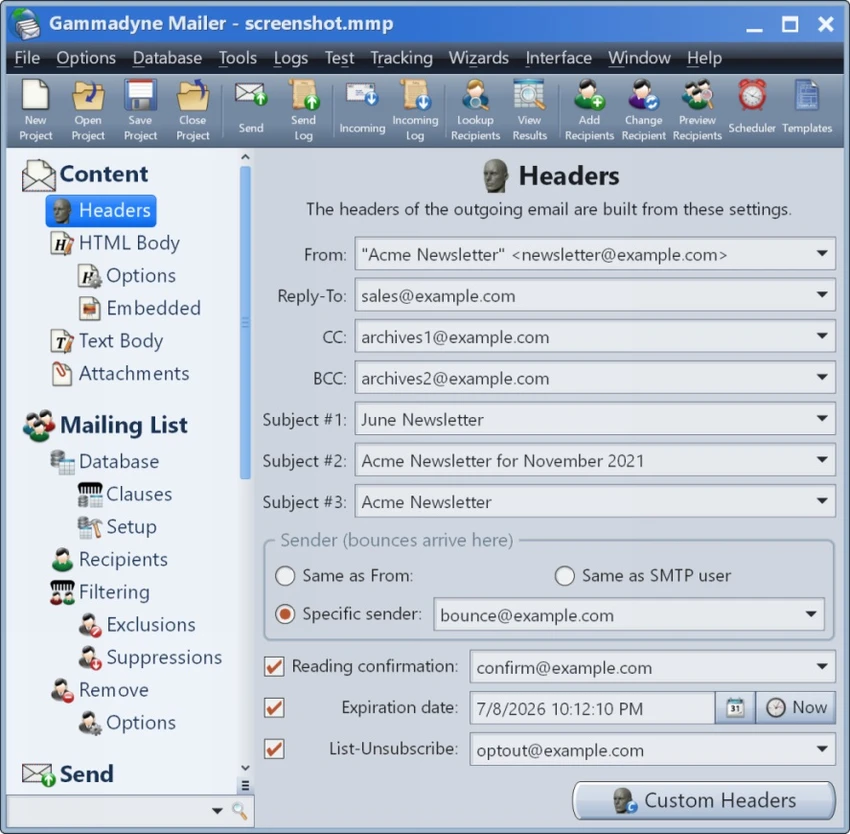
Gammadyne Mailer provides a feature-focused interface designed around creating and managing email automation projects. Users can configure campaigns, recipient lists, automated responses, and processing rules through project-based settings that can be saved and reused.

The included setup wizards help configure common email automation tasks such as sending campaigns, bounce processing, opt-out handling, sign-up processing, and list-serving. These tools make it easier to set up structured workflows without configuring every option manually. The software also provides message preview, HTML editing tools, scheduling controls, and reporting features that help users manage campaigns more efficiently. Advanced options such as filtering, throttling, and load balancing provide additional control for users handling larger email operations.

Who Should Use Gammadyne Mailer?

  • Businesses running email marketing campaigns
  • Organizations managing subscriber lists
  • Marketers who need desktop-based email automation
  • Users requiring custom SMTP-based email delivery
  • Companies managing automated responses and follow-ups
  • Professionals who want detailed campaign tracking

Conclusion

Gammadyne Mailer provides a complete desktop solution for businesses that need control over email marketing automation. Its combination of campaign management, list handling, tracking, scheduling, and message processing tools makes it suitable for users who want to manage email workflows without relying on monthly email service subscriptions.

Pros & Cons

✓

Pros

  • No monthly subscription fee
  • Comprehensive email automation features
  • Supports large mailing lists
  • Includes campaign tracking tools
  • Offers scheduling and follow-up automation
  • Supports multiple email protocols
  • Provides advanced filtering and list management
✕

Cons

  • Requires access to a mail server for sending emails
  • Advanced features may require technical knowledge

Frequently Asked Questions

What is Gammadyne Mailer used for?

Gammadyne Mailer is used for automating email marketing tasks, including sending campaigns, managing mailing lists, processing incoming messages, and tracking email engagement.

Does Gammadyne Mailer require a subscription?

No. According to the provided information, Gammadyne Mailer does not require a subscription fee. Users need access to a mail server to send emails.

Can Gammadyne Mailer track email campaign performance?

Yes. The software can track email opens and clicks, providing campaign information about recipient engagement.

Does Gammadyne Mailer support HTML emails?

Yes. Gammadyne Mailer supports HTML emails with graphics and includes a WYSIWYG HTML editing feature for creating formatted messages.

Can Gammadyne Mailer manage large mailing lists?

Yes. The software supports mailing lists without a stated size limit and includes tools for filtering recipients, removing duplicates, and cleaning invalid addresses.

Which email servers are compatible with Gammadyne Mailer?

According to the provided information, Gammadyne Mailer works with SMTP, POP3, and IMAP4 servers and supports SSL-encrypted connections.

Recommended apps [Freeware]:
  • FluentTweaker 26.06.02 FluentTweaker logo a Windows utility for safe, reversible system tweaks focused on UI, privacy, and performance control.
  • Wise Disk Cleaner 11.3.6.856 Wise Disk Cleaner logo Free up storage, remove junk files, and optimize your PC with Wise Disk Cleaner for faster Windows performance
  • WinMerge 2.16.56.2 WinMerge logo Compare, synchronize, and merge files and folders with visual difference highlighting, Unicode support, and three-way comparison tools.
  • AltAppSwitcher 0.95 AltAppSwitcher logo Switch between Windows applications with macOS-inspired shortcuts using a lightweight portable utility designed for faster multitasking.
  • CapCut 8.9.1.3802 CapCut logo Create professional videos easily with a versatile editor featuring AI tools, effects, templates, and advanced editing options.
  • cPicture LE 4.14 cPicture LE logo Manage, browse, crop, search, and process digital photos with a lightweight image workflow application supporting plugins and JPEG tools.
Recommended apps [Shareware]:
  • All Video Downloader Pro 10.4.7 All Video Downloader Pro logo Download videos, playlists, subtitles, and audio from popular sites with built-in conversion and playback tools
  • Duplicate Finder 2026 v418 Duplicate Finder logo remove duplicate photos and videos by scanning files using MD5 hashing for accurate results.
  • JP Software TCC 36.50.70 JP Software TCC logo advanced Windows CMD replacement shell with scripting, debugging, and enhanced command-line features
  • System Mechanic Ultimate Defense 26.5.0.227 System Mechanic Ultimate Defense logo Optimize, repair, and secure your Windows PC with System Mechanic Ultimate Defense's all-in-one maintenance suite.
  • ProfiCAD 13.5.8 ProfiCAD logo easy-to-use CAD tool for creating electrical, electronic, control, pneumatic, and hydraulic diagrams
  • Rapid CSS 2025 v18.7.0.277 Rapid CSS logo Fast CSS editor with code completion, browser preview, validation tools, and FTP support for modern web development.