


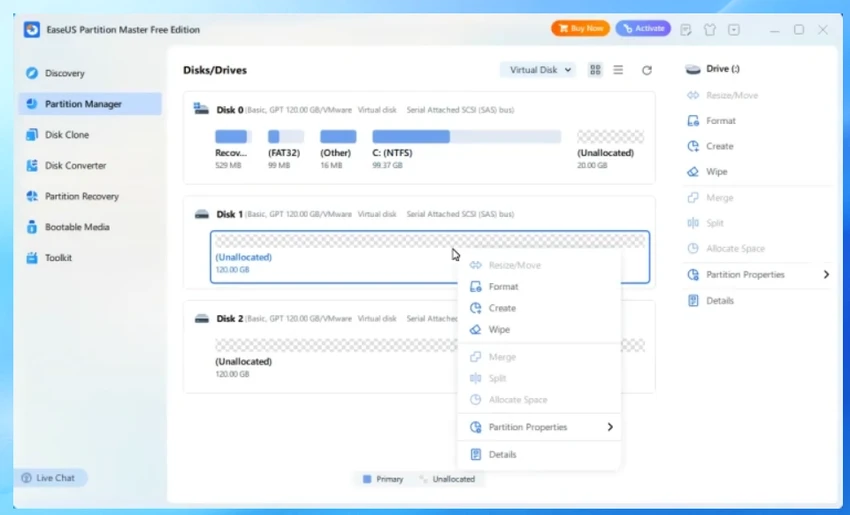

EaseUS Partition Master is an all-in-one disk management solution designed to help users create, resize, convert, clone, and recover disk partitions without data loss. It supports both basic and advanced disk operations, making it suitable for home users, IT professionals, and enterprise environments.
Overview
EaseUS Partition Master provides a comprehensive set of tools for managing hard drives and storage partitions on Windows systems. It is built to simplify complex disk operations such as resizing system partitions, converting disk formats, and migrating operating systems to SSDs. The software supports MBR and GPT disk structures and works across a wide range of file systems including NTFS, FAT, EXT2, and EXT3. It also includes recovery and cloning tools that help users protect and restore data in case of disk failure or accidental deletion.
Different editions are available, including Free, Server, Unlimited, and Technician versions, catering to individual users as well as enterprise IT environments.
Features of EaseUS Partition Master
- Resize and extend system partitions without rebooting
- Merge adjacent partitions without data loss
- Convert between MBR and GPT disks safely
- Convert FAT to NTFS file system
- Convert primary and logical partitions
- Clone entire disks or individual partitions
- Migrate operating system to SSD without reinstalling Windows
- Partition recovery for deleted or lost volumes
- Create, format, delete, and manage partitions
- Support for RAID, HDD, SSD, and removable drives
- Support for BIOS and UEFI systems
- WinPE bootable rescue media creation
- Disk defragmentation tools for performance optimization
- Linux partition support (EXT2, EXT3)
- Dynamic and basic disk management
- Fast file-by-file copying for data protection
User Experience
EaseUS Partition Master provides a structured and guided interface that makes complex disk operations more accessible. Tasks such as resizing partitions or migrating an operating system are presented through step-by-step wizards, reducing the risk of user error. One of its most practical features is the ability to extend system partitions without requiring a reboot in many cases, which helps minimize system downtime. The disk cloning and OS migration tools are especially useful for users upgrading to SSDs, allowing them to transfer their entire system without reinstalling Windows.
The partition recovery feature adds an extra layer of security by helping restore lost or deleted partitions caused by system errors, accidental formatting, or disk corruption. While the software is powerful, users unfamiliar with disk management concepts may need some time to understand partition structures and disk types. However, the interface generally helps simplify these technical processes.
Who Should Use EaseUS Partition Master?
- PC users upgrading storage drives
- IT administrators managing multiple systems
- Users migrating Windows to SSD
- Technicians performing disk recovery tasks
- Advanced users managing complex partition layouts
- Businesses maintaining server storage systems
System Requirements
- Windows XP
- Windows Vista
- Windows 7
- Windows 8 / 8.1
- Windows 10
- Windows 11
- Windows Server editions
Conclusion
EaseUS Partition Master is a powerful and versatile disk management utility that simplifies complex storage operations such as resizing, cloning, converting, and recovering partitions. Its combination of guided tools and advanced features makes it a dependable choice for both everyday users and IT professionals managing system storage.


