eM Client logo

eM Client 10.4.5600.0

  • User Rating:
    ★★★★★
    ★★★★★
    0.0 0Votes
  • Requirements:
    Windows
  • Version: 10.4.5600.0
  • Latest updated: 5 days ago
  • License: Freemium  
  • Publisher: ES Software
  • Size: 139 MB
× app stores

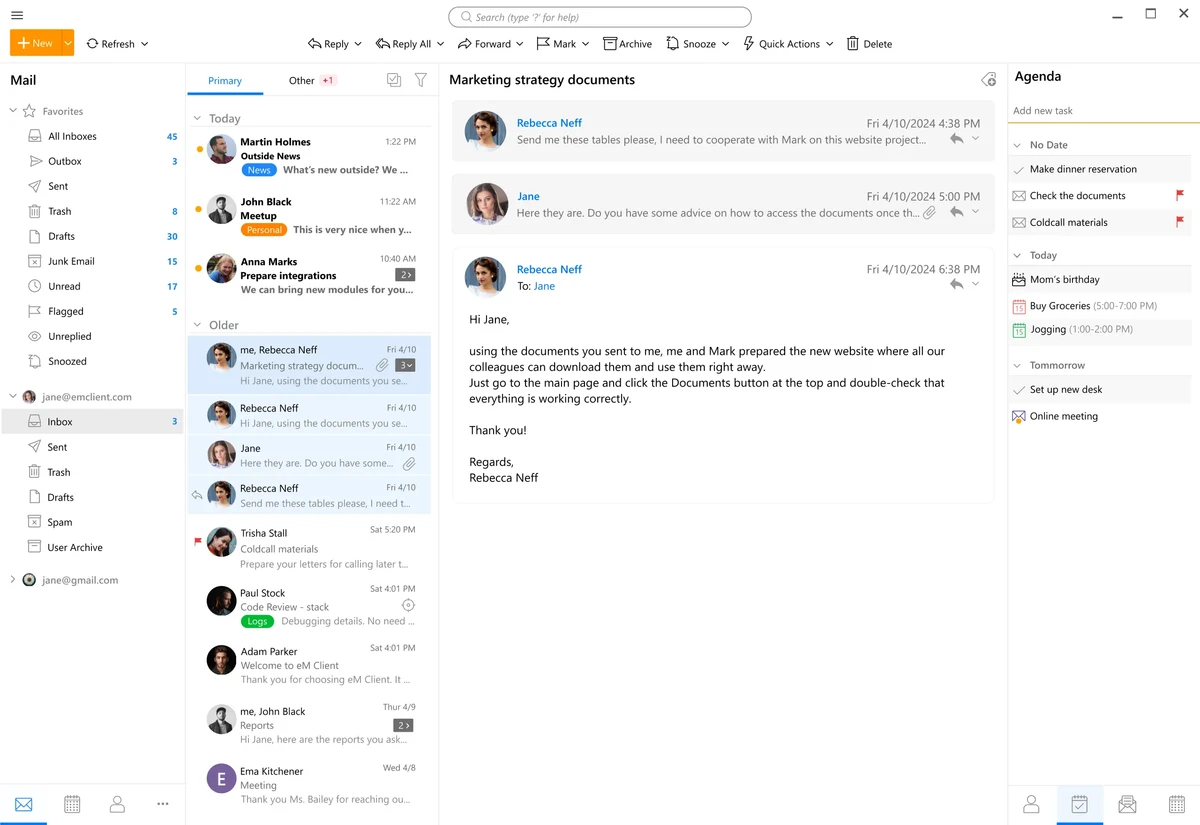
eM Client is a modern, full-featured email application designed for Windows users who want more than just basic email management. It combines email, calendar, contacts, tasks, and chat into a single unified interface. The software supports major email services such as Gmail, Microsoft Exchange, iCloud, and Outlook.com, making it a flexible solution for both personal and professional communication.

Features of eM Client

  • Supports Gmail, Exchange, iCloud, Outlook.com, and other IMAP/SMTP services
  • Automatic email account setup for quick configuration
  • Integrated calendar for scheduling and planning
  • Task management and to-do lists
  • Built-in contact management system
  • Chat functionality for supported services
  • Fast and customizable search engine
  • Email history and attachment tracking
  • Sidebar with contextual productivity tools
  • Import data from Outlook, Thunderbird, and other email clients
  • Touch-optimized interface for modern devices
  • Built-in backup system for automatic data protection
  • Modern and clean user interface design

User Experience

During my experience with eM Client, the software felt like a complete communication hub rather than just an email program. Setting up an account is straightforward, with automatic configuration handling most major providers without manual input.

The interface is clean and well-organized, with email, calendar, contacts, and tasks integrated into a single workspace. This makes it easy to switch between communication and productivity tools without relying on multiple applications. One of the strongest aspects is the search functionality, which is fast and responsive even with large mailboxes. Finding old emails, attachments, or conversations is quick and efficient.

The calendar and task integration also stand out, allowing users to manage schedules and to-do lists without leaving the application. This is particularly useful for professionals who rely heavily on email-based workflows. Importing data from other email clients such as Outlook or Thunderbird is smooth, making migration relatively easy for new users.

Who Should Use eM Client?

  • Business professionals managing multiple email accounts
  • Users looking for an Outlook alternative
  • People who want integrated email and calendar tools
  • Teams needing centralized communication tools
  • Users migrating from Thunderbird or Outlook
  • Anyone who wants an all-in-one email productivity suite

Conclusion

eM Client offers a complete communication and productivity solution in a single application. With support for major email services and integrated tools for scheduling and task management, it provides a streamlined workflow for both personal and professional users.

Pros & Cons

Pros

  • All-in-one email, calendar, and task management
  • Supports major email providers
  • Clean and modern interface
  • Fast and powerful search feature
  • Easy account setup and migration
  • Built-in backup system
  • Integrated chat functionality

Cons

  • Advanced features require Pro version
  • May feel heavy for users who only need basic email
  • Some features depend on email provider support

Frequently Asked Questions

What is eM Client used for?

eM Client is used for managing emails, calendars, contacts, tasks, and chat in one application.

Does eM Client support Gmail and Outlook?

Yes. It supports Gmail, Outlook.com, Exchange, iCloud, and other standard email services.

Can I import emails from other clients?

Yes. It supports importing data from Outlook, Thunderbird, and other email applications.

Does eM Client include a calendar?

Yes. It includes a fully integrated calendar for scheduling and event management.

Is eM Client suitable for business use?

Yes. It is widely used by professionals and businesses for email and productivity management.

Does eM Client have a free version?

Yes, but advanced features are available in the Pro version.

Is eM Client better than Outlook?

It depends on user needs, but eM Client is often preferred for its simpler interface and easier setup.

Recommended apps [Freeware]:
  • WinScan2PDF 9.77 WinScan2PDF logo scan documents and save them as PDFs or JPEGs with minimal setup and low CPU usage.
  • CalendarTask 3.30.290.9088 CalendarTask logo lightweight desktop calendar with note-taking, cloud sync, reminders, and desktop scheduling tools
  • Helium Music Manager 18.1.777 Helium Music Manager logo Organize, tag, play, sync, and manage your music collection with Helium Music Manager for Windows
  • Cyberduck 9.5.0.45237 Cyberduck logo Manage FTP, SFTP, and cloud storage services like Google Drive, Dropbox, and Amazon S3 with Cyberduck for Windows
  • MakeMKV 1.18.4 MakeMKV logo disc ripper that converts DVD and Blu-ray discs into MKV files while preserving audio, video, subtitles, and metadata
  • Recuva 1.55.133 Recuva logo recover deleted files from PCs, USB drives, memory cards, and damaged or formatted disks
Recommended apps [Shareware]:
  • Adobe Acrobat Pro DC 2026 Adobe Acrobat Pro DC logo create, edit, and secure PDFs easily. Professional PDF solution for individuals and businesses.
  • Ant Download Manager 2.17.4.96212 Ant Download Manager logo a Windows tool that speeds up downloads, captures streaming media, supports torrents, and integrates with browsers
  • DP Animation Maker 3.5.51 DP Animation Maker logo a simple Windows tool for creating animated images, GIFs, and videos with effects, objects, and music.
  • VideoPad Video Editor 18.38 VideoPad Video Editor logo a Windows movie maker for editing videos, adding effects, transitions, audio, and exporting to social platforms
  • Net Monitor for Employees Professional 6.6.6 Net Monitor for Employees Professional logo track screen activity, usage, and productivity in business environments.
  • Your Uninstaller! 7.5.3.1287 Your Uninstaller! logo powerful Windows uninstaller tool with deep scan, leftover removal, and system cleanup utilities for Windows PC