CheckMail logo

CheckMail 5.23.6

  • User Rating:
    ★★★★★
    ★★★★★
    0.0 0Votes
  • Requirements:
    Windows
  • Version: 5.23.6
  • Latest updated: 1 week ago
  • License: Freeware  
  • Publisher: Desksoft
  • Size: 1 MB
× app stores

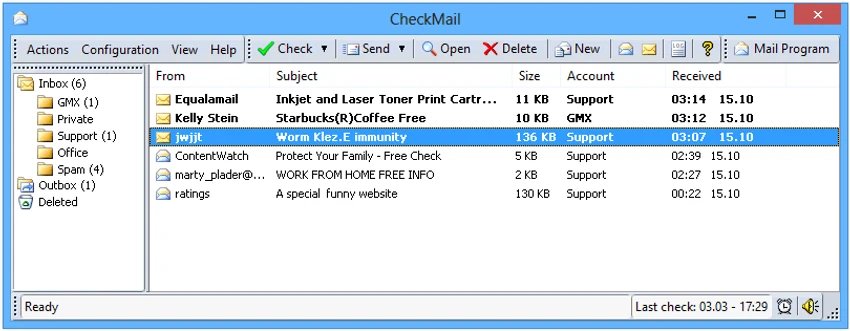
CheckMail is a dedicated POP3 email checking utility designed to help users monitor and manage incoming email messages before downloading them to their computer. The software focuses on efficiency by allowing users to preview, sort, filter, and delete unwanted emails directly from the mail server. For users who manage multiple email accounts, CheckMail offers a centralized way to monitor incoming messages while reducing unnecessary downloads. It also includes basic email composition and management tools, allowing users to send, reply to, and forward emails without opening a separate email application.

Features of CheckMail

  • Checks multiple POP3 email accounts from a single interface
  • Notifies users when new email messages arrive
  • Preview emails before downloading them
  • Delete unwanted or large messages directly from the server
  • Compose and send new emails
  • Reply to and forward existing messages
  • Customizable email notifications
  • Sorting and filtering options for better email organization
  • Supports regular automatic email checking intervals
  • Can collect and send emails for multiple users in small office environments
  • Designed to prevent harmful email content from executing automatically
  • Suitable for always-connected and manually connected internet environments

User Experience

After using CheckMail, I found that its biggest strength is its straightforward approach to email management. Instead of downloading every incoming message, the software allows users to preview emails first and decide which messages are worth keeping. This approach can be particularly useful for users with limited bandwidth or those who frequently receive large attachments and unwanted messages. Being able to remove unnecessary emails directly from the server helps keep inboxes cleaner and reduces download time.

The interface is geared toward functionality rather than modern aesthetics. Users who primarily need efficient POP3 email monitoring will likely appreciate the software's focused design. Managing multiple accounts from a single location is convenient, and the customizable notification system makes it easy to stay informed about new messages.

Conclusion

CheckMail remains a useful utility for users who rely on POP3 email accounts and want more control over incoming messages. Its ability to preview, filter, and delete emails before downloading them can save time and reduce unnecessary bandwidth usage.

Pros & Cons

Pros

  • Preview emails before downloading them
  • Delete unwanted messages directly from the server
  • Supports multiple POP3 email accounts
  • Customizable notifications
  • Includes email sending, replying, and forwarding capabilities
  • Sorting and filtering tools improve email organization
  • Designed to avoid automatically executing potentially harmful email content
  • Suitable for small office and home office environments

Cons

  • Focused specifically on POP3 email management
  • Interface may feel basic compared to modern email platforms

Frequently Asked Questions

What is CheckMail used for?

CheckMail is a POP3 email checking application that allows users to monitor, preview, and manage incoming email messages before downloading them to their computer.

Can CheckMail manage multiple email accounts?

Yes. The software supports multiple email accounts and allows users to check them from a single interface.

Can I delete emails before downloading them?

Yes. CheckMail allows users to delete unwanted or large messages directly from the email server before downloading them.

Does CheckMail send emails?

Yes. Users can compose and send new emails, as well as reply to and forward existing messages.

Is CheckMail compatible with Windows 11?

Yes. CheckMail supports Windows Vista, Windows 7, Windows 8, Windows 10, Windows 11, and Windows Server editions.

Does CheckMail automatically check for new emails?

Yes. The software can check for new messages at regular intervals when an internet connection is available.

Recommended apps [Freeware]:
  • BleachBit 6.0.0 BleachBit logo a free Windows cleaner that removes junk files, protects privacy, and frees disk space with secure wiping.
  • DefenderUI 2.10 DefenderUI logo enhances Microsoft Defender on Windows 10/11 with advanced security profiles and easier system protection control
  • 3D Youtube Downloader 1.26.6 3D Youtube Downloader logo download videos, playlists, and subtitles from YouTube and other sites
  • Disk Benchmark 1.0 Disk Benchmark logo measures SSD, HDD, NVMe, and USB drive performance with detailed speed, IOPS, and latency tests
  • Donemax Video Downloader 3.0 Donemax Video Downloader logo download videos and audio from 1,200+ websites for offline viewing and playback
  • DriverHub 2.1.5 DriverHub logo scans your PC and installs the latest drivers automatically, helping keep hardware updated and stable on Window
Recommended apps [Shareware]:
  • Roboform 9.9.4.6 Roboform logo a secure password manager using AES-256 encryption, autofill, and cross-device sync for safer login management
  • DocuFreezer 7.0.2606.20080 DocuFreezer logo a Windows batch converter for documents and images, converting files to PDF, JPG, TIFF, PNG, and TXT formats
  • Drive SnapShot 1.51.0.1811 Drive SnapShot logo creates complete disk image backups while Windows runs, allowing fast system recovery and file restoration
  • App Builder 2026.15 App Builder logo a visual development environment for creating HTML5, mobile, desktop, and PWA applications
  • ON1 Effects 2026.4 ON1 Effects logo AI-powered photo effects, creative filters, presets, LUTs, and masking tools for stunning image enhancements
  • WYSIWYG Web Builder 21.1.0 WYSIWYG Web Builder logo create responsive websites visually with drag-and-drop tools and automatic HTML generation