


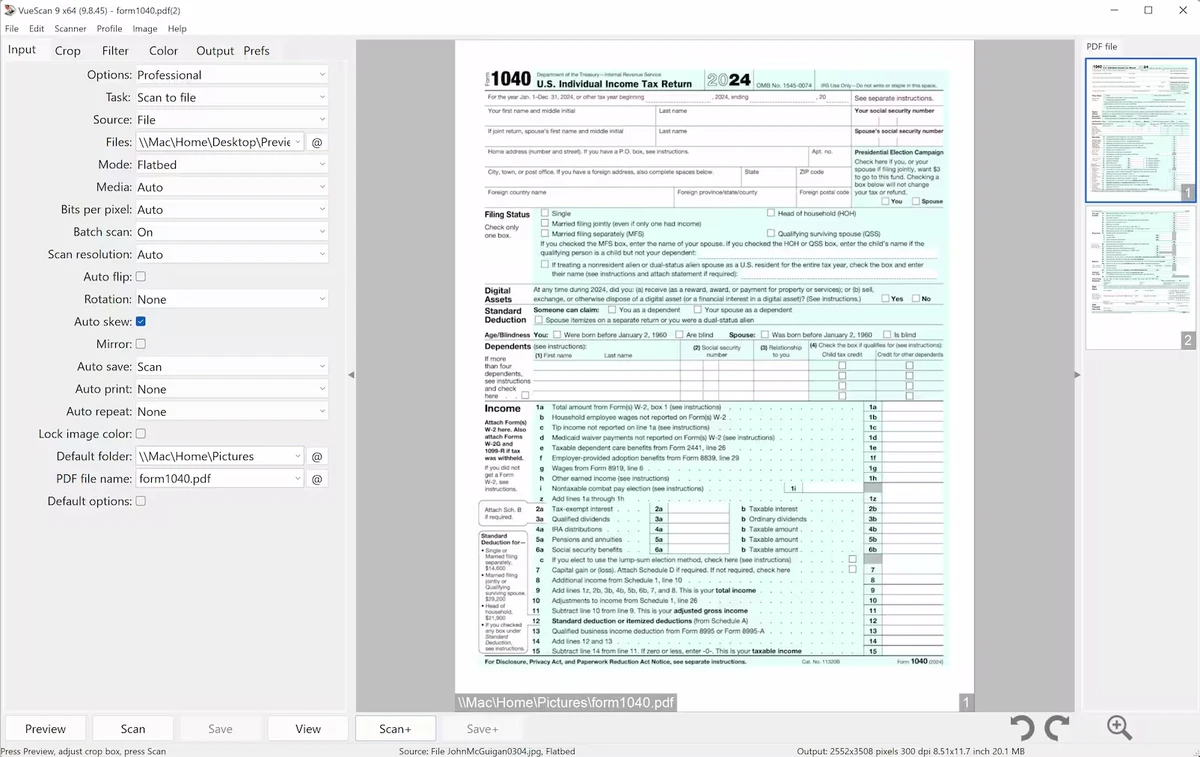

VueScan is a comprehensive scanning application designed to help users get more value from their scanners. Whether you're digitizing documents, preserving family photos, or scanning film negatives and slides, VueScan offers a wide range of tools that go beyond the software typically bundled with scanner hardware. One of its biggest advantages is broad hardware compatibility, supporting more than 3,000 scanners from numerous manufacturers. This makes VueScan particularly useful for users with older scanners that may no longer receive official driver updates.
Features of VueScan
- Supports over 3,000 scanners from multiple manufacturers
- Scan documents using flatbed scanners and Automatic Document Feeders (ADF)
- Create single-page and multi-page PDF files
- Built-in Optical Character Recognition (OCR)
- Automatic color detection
- Automatic document deskewing
- Optimized file sizes for scanned documents
- Scan photos to JPG or TIFF formats
- Preset photo sizes for faster scanning workflows
- Scan multiple photos simultaneously on a flatbed scanner
- Automatic file naming options
- Color correction and fading restoration tools
- Scan film negatives and photographic slides
- Output film scans to JPEG, TIFF, or RAW formats
- Infrared dust removal support
- IT8 calibration capabilities
- Adobe Photoshop integration
User Experience
Using VueScan feels like upgrading the capabilities of an existing scanner without replacing the hardware. The software provides a more flexible scanning environment than many manufacturer-supplied utilities, particularly for users with specialized scanning needs.
For document scanning, the workflow is straightforward. Features such as automatic color detection, OCR support, and deskewing help streamline the process of converting paper documents into searchable digital files. Multi-page PDF creation is especially useful for offices and users digitizing large collections of paperwork.
Photo scanning is where VueScan truly shines. The ability to scan multiple photos in a single session, combined with automatic file naming and color correction tools, significantly reduces the time required to archive large photo collections. Restoring faded images without relying on separate photo-editing software is another welcome benefit.
Who Should Use VueScan?
- Users with older scanners lacking updated drivers
- Home users digitizing family photos
- Offices scanning large document collections
- Archivists preserving photographs and printed materials
- Photographers digitizing film negatives and slides
- Anyone seeking more advanced scanning features than standard scanner software provides
System Requirements
- Operating System: Windows 11, Windows 10 x64, Windows 8 x64, Windows 7 x64, Windows Vista x64
- Scanner: Compatible flatbed, ADF, film, or slide scanner
Conclusion
VueScan successfully transforms compatible scanners into more powerful and versatile imaging devices. Its support for thousands of scanner models, combined with advanced document, photo, and film scanning features, makes it one of the most comprehensive scanning solutions available.


