Modern CSV logo

Modern CSV 2.4.3

  • User Rating:
    ★★★★★
    ★★★★★
    0.0 0Votes
  • Requirements:
    Windows
  • Version: 2.4.3
  • Latest updated: 4 days ago
  • License: Freemium  
  • Publisher: GALLIUM DIGITAL
  • Size: 17 MB
× app stores

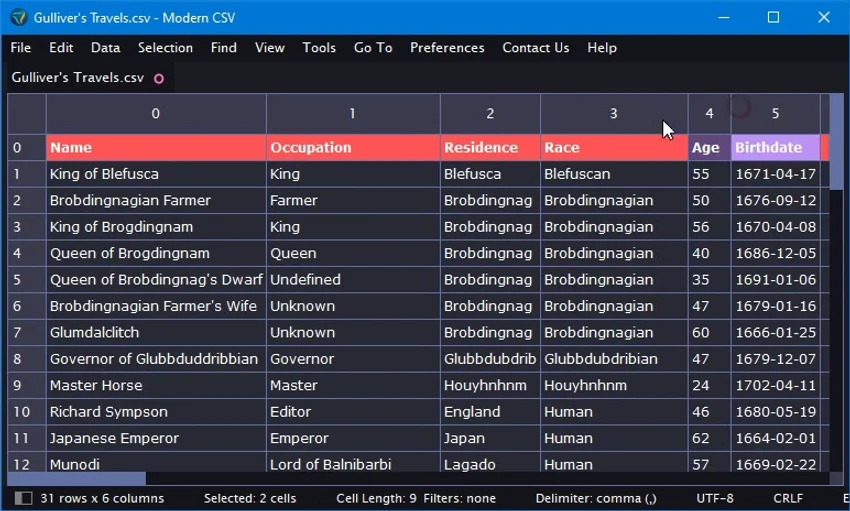
Modern CSV is a specialized data editing tool designed for working with CSV (Comma-Separated Values) files efficiently and at scale. Unlike traditional spreadsheet applications, it focuses specifically on speed, usability, and handling extremely large datasets without performance issues. It is built for users who need to manipulate structured data quickly, offering a responsive interface and advanced editing capabilities that go beyond standard spreadsheet tools.

Features of Modern CSV

Quick Editing Tools

  • Multi-cell editing support
  • Insert, delete, and move rows, columns, and cells
  • Duplicate rows, columns, and cell blocks
  • Fast inline editing for structured data

Large File Performance

  • Load extremely large CSV files (billions of lines supported)
  • Up to 11x faster loading than traditional spreadsheet tools like Excel
  • Read-only mode for optimized performance on large datasets

Data Management & Organization

  • Find and replace with regex support
  • Highlight matching results
  • Sort rows and columns (ascending/descending)
  • Filter data dynamically

Customization Options

  • Light and dark themes
  • Fully customizable keyboard shortcuts
  • Adjustable cell size and row/column styling
  • Font and layout configuration options

User Experience

After using Modern CSV, the most noticeable advantage is its speed when handling large datasets. Unlike traditional spreadsheet applications that slow down with large files, Modern CSV remains responsive even with extremely large CSV documents. The interface is clean and focused, allowing users to quickly edit, sort, and filter data without unnecessary distractions. Multi-cell editing and row/column manipulation tools make bulk data changes significantly more efficient.

Search and filtering tools are particularly powerful, especially with regex support, which allows precise data extraction and manipulation. Sorting and filtering operations are fast and do not require complex setup. Customization options such as themes and keyboard shortcuts also improve workflow efficiency, especially for users who work with CSV files regularly. Overall, Modern CSV provides a highly optimized experience for users dealing with large-scale data processing and structured file editing.

Who Should Use Modern CSV?

  • Data analysts working with large CSV datasets
  • Developers handling structured data files
  • Researchers processing large tabular data
  • Users who find Excel too slow for large files
  • Anyone needing fast CSV editing and filtering tools

Conclusion

Modern CSV is a high-performance CSV editor built for speed and efficiency when working with large datasets. Its powerful editing tools, fast loading capabilities, and flexible filtering options make it a strong alternative to traditional spreadsheet applications for CSV-specific tasks.

Pros & Cons

Pros

  • Extremely fast performance with large CSV files
  • Supports massive datasets beyond typical spreadsheet limits
  • Powerful editing tools for rows, columns, and cells
  • Regex-based search and replace functionality
  • Lightweight and responsive interface
  • Customizable shortcuts and themes
  • Better performance than traditional spreadsheet software

Cons

  • Focused only on CSV files (not full spreadsheet features)
  • No advanced formulas or charting tools like Excel
  • Requires learning for users new to data editing tools

Frequently Asked Questions

What is Modern CSV used for?

Modern CSV is used to edit, filter, and manage CSV data files efficiently, especially large datasets.

Can Modern CSV handle large files?

Yes. It is designed to handle extremely large CSV files, even with billions of lines.

Does Modern CSV support Excel features?

No. It focuses on CSV editing and does not include advanced spreadsheet features like formulas or charts.

Is Modern CSV faster than Excel?

Yes. It is optimized for CSV performance and can load large files significantly faster than Excel.

Can I filter and sort data in Modern CSV?

Yes. It supports sorting, filtering, and regex-based search and replace.

Who should use Modern CSV?

It is ideal for data analysts, developers, and anyone working with large structured CSV files.

Recommended apps [Freeware]:
  • CalendarTask 3.30.290.9088 CalendarTask logo lightweight desktop calendar with note-taking, cloud sync, reminders, and desktop scheduling tools
  • PDFgear 2.1.16 PDFgear logo a free PDF editor for Windows that supports editing, conversion, OCR, merging, signing, and AI-assisted PDF workflows
  • Mozilla Firefox 152.0.3 Mozilla Firefox logo Browse the web securely and quickly with Mozilla Firefox, a customizable browser with strong privacy and add-on support
  • XRecode 3 v1.184 XRecode logo a powerful audio converter supporting many formats, CD ripping, and audio extraction from video files
  • Ventoy 1.1.16 + LiveCD Ventoy logo create bootable USB drives and boot directly from ISO files without extraction or reformatting
  • Kali Linux 2026.2 Kali Linux logo a powerful penetration testing OS with tools for cybersecurity, digital forensics, and ethical hacking
Recommended apps [Shareware]:
  • Adobe After Effects 2026 Adobe After Effects logo advanced motion graphics, visual effects, compositing, and animation tools for creators.
  • Charles 5.2.0 Charles logo HTTP proxy tool for web debugging, allowing developers to inspect, modify, and analyze network traffic in real time
  • SkyDemon 4.3.1 SkyDemon logo Plan flights with real-time aeronautical data, dynamic charts, NOTAMs, METAR, TAF, and intelligent route planning using SkyDemon
  • GetFLV 32.2606.25 GetFLV logo combines video downloading, conversion, audio extraction, and basic editing tools in one Windows application
  • Rons WebLynx 2026.6.23.820 Rons WebLynx logo offline Windows bookmark manager with tagging, automation, RSS support, and link checking
  • Capture One 16.8.2.3615 Capture One logo professional RAW photo editor with advanced color accuracy, tethered shooting, and studio workflow tools for photographers