Howard Email Notifier logo

Howard Email Notifier 2.17

  • User Rating:
    ★★★★★
    ★★★★★
    0.0 0Votes
  • Requirements:
    Windows
  • Version: 2.17
  • Latest updated: 2 days ago
  • License: Freeware  
  • Publisher: The SZ Development
  • Size: 6 MB
× app stores

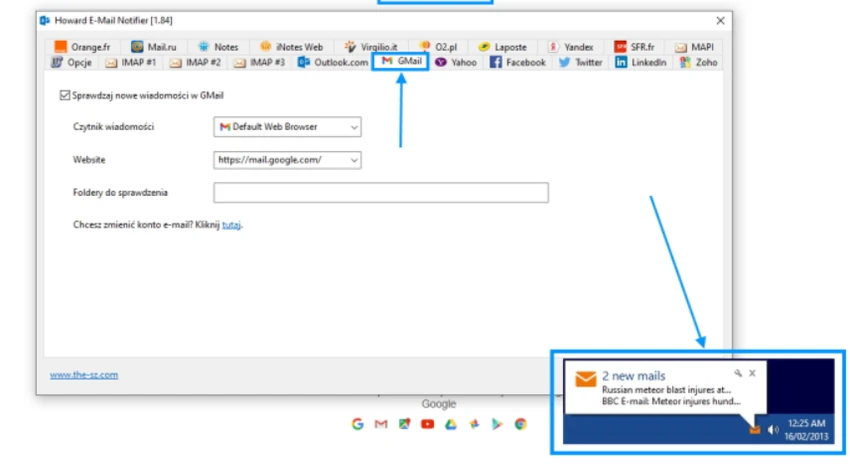
Howard Email Notifier is a lightweight desktop utility designed to keep you informed whenever new emails arrive in your web-based inboxes. It supports a wide range of popular email providers and online services, making it a practical replacement for the email notifications previously available through Windows Live Messenger. Instead of constantly checking your browser, Howard Email Notifier displays desktop alerts with useful information about incoming messages. With a single click, you can quickly open your inbox in your preferred web browser or Windows Mail.

Features of Howard Email Notifier

  • Supports notifications for multiple email services, including:
    • Outlook.com
    • Live.com
    • Hotmail
    • Gmail
    • Yahoo Mail
    • Facebook
    • LinkedIn
    • Twitter
    • Mail.ru
    • Orange.fr
    • IBM / Lotus Notes
    • Virgilio Mail
    • O2.pl
    • Yandex
    • Laposte.net
    • Zoho Mail
  • Displays desktop tooltip notifications when new emails arrive.
  • Shows the sender's name and email subject in the notification.
  • Plays a sound alert for new messages.
  • Opens your inbox directly in your web browser or Windows Mail with a single click.
  • Serves as a replacement for Windows Live Messenger email notifications.

User Experience

After using Howard Email Notifier, I found that it focuses on one core task—keeping email notifications simple and accessible. The desktop tooltip provides enough information to determine whether a message requires immediate attention, while the accompanying sound helps ensure important emails are not missed. The ability to click the notification and jump directly to the inbox streamlines the workflow, especially for users who manage several webmail accounts. Rather than introducing unnecessary complexity, Howard Email Notifier sticks to providing quick, unobtrusive notifications.

Who Should Use Howard Email Notifier?

  • Users who rely on multiple webmail accounts.
  • Professionals who want desktop notifications without constantly checking their browser.
  • Former Windows Live Messenger users looking for a similar email notification experience.
  • Anyone seeking a lightweight email notification utility.

Conclusion

Howard Email Notifier offers a straightforward way to receive desktop notifications for multiple webmail services. It emphasizes simplicity by displaying sender information, email subjects, and providing direct access to your inbox with a single click.

Pros & Cons

Pros

  • Supports a wide range of email providers and online services.
  • Displays sender and subject directly in notifications.
  • Includes optional sound alerts for new emails.
  • One-click access to your inbox.
  • Lightweight replacement for Windows Live Messenger email notifications.

Cons

  • Feature set is focused solely on email notifications.

Frequently Asked Questions

What is Howard Email Notifier?

Howard Email Notifier is a desktop utility that alerts users when new emails arrive across supported webmail services.

Which email services does Howard Email Notifier support?

It supports Outlook.com, Live.com, Hotmail, Gmail, Yahoo Mail, Mail.ru, Orange.fr, IBM/Lotus Notes, Virgilio Mail, O2.pl, Yandex, Laposte.net, Zoho Mail, and several online platforms including Facebook, LinkedIn, and Twitter.

Does Howard Email Notifier display email details?

Yes. Desktop notifications include the sender's name and the email subject.

Can I open my inbox directly from a notification?

Yes. Clicking the notification or application icon opens your inbox in your web browser or Windows Mail.

Does Howard Email Notifier replace Windows Live Messenger notifications?

Yes. It is designed as a replacement for the email notification functionality previously available in Windows Live Messenger.

Recommended apps [Freeware]:
  • CalendarTask 3.30.290.9088 CalendarTask logo lightweight desktop calendar with note-taking, cloud sync, reminders, and desktop scheduling tools
  • PortKiller 3.3.3 PortKiller logo a network utility for monitoring TCP ports, managing processes, and handling tunnels on Windows.
  • Far Manager 3.0 Build 6699 Far Manager logo Manage files efficiently with Far Manager's fast text-based interface, plugins, and archive support
  • Mozilla Firefox 152.0.3 Mozilla Firefox logo Browse the web securely and quickly with Mozilla Firefox, a customizable browser with strong privacy and add-on support
  • Quick Clipboard Editor 3.4.0.0 Quick Clipboard Editor logo edit, format, and manage clipboard text with powerful tools for productivity and automation
  • Youtube Downloader HD 5.9.9.13 Youtube Downloader HD logo a simple Windows tool for downloading and converting YouTube videos in HD formats
Recommended apps [Shareware]:
  • Wipe Professional 2026.07 Wipe Professional logo a Windows cleanup tool that removes junk files, cache, cookies, and browsing traces to improve privacy and performance
  • IntraWEB 16.2.2 IntraWEB logo web development framework for creating interactive web applications using a Windows application-style approach
  • Royal TS 7.4.50622 Royal TS logo centralizes remote connections, credential management, automation, and secure team collaboration.
  • VideoPad Video Editor 18.38 VideoPad Video Editor logo a Windows movie maker for editing videos, adding effects, transitions, audio, and exporting to social platforms
  • Smart Game Booster 6.0.0.1164 Smart Game Booster logo Optimize Windows, monitor FPS and temperatures, and reduce lag with one click
  • HTML Compiler 2026.7 HTML Compiler logo convert HTML apps into secure Windows executables using Chromium-based runtime