ActiveXperts Network Monitor logo

ActiveXperts Network Monitor 2026 v902.6061

  • User Rating:
    ★★★★★
    ★★★★★
    0.0 ★ 0Votes
  • Requirements:
    Windows
  • Version: 2026 v902.6061
  • Latest updated: 3 weeks ago
  • License: Free Trial  
  • Publisher: ActiveXperts Software
  • Size: 93 MB
× app stores

ActiveXperts Network Monitor is an enterprise-grade monitoring solution designed to track the health, performance, and availability of IT infrastructure components. It can monitor a wide range of systems, including servers, workstations, cloud services, virtualization platforms, databases, applications, and network devices.

The software operates as a Windows background service and provides continuous monitoring for both Windows and Linux environments, as well as IP-based devices. It is designed for IT administrators who need real-time visibility into system performance and immediate alerts when issues arise.

When potential problems are detected, ActiveXperts Network Monitor can send notifications through multiple channels, including email, SMS, WhatsApp, and SNMP traps, ensuring that administrators can respond quickly to incidents.

Features of ActiveXperts Network Monitor

  • Continuous monitoring of IT infrastructure components.
  • Supports monitoring of:
    • Servers
    • Workstations
    • Cloud platforms
    • Virtualization systems
    • Databases
    • Applications
    • Network devices
  • Runs as a Windows background service (32-bit and 64-bit).
  • Agentless monitoring architecture.
  • Multi-channel alert system:
    • Email notifications
    • SMS alerts
    • WhatsApp notifications
    • SNMP traps
  • Web-based interface (ActiveXperts Web Access).
  • Customizable dashboards and views.
  • Filtering by check types, servers, or groups.
  • Supports Windows and Linux systems.
  • Includes PowerShell, VBScript, and SSH-based monitoring scripts.
  • Flexible scripting for custom monitoring checks.
  • Limited free check availability.

Interface and Usability

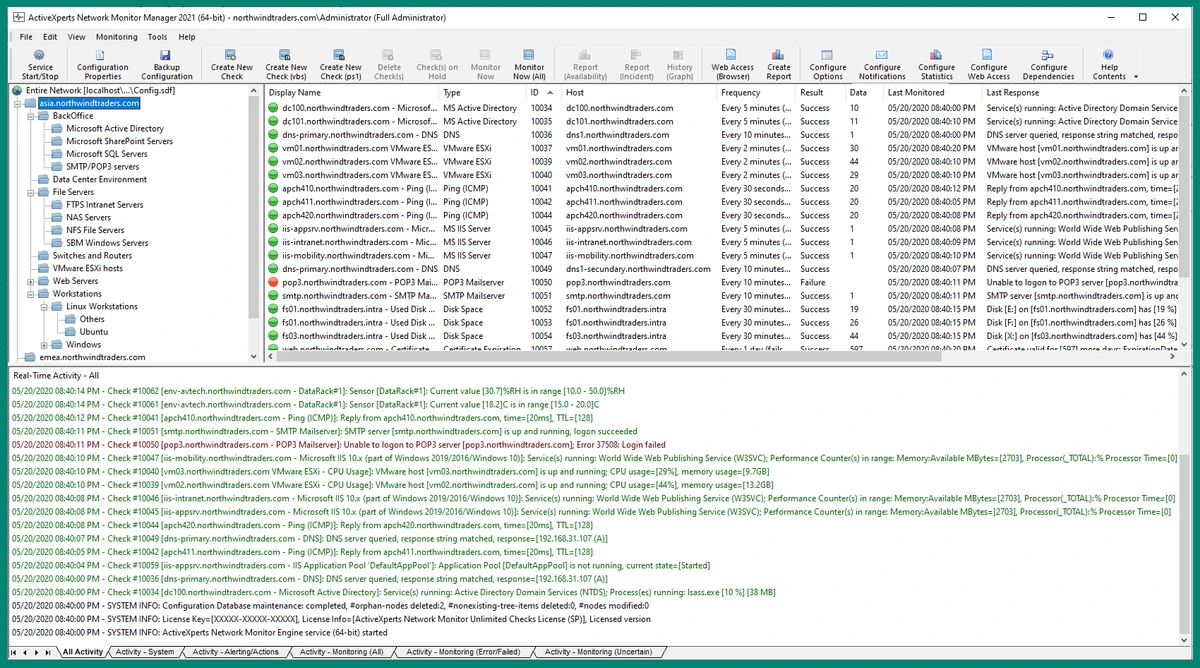
ActiveXperts Network Monitor provides a structured administrative interface designed for IT professionals managing complex environments. The web-based dashboard allows users to view system status, configure monitoring rules, and create customized views tailored to specific infrastructure needs.

While the interface is highly functional, it is geared toward technical users rather than casual users. Setting up monitoring rules and custom scripts may require familiarity with IT administration concepts, but the flexibility it offers is valuable in enterprise environments. The ability to access monitoring data through mobile-friendly web access improves usability for administrators who need real-time insights while on the move.

Who Should Use ActiveXperts Network Monitor?

  • IT administrators managing enterprise infrastructure.
  • System engineers responsible for server uptime.
  • DevOps teams monitoring cloud and virtualization platforms.
  • Businesses requiring real-time alerting for system failures.
  • Organizations needing multi-channel notification systems.
  • Users who want agentless monitoring across mixed environments.

Conclusion

ActiveXperts Network Monitor is a powerful enterprise monitoring solution designed for IT teams that need full visibility into their infrastructure. Its broad monitoring capabilities, flexible scripting support, and multi-channel alerting system make it suitable for managing complex and distributed environments.

Pros & Cons

✓

Pros

  • Comprehensive IT infrastructure monitoring.
  • Supports servers, cloud, databases, and network devices.
  • Agentless architecture simplifies deployment.
  • Multiple alert channels (email, SMS, WhatsApp, SNMP).
  • Web-based responsive dashboard.
  • Custom scripting support (PowerShell, VBScript, SSH).
  • Works across Windows and Linux environments.
  • Suitable for enterprise-scale environments.
✕

Cons

  • Requires technical expertise to configure effectively.
  • Primarily designed for IT professionals, not casual users.
  • Limited free check availability.

Frequently Asked Questions

What is ActiveXperts Network Monitor used for?

ActiveXperts Network Monitor is used to monitor IT infrastructure components such as servers, applications, databases, cloud services, and network devices, alerting administrators when issues occur.

How does ActiveXperts Network Monitor send alerts?

The software can send alerts through multiple channels, including email, SMS, WhatsApp, and SNMP traps, ensuring administrators are notified quickly.

Does ActiveXperts Network Monitor require agents?

No. It uses an agentless monitoring approach, allowing it to monitor systems without installing additional software on target devices.

Can it monitor Linux systems?

Yes. ActiveXperts Network Monitor supports monitoring both Windows and Linux systems, as well as IP-based devices.

Is there a web interface available?

Yes. The software includes ActiveXperts Web Access, a responsive web interface that allows users to view and manage monitoring data from desktops and mobile devices.

Is ActiveXperts Network Monitor suitable for small businesses?

Yes, but it is primarily designed for IT professionals and enterprise environments. Small businesses may benefit if they require advanced infrastructure monitoring capabilities.

Recommended apps [Freeware]:
  • All in One Runtimes 2.5.0 All in One Runtimes logo Package essential Windows runtime environment packages to improve software compatibility and system stability.
  • AnyTXT Searcher 1.3.3241 AnyTXT Searcher logo fast desktop search tool that indexes and searches full-text content across documents, PDFs, emails, and more
  • BleachBit 6.0.2 BleachBit logo a free Windows cleaner that removes junk files, protects privacy, and frees disk space with secure wiping.
  • CrossFTP 2.00.1 CrossFTP logo a multi-protocol FTP client for Windows supporting SFTP, WebDAV, S3, Azure, and secure file transfers
  • Power-user 1.7.85.410 Power-user logo Office add-in offering templates, icons, charts, maps, and diagrams to boost productivity in PowerPoint, Excel, and Word
  • Photo Pos Pro 4.21 Build 51 Photo Pos Pro logo a feature-rich photo editor for Windows with layers, filters, RAW support, and advanced image design tools
Recommended apps [Shareware]:
  • Drive SnapShot 1.51.0.1811 Drive SnapShot logo creates complete disk image backups while Windows runs, allowing fast system recovery and file restoration
  • Allavsoft 3.29.4.9686 Allavsoft logo video downloader and converter for batch downloads, HD quality, and audio extraction on Windows.
  • Softros LAN Messenger 12.6.3.0 Softros LAN Messenger logo secure encrypted LAN messaging, group chat, and file sharing for office communication
  • NoteCase Pro 4.9.0 NoteCase Pro logo organize notes, tasks, attachments, and audio across multiple platforms with powerful import and export support
  • PDF Architect 9.1.133.23134 PDF Architect logo Windows PDF editor for creating, editing, converting, and securing PDF documents efficiently.
  • Apowersoft Video Download Capture 6.6.4.0 Apowersoft Video Download Capture logo Download, record, convert, and edit online videos with a versatile tool supporting multiple formats, resolutions, and streaming sources.