SmarterMail logo

SmarterMail Build 9686

  • User Rating:
    ★★★★★
    ★★★★★
    0.0 ★ 0Votes
  • Requirements:
    Windows
  • Version: Build 9686
  • Latest updated: 2 weeks ago
  • License: Freemium  
  • Publisher: Smarter Tools
  • Size: 279 MB
× app stores

SmarterMail is a business email server designed as an alternative to Microsoft Exchange, offering enterprise messaging and collaboration features while maintaining compatibility with industry-standard email technologies. With native support for MAPI, SmarterMail enables organizations to use many of the same capabilities associated with Microsoft Exchange while providing a more cost-effective deployment option.

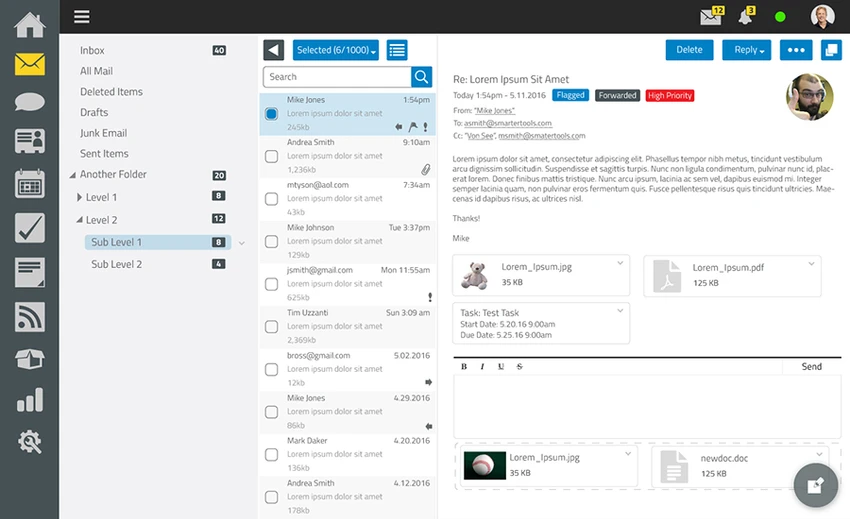
Beyond email services, SmarterMail includes a modern web-based interface that integrates collaboration tools such as messaging, task management, and video conferencing. These built-in features allow teams to communicate and collaborate without requiring additional plugins or third-party applications. The platform also incorporates security features including spam filtering, DDoS protection, and enterprise-grade antivirus protection at no additional cost.

For administrators, SmarterMail provides a comprehensive management environment with reporting tools, password management, remote administration, and mailbox migration utilities that support services such as Gmail, Microsoft Exchange, Yahoo Mail, and Microsoft Office. Support for Microsoft Exchange ActiveSync also enables synchronization with a variety of mobile email applications, including iOS Mail, Gmail, Spark, and Outlook Mobile. Whether deployed for small organizations or growing businesses, SmarterMail offers a complete email and collaboration platform with flexible administration capabilities.

Features of SmarterMail

  • Microsoft Exchange alternative with native MAPI support
  • Web-based email interface
  • Built-in task management
  • Team messaging features
  • Integrated video conferencing
  • Built-in spam filtering
  • DDoS protection
  • Enterprise-level antivirus protection
  • Administrative reporting tools
  • Password management
  • Remote administration
  • Mailbox migration from Gmail, Microsoft Exchange, Yahoo Mail, and Microsoft Office
  • Microsoft Exchange ActiveSync support
  • Compatible with mobile clients including iOS Mail, Gmail, Spark, and Outlook Mobile
  • Free edition supports one domain and up to ten email accounts

Interface and Usability

After exploring SmarterMail, I found the web interface modern and organized, bringing together email, collaboration, and administrative tools in a single environment. Users can access email, messaging, tasks, and video conferencing from a web browser without installing additional software.

Administrative features are grouped logically, making it relatively easy to manage users, security settings, and mailbox migrations once the server is configured. Initial deployment requires a domain and server configuration, including IIS setup, so users with previous mail server experience will likely find the installation process more straightforward than complete beginners.

Who Should Use SmarterMail?

  • Small and medium-sized businesses hosting their own email
  • Organizations looking for an alternative to Microsoft Exchange
  • IT administrators managing business email infrastructure
  • Companies that need integrated collaboration tools
  • Businesses requiring ActiveSync support for mobile devices

Conclusion

SmarterMail delivers a comprehensive email server solution that combines business email, collaboration, and security in a single platform. Native MAPI support, ActiveSync compatibility, integrated messaging, video conferencing, and administrative tools make it a capable alternative for organizations seeking functionality similar to Microsoft Exchange without the same licensing costs.

Pros & Cons

✓

Pros

  • Native MAPI support
  • Integrated webmail and collaboration tools
  • Built-in spam filtering, DDoS protection, and antivirus
  • Supports Microsoft Exchange ActiveSync
  • Includes mailbox migration tools
  • Web-based administration
  • Free edition available for small deployments
✕

Cons

  • Initial setup requires server configuration and a domain
  • Better suited to users with mail server administration experience
  • Free version is limited to one domain and ten email accounts

Frequently Asked Questions

What is SmarterMail used for?

SmarterMail is a mail server platform used to host business email, manage user mailboxes, and provide collaboration features such as messaging, tasks, and webmail access.

Is SmarterMail an alternative to Microsoft Exchange?

Yes. SmarterMail is designed as an alternative to Microsoft Exchange and includes native MAPI support for Exchange-compatible functionality.

Does SmarterMail support mobile devices?

Yes. SmarterMail supports Microsoft Exchange ActiveSync, allowing synchronization with compatible mobile email applications such as iOS Mail, Gmail, Spark, and Outlook Mobile.

Can I migrate existing mailboxes to SmarterMail?

Yes. SmarterMail includes mailbox migration tools that support importing mailboxes from services including Gmail, Microsoft Exchange, Yahoo Mail, and Microsoft Office.

Is there a free version of SmarterMail?

Yes. The free edition supports one domain and up to ten email accounts. Larger deployments require a paid license.

Who should use SmarterMail?

SmarterMail is best suited for businesses, organizations, and IT administrators looking to deploy and manage their own email server with built-in collaboration, security, and mobile synchronization features.

Recommended apps [Freeware]:
  • Disk Drill 6.3.1398.0 Disk Drill logo advanced data recovery software for Windows to restore deleted files from drives, USB, and partitions
  • 7-Zip 26.02 7-Zip logo free file compression tool with high compression ratio, strong encryption, and wide format support on Windows
  • HFS: HTTP File Server 3.2.1 HFS: HTTP File Server logo Share files over the internet with HFS HTTP File Server. Easy setup, bandwidth control, virtual file system, and user management
  • Patch My PC 5.4.5.0 Patch My PC logo Keep installed applications updated automatically with silent updates, software scanning, scheduling, and easy patch management.
  • v2rayN 7.23.3 v2rayN logo Manage secure proxy connections with advanced routing, encryption, and protocol support for flexible private browsing.
  • Clonezilla 3.3.3-15 Clonezilla logo Create disk images, clone drives, and restore entire systems with an open-source backup and deployment solution for multiple platforms.
Recommended apps [Shareware]:
  • Total PDF Converter 6.5.0.183 Total PDF Converter logo converts PDF to DOC, XLS, images, TXT, PDF/A and more with batch processing and advanced tools.
  • Neevia Document Converter Pro 7.7.0.292 Neevia Document Converter Pro logo Convert over 300 document formats to PDF, PDF/A, and image files
  • UniFab 4.1.7.0 UniFab logo Enhance videos with AI using UniFab. Upscale footage, reduce noise, boost frame rates, convert HDR, and improve audio quality
  • ActiveXperts Network Monitor 2026 v902.6061 ActiveXperts Network Monitor logo Monitor servers, devices, and applications with ActiveXperts Network Monitor. Get alerts via SMS, email, WhatsApp, and SNMP traps
  • Artweaver Plus 8.1.6.4131 Artweaver Plus logo a digital painting tool with realistic brushes, layers, and teamwork features for artists
  • WeBuilder 2025 v18.7.0.277 WeBuilder logo Lightweight web code editor with syntax highlighting, FTP publishing, code snippets, and support for modern web technologies.