Beeper logo

Beeper 4.2.972

  • User Rating:
    ★★★★★
    ★★★★★
    0.0 ★ 0Votes
  • Requirements:
    Windows
  • Version: 4.2.972
  • Latest updated: 2 weeks ago
  • License: Freeware  
  • Publisher: Automattic Inc
  • Size: 196 MB
× app stores

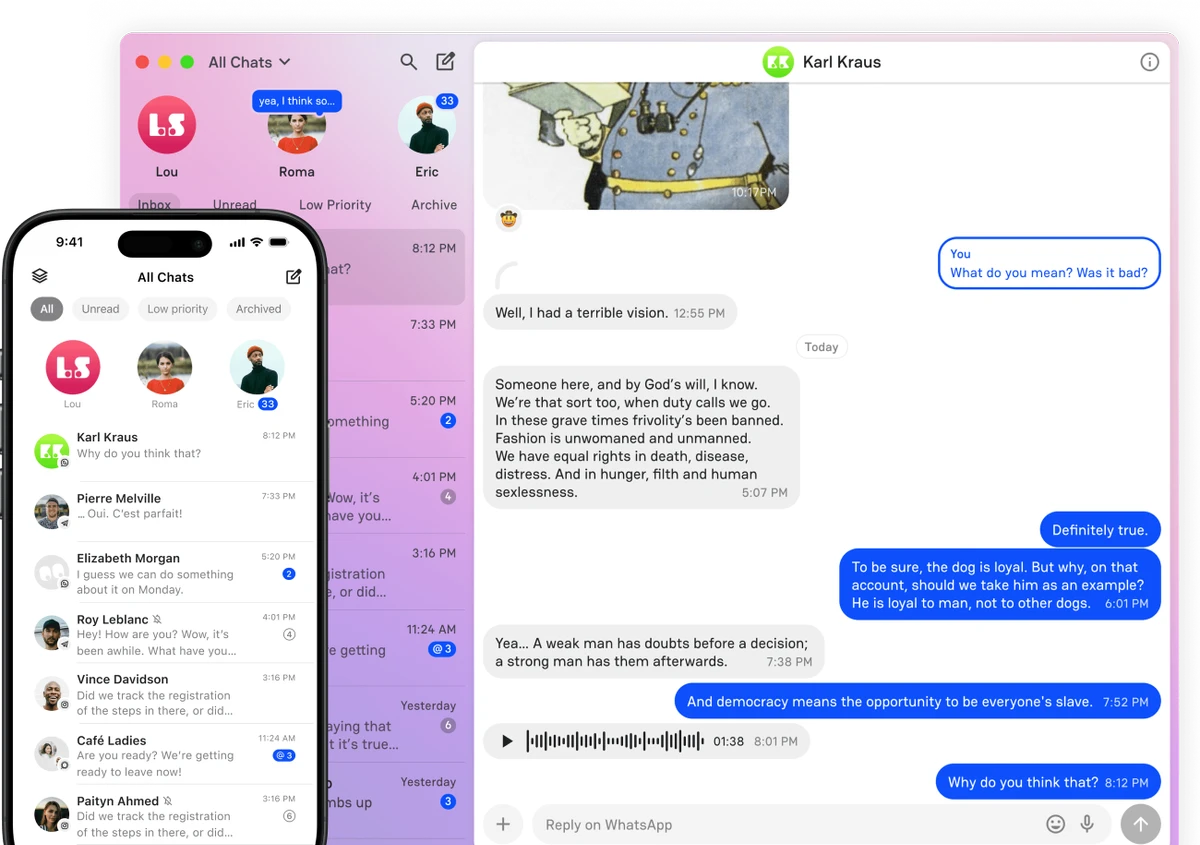
Beeper is a cross-platform messaging application that brings multiple chat services together into a single, unified inbox. Instead of switching between separate apps throughout the day, users can manage conversations from supported messaging platforms within one interface across Windows, macOS, Linux, Android, iOS, and the web.

The application is designed for users who regularly communicate through multiple services such as WhatsApp, iMessage, Telegram, Signal, Slack, and Discord. Beeper connects these supported accounts and presents conversations in an organized interface while keeping each messaging service separate.

Built on the Matrix protocol, Beeper synchronizes messages across devices to provide a consistent messaging experience. Users can send replies, share attachments, react to messages, search conversations, and manage notifications without needing to switch between different applications. One of Beeper's standout features is its unified search capability, allowing users to search conversations across multiple messaging platforms from a single location. The application also consolidates notifications, helping reduce the number of separate alerts generated by multiple chat apps.

Beeper offers a free version with core messaging functionality, while a paid subscription adds features such as enhanced cloud history and priority support. Some service-specific features may still require opening the original messaging application, depending on the platform being used.

Features of Beeper

  • Unified inbox for multiple messaging services
  • Supports WhatsApp, iMessage, Telegram, Signal, Slack, Discord, and more
  • Available on Windows, macOS, Linux, Android, iOS, and the web
  • Synchronizes messages across devices
  • Search conversations across supported messaging networks
  • Send messages, attachments, and reactions
  • Unified notification management
  • Built on the Matrix protocol
  • Supports end-to-end encryption where provided by the original messaging service
  • Free version available
  • Optional paid subscription with additional cloud history and priority support

Interface and Usability

Beeper provides a modern interface that brings multiple messaging platforms together without feeling cluttered. Conversations remain organized by service while still being accessible from a single application, making it easier to manage personal and professional communication.

The interface behaves similarly across desktop and mobile devices, providing familiar messaging features such as replying, searching, reacting, and managing notifications. Unified search is especially useful for locating older conversations or shared files without remembering which messaging platform was used.

While Beeper simplifies everyday communication, some advanced features offered by individual messaging services may still require opening the original application. Overall, the interface prioritizes convenience while maintaining compatibility with multiple chat platforms.

Who Should Use Beeper?

  • Users who regularly use multiple messaging platforms
  • Remote workers managing business communication
  • Freelancers communicating with different clients
  • Users who want fewer messaging apps installed
  • People looking for a unified messaging experience across devices

Conclusion

Beeper offers a practical solution for managing conversations across multiple messaging services from one application. Its unified inbox, cross-platform availability, integrated search, and centralized notifications help simplify everyday communication without requiring users to constantly switch between apps.

Pros & Cons

✓

Pros

  • Combines multiple messaging services into one application
  • Available across major desktop, mobile, and web platforms
  • Powerful cross-network conversation search
  • Clean and modern interface
  • Unified notification management
  • Free version available
✕

Cons

  • Some service-specific features may require the original app
  • Certain integrations may be temporarily affected by platform changes
  • Advanced cloud features require a paid subscription

Frequently Asked Questions

What is Beeper used for?

Beeper is a messaging application that combines conversations from multiple supported chat services into a single unified inbox, allowing users to manage different messaging platforms from one app.

Which messaging services does Beeper support?

Beeper supports multiple messaging platforms, including WhatsApp, iMessage, Telegram, Signal, Slack, Discord, and other compatible services.

Is Beeper available on multiple operating systems?

Yes. Beeper is available for Windows, macOS, Linux, Android, iOS, and through a web application.

Does Beeper support message search across different apps?

Yes. Beeper allows users to search conversations across connected messaging services from a single search interface.

Is Beeper free to use?

Yes. Beeper offers a free version with core messaging features. A paid subscription is available for users who need additional features such as enhanced cloud history and priority support.

Does Beeper replace the original messaging apps?

Beeper allows users to manage supported messaging services from one interface, but some advanced features specific to individual platforms may still require using the original application.

Recommended apps [Freeware]:
  • Disk Benchmark 1.0 Disk Benchmark logo measures SSD, HDD, NVMe, and USB drive performance with detailed speed, IOPS, and latency tests
  • YouTube Music (Desktop App) 3.12.0 YouTube Music (Desktop App) logo Experience YouTube Music with custom plugins, ad blocking, keyboard shortcuts, and desktop playback
  • WinDirStat 2.7.0 WinDirStat logo Analyze disk space visually with WinDirStat, a free Windows tool that helps identify and clean large files quickly
  • ShareX 21.0.0 ShareX logo a free Windows tool for screenshots, screen recording, annotation, and instant file sharing with cloud support
  • ImTranslator 20.1 ImTranslator logo Translate text, web pages, and phrases in over 90 languages with multiple translation providers, dictionary support, and text-to-speech.
  • HWiNFO Portable 8.50 HWiNFO Portable logo Analyze hardware, monitor system sensors, and generate detailed reports with a portable diagnostic tool that requires no installation.
Recommended apps [Shareware]:
  • Typing Instructor Platinum 21.1 Typing Instructor Platinum logo improve typing speed and accuracy through interactive lessons, games, and 10-finger typing practice.
  • EF Duplicate Files Manager 26.05 EF Duplicate Files Manager logo finds and removes duplicate files by name, size, or content to reclaim storage space.
  • MobiKin Backup Manager for Android 2.0.30 MobiKin Backup Manager for Android logo Back up and restore Android data with one click using MobiKin Backup Manager for Android for Windows PCs
  • F-Rename 3.001 F-Rename logo Rename multiple files in seconds with F-Rename using custom patterns, dates, numbers, and MP3 metadata on Windows
  • AD FastReporter 26.7.1 AD FastReporter logo Active Directory reporting tool that simplifies generating, scheduling, and sharing AD reports efficiently.
  • Ultimate Power Assistant 1.1.28.0 Ultimate Power Assistant logo manage Windows power settings, schedules tasks, and automates shutdown options