


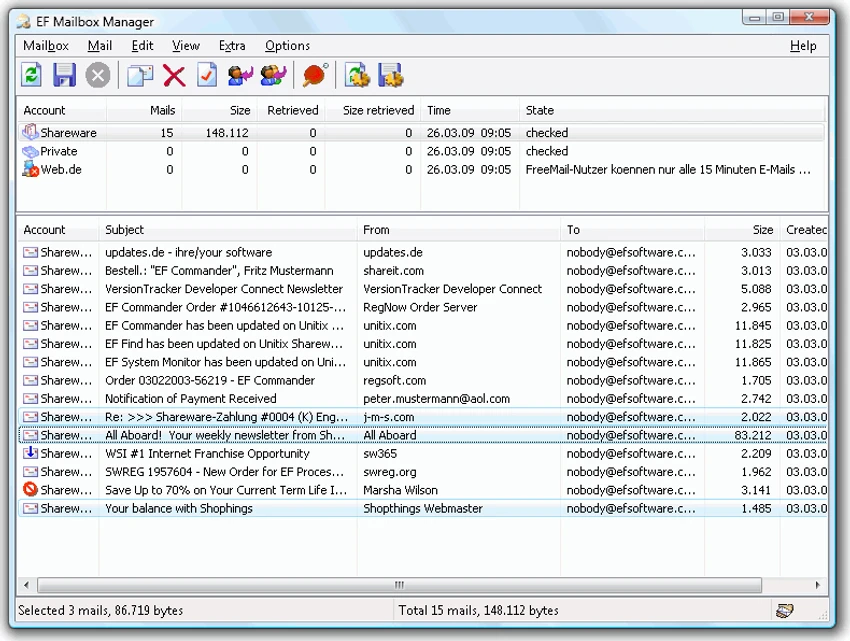

EF Mailbox Manager is a lightweight email management utility designed to monitor and manage multiple POP3 email accounts from a single interface. Instead of functioning as a full-featured email client, the software focuses on checking mailboxes, downloading messages, deleting unwanted emails directly from the server, and organizing downloaded messages locally.
With support for multiple accounts, customizable polling intervals, and secure APOP authentication, EF Mailbox Manager provides a practical solution for users who want greater control over incoming email without relying entirely on traditional email clients.
Key Features of EF Mailbox Manager
Multi-Account Email Management
- Manage multiple POP3 accounts
- Monitor several mailboxes simultaneously
- Centralized email account handling
Automatic Mail Checking
- Periodic mailbox polling
- Custom polling intervals for each account
- Automatic new message detection
Email Retrieval Options
- Check for new messages on the server
- Download emails to a local computer
- Store downloaded emails in mailbox folders
- Save messages as ASCII text files
Server-Side Email Management
- Delete messages directly from the mail server
- Remove unwanted emails before downloading
- Reduce unnecessary data transfers
Spam Control
- Identify and remove spam emails on the server
- Avoid downloading unwanted messages
- Save bandwidth and connection time
Security Features
- Supports APOP secure authentication
- Protects passwords during login when supported by the mail server
- Reduces exposure of login credentials
Email Client Integration
- Works with the installed default email client
- Supports message creation through the default mail application
- Supports email replies through the default mail application
Local Message Storage
- Downloaded messages stored locally
- Easy access to email archives
- Compatible with standard text editors
User Experience
EF Mailbox Manager takes a different approach from modern email clients. Rather than focusing on composing, organizing, and synchronizing emails across devices, it serves as a mailbox monitoring and management utility. The software is particularly useful for users who maintain multiple POP3 accounts and want to check mailboxes quickly without opening a full email client. The ability to configure individual polling intervals for each account adds flexibility and helps streamline email monitoring.
One of its most practical features is server-side email management. Users can review incoming messages and remove unwanted emails before downloading them. This capability is especially useful when dealing with spam or when working with limited bandwidth connections.
Downloaded messages are stored as plain text files, making them easy to archive, search, and access independently of a specific email application. This approach also provides a layer of protection against automatically opening potentially unsafe attachments in traditional email clients. The inclusion of APOP authentication support enhances security by preventing passwords from being transmitted in plain form when supported by the mail server. While EF Mailbox Manager does not aim to replace a modern email client, it offers a focused and efficient solution for mailbox monitoring and server-level email management.
Who Should Use EF Mailbox Manager?
- Users with multiple POP3 email accounts
- System administrators
- Small business users
- Users monitoring legacy email systems
- Individuals seeking lightweight email management tools
- Users who prefer local email storage
Conclusion
EF Mailbox Manager is a practical utility for users who need straightforward POP3 account management and server-side email control. Its ability to monitor multiple accounts, delete spam before downloading, and securely retrieve messages makes it a useful addition to any email management toolkit.


