VovSoft Desktop Diary logo

VovSoft Desktop Diary 3.2

  • User Rating:
    ★★★★★
    ★★★★★
    0.0 ★ 0Votes
  • Requirements:
    Windows
  • Version: 3.2
  • Latest updated: 3 weeks ago
  • License: Free Trial  
  • Publisher: VovSoft
  • Size: 11 MB
× app stores

VovSoft Desktop Diary is a Windows diary application designed for users who want to record personal memories, daily notes, and important appointments directly on their computer. The software provides a private offline environment where users can write journal entries without sending diary information to the internet.

I found Desktop Diary focused on simplicity and privacy. Instead of being a cloud-based journaling service, it keeps stored information on the user's own computer and protects access with password security. The application supports multiple user accounts, allowing different users to maintain separate private diary spaces.

The built-in calendar makes it easy to move between dates and review previous entries, while the search feature helps locate saved notes quickly. Users can customize the appearance with different themes, installed system fonts, text sizes, and styles. With encrypted backups available, VovSoft Desktop Diary provides a practical solution for anyone looking for a personal offline journal tool on Windows.

Features of VovSoft Desktop Diary

  • Private offline diary system that keeps personal information stored on your computer.
  • Password protection to prevent unauthorized access to diary entries.
  • Multiple user account support for separate private diary profiles.
  • Calendar-based navigation for browsing daily notes and previous entries.
  • Built-in search function to help find saved memories or appointments.
  • Customizable themes for changing the diary interface appearance.
  • Font customization using fonts installed on your Windows system.
  • Adjustable text size and style for a more personalized writing experience.
  • Encrypted backups to help protect and restore diary data.
  • Support for daily notes and appointment records in one application.

Interface and Usability

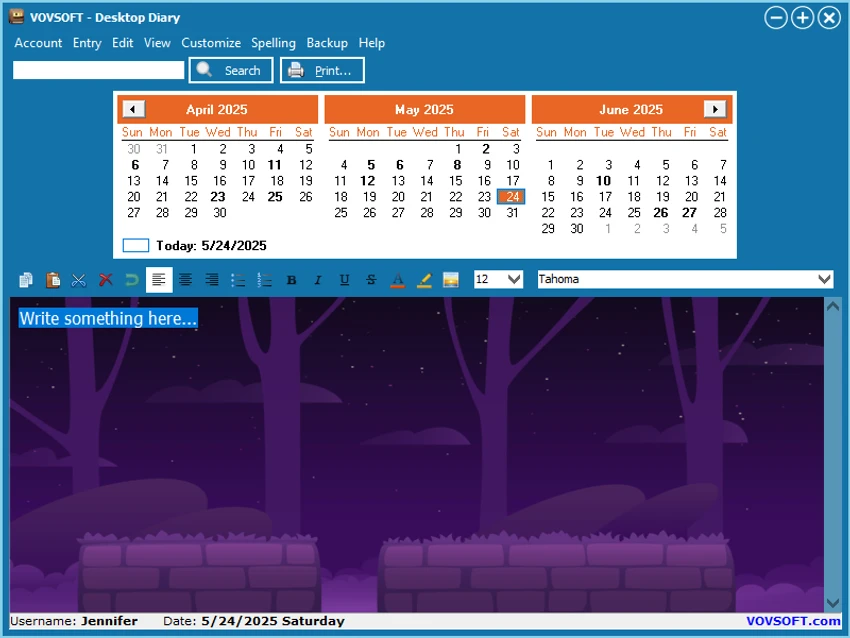
VovSoft Desktop Diary offers a straightforward interface built around daily writing and organization. The main window includes a calendar that allows users to select different dates and access related entries, making it easy to organize notes chronologically.

The writing experience is simple, with customization options that allow users to adjust fonts, text size, and styles according to their preferences. The search feature is useful when looking through older diary entries, especially for users who keep long-term records. The software does not rely on online accounts or cloud services, which keeps the experience focused on local storage and personal privacy. Users who prefer a traditional desktop diary rather than a web-based journaling platform may find the approach convenient.

Who Should Use VovSoft Desktop Diary?

  • Users who want a private digital diary on Windows.
  • People who prefer storing personal notes offline.
  • Anyone looking for a simple tool to record memories and appointments.
  • Users who want password-protected journal entries.
  • Individuals who need a desktop-based alternative to online diary services.

Conclusion

VovSoft Desktop Diary is a practical choice for users who want a private and simple way to keep a digital journal on Windows. Its combination of password protection, offline storage, calendar organization, and encrypted backups makes it suitable for recording personal memories and important notes securely.

Pros & Cons

✓

Pros

  • Keeps diary information offline on the user's computer.
  • Password protection helps secure private entries.
  • Supports multiple user accounts.
  • Includes calendar navigation and search tools.
  • Allows interface and text customization.
  • Provides encrypted backup options.
✕

Cons

  • No cloud synchronization features are available.
  • Designed only for Windows computers.

Frequently Asked Questions

What is VovSoft Desktop Diary?

VovSoft Desktop Diary is a Windows application that allows users to write personal diary entries, save memories, and record appointments on their desktop or laptop computer.

Is VovSoft Desktop Diary an online or offline diary app?

VovSoft Desktop Diary is an offline diary application. The software stores diary information locally and does not send diary data to the internet.

Can I protect my diary entries with a password?

Yes. VovSoft Desktop Diary allows users to lock their accounts with a password to help prevent unauthorized access to stored diary information.

Can multiple users create separate diary accounts?

Yes. The application supports multiple user accounts, allowing different users to maintain their own protected diary information.

Does VovSoft Desktop Diary include backup options?

Yes. The software allows users to create encrypted backups so diary data can be restored when needed.

What operating systems support VovSoft Desktop Diary?

VovSoft Desktop Diary supports Windows 11, Windows 10, Windows 8/8.1, Windows 7, and Windows Vista in both 32-bit and 64-bit versions.

Recommended apps [Freeware]:
  • BDtoAVCHD 3.2.0 BDtoAVCHD logo convert Blu-ray and MKV files into AVCHD or MKV for DVD or USB high-definition backups
  • 360 Total Security 11.0.0.1314 360 Total Security logo 360 Total Security provides antivirus protection, malware detection, system cleanup, and online security tools
  • Clipboard Remote 2.0.1 Clipboard Remote logo Transfer text, URLs, and images securely across your devices over LAN or Wi-Fi with fast clipboard synchronization.
  • Win11Debloat 2026.07.11 Win11Debloat logo Remove unwanted apps, reduce telemetry, and customize Windows settings with a lightweight PowerShell script for system cleanup.
  • Universal Media Server 15.6.0 Universal Media Server logo Stream videos, music, and images across devices with a flexible DLNA server supporting multiple platforms and formats.
  • Winget-AutoUpdate 2.12.0 Winget-AutoUpdate logo Automatically update Windows applications with scheduled Winget tasks, notifications, app filters, and detailed update logs.
Recommended apps [Shareware]:
  • Topaz Photo 1.6.1 Topaz Photo logo advanced AI to sharpen photos, remove noise, and enhance image quality with ease
  • Sketchbook Pro 9.4.7.0 Sketchbook Pro logo a professional drawing app with customizable brushes, layers, symmetry tools, and natural pen support.
  • Neevia Document Converter Pro 7.7.0.292 Neevia Document Converter Pro logo Convert over 300 document formats to PDF, PDF/A, and image files
  • EaseUS VoiceWave 3.5.0 EaseUS VoiceWave logo Transform your voice in real time with EaseUS VoiceWave using AI voice effects for gaming, streaming, and meetings
  • AnyViewer 5.8.0 AnyViewer logo Access and control computers remotely with smooth connections, file transfers, chat, and security tools for flexible work.
  • SmarterMail Build 9686 SmarterMail logo Host and manage business email with collaboration tools, spam protection, ActiveSync support, and web-based administration.