SoftPerfect Ping Monitor logo

SoftPerfect Ping Monitor 26.6

  • User Rating:
    ★★★★★
    ★★★★★
    0.0 ★ 0Votes
  • Requirements:
    Windows
  • Version: 26.6
  • Latest updated: 3 weeks ago
  • License: Freeware  
  • Publisher: SoftPerfect Pty Ltd
  • Size: 10 MB
× app stores

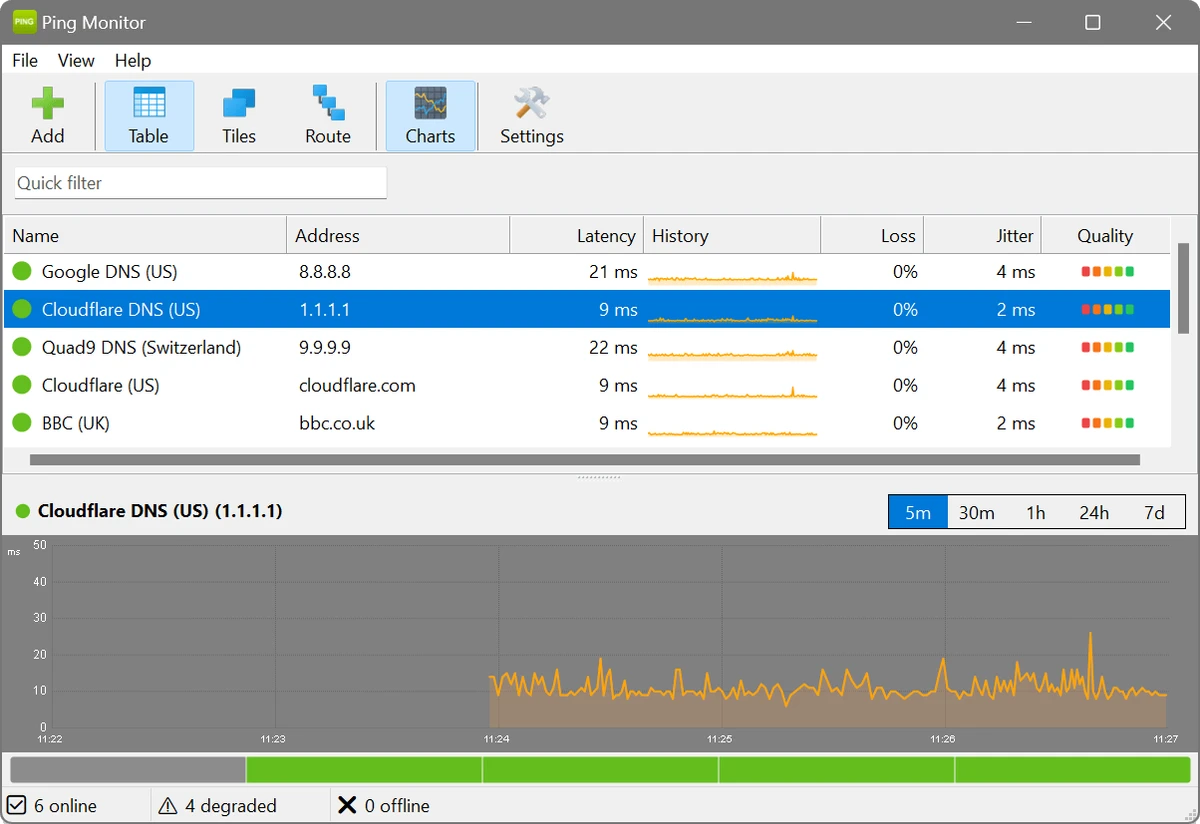
SoftPerfect Ping Monitor is a cross-platform network monitoring application that continuously checks the availability and performance of network hosts using ICMP ping. Designed for IT professionals, system administrators, and network engineers, it provides real-time visibility into network health by tracking latency, packet loss, and jitter. Rather than simply reporting whether a device is online, the software offers detailed historical data, interactive graphs, configurable thresholds, and multiple viewing modes to help identify connectivity problems before they become critical. Whether you're monitoring servers, routers, NAS devices, or remote systems, SoftPerfect Ping Monitor delivers actionable insights without requiring external services or cloud subscriptions.

The application stores monitoring data locally in an SQLite database, making it a privacy-friendly solution for organizations that prefer to keep diagnostic information on their own systems.

Features of SoftPerfect Ping Monitor

  • Real-time ICMP ping monitoring
  • Continuous host availability monitoring
  • Tracks latency, packet loss, and jitter
  • Configurable ping intervals
  • Color-coded host status indicators
  • Three monitoring views:
    • Sortable table view with sparklines
    • Visual tile view with multiple size options
    • Hop-by-hop route trace analysis
  • Interactive latency graphs
  • Five graph time ranges (5 minutes to 7 days)
  • 24-hour network quality heat strips
  • Custom latency thresholds
  • Automatic status classification (Good, Degraded, Critical)
  • Desktop notifications
  • Optional sound alerts
  • Notifications for host outages, degradation, and recovery
  • Seven built-in graph color themes
  • Customizable color schemes
  • Light and dark mode support
  • Local SQLite database storage
  • Works without external services or subscriptions
  • Available for Windows, macOS, and Linux

Interface and Usability

SoftPerfect Ping Monitor presents a clean and professional interface that balances simplicity with detailed monitoring capabilities. The software offers three different viewing modes, allowing users to switch between a traditional table, a visual tile layout, or a route trace view depending on the task at hand. During monitoring, real-time updates make it easy to spot increases in latency or packet loss. Interactive graphs provide historical performance data across multiple time ranges, while color-coded indicators quickly highlight hosts that require attention.

Threshold configuration is straightforward, enabling users to define acceptable latency levels for individual hosts or apply global settings across an entire monitoring environment. Desktop notifications and optional sound alerts ensure that network issues are brought to your attention without constantly watching the dashboard.

Who Should Use SoftPerfect Ping Monitor?

  • Network administrators
  • IT professionals
  • System administrators
  • Managed service providers (MSPs)
  • Small business network managers
  • Home lab enthusiasts
  • Organizations monitoring servers, routers, switches, and network devices

Conclusion

SoftPerfect Ping Monitor delivers a comprehensive yet approachable solution for monitoring network availability and performance. By continuously tracking latency, packet loss, and jitter, it helps identify connectivity issues before they affect users or critical services.

Pros & Cons

✓

Pros

  • Real-time network monitoring
  • Tracks latency, packet loss, and jitter
  • Multiple monitoring views
  • Interactive historical graphs
  • Customizable alert thresholds
  • Desktop notifications
  • Route trace analysis
  • Local SQLite data storage
  • No cloud dependency or subscription required
  • Cross-platform compatibility
✕

Cons

  • Focused specifically on ICMP-based monitoring
  • Advanced networking concepts may require some technical knowledge
  • Designed primarily for network administration rather than casual users

Frequently Asked Questions

What is SoftPerfect Ping Monitor used for?

SoftPerfect Ping Monitor is a network monitoring application that continuously checks the availability and responsiveness of network hosts using ICMP ping while measuring latency, packet loss, and jitter.

Which operating systems does SoftPerfect Ping Monitor support?

The application is available for Windows, macOS, and Linux.

What network metrics does SoftPerfect Ping Monitor track?

It monitors several key performance indicators, including latency, packet loss, and jitter, helping users evaluate network stability and responsiveness.

Does SoftPerfect Ping Monitor provide alerts?

Yes. The software supports desktop notifications and optional sound alerts when monitored hosts become unavailable, exceed configured thresholds, or recover.

How does SoftPerfect Ping Monitor store monitoring data?

The application stores all monitoring information locally in an SQLite database, allowing users to retain historical performance data without relying on external cloud services.

Can SoftPerfect Ping Monitor monitor multiple hosts at the same time?

Yes. SoftPerfect Ping Monitor is designed to monitor multiple network hosts simultaneously, providing real-time status updates, historical graphs, and configurable thresholds for each monitored device.

Recommended apps [Freeware]:
  • CheckMail 5.23.7 CheckMail logo a POP3 email checker that lets users preview, manage, and delete emails before downloading them
  • Viber for Windows 28.3.1 Viber for Windows logo make free calls, send messages, and sync chats across devices via WiFi or 3G
  • Pale Moon 34.3.1 Pale Moon logo fast, open-source web browser based on Firefox technology, offering customization, stability, and efficient performance
  • NoMachine 9.8.2 NoMachine logo Access and control remote computers securely with a fast desktop sharing tool for working, accessing files, and remote management.
  • Revo Uninstaller Free 2.7.0 Revo Uninstaller Free logo Remove unwanted programs, clean leftover files, and manage Windows apps with a free uninstall utility designed for easier system maintenance.
  • Blender 5.2.0 Blender logo Create 3D models, animations, visual effects, and rendered scenes with a free, open-source suite for professional content creation
Recommended apps [Shareware]:
  • Quick Heal AntiVirus Pro 26.1.0.2 Quick Heal AntiVirus Pro logo real-time malware protection, ransomware defense, and email security
  • Copy Protect 3.0.2 Copy Protect logo converts media files into secured executables to prevent copying, duplication, and unauthorized distribution on Windows.
  • Adobe Media Encoder 2026 Adobe Media Encoder logo a powerful video encoding and media management tool for exporting and transcoding
  • Total Image Converter 8.5.0.322 Total Image Converter logo Windows tool for converting, resizing, and editing images in bulk with support for RAW, TIFF, PSD, and more
  • SysTools MBOX Converter 9.0 SysTools MBOX Converter logo batch email migration tool that converts MBOX, MBS, and MBX files into multiple formats with attachment support
  • Cyber Privacy Suite 4.5.5 Cyber Privacy Suite logo protect privacy with VPN, tracking protection, encryption, and real-time security tools for Windows users