FileLegit Windows Utilities System Tools Auslogics ChillMate
Auslogics ChillMate logo

Auslogics ChillMate 1.1.0.6

  • User Rating:
    ★★★★★
    ★★★★★
    0.0 ★ 0Votes
  • Requirements:
    Windows
  • Version: 1.1.0.6
  • Latest updated: 3 weeks ago
  • License: Free Trial  
  • Publisher: Auslogics
  • Size: 27.5 MB
× app stores

Auslogics ChillMate is a Windows system utility designed to help users monitor and manage laptop temperature, performance, and power consumption. It focuses on preventing overheating by tracking CPU and GPU temperatures in real time and offering optimization profiles tailored to different usage scenarios such as gaming, office work, or general browsing.

Beyond temperature monitoring, ChillMate also includes tools for battery optimization, system performance adjustments, and hardware protection. By reducing excessive heat and managing system load, the software aims to extend hardware lifespan, reduce fan noise, and improve overall system stability without requiring advanced technical adjustments like undervolting or manual clock tuning.

Features of Auslogics ChillMate

  • Real-time monitoring of:
    • CPU temperature
    • GPU temperature
    • CPU and GPU load
    • RAM usage
    • Battery level
    • Internet speed
  • Prevents laptop overheating through system optimization tools.
  • Built-in performance profiles:
    • Game mode
    • Office mode
    • Browsing mode
    • Outdoor mode
    • Default mode
    • Custom user profiles
  • Battery optimization tools to extend laptop battery life.
  • Reduces fan noise by controlling system performance levels.
  • Protects hardware from heat-related wear and damage.
  • Helps optimize CPU, memory, and SSD performance.
  • Provides long-term and short-term performance analytics (up to 24 hours).
  • Simple interface with preset and customizable optimization modes.

Interface and Usability

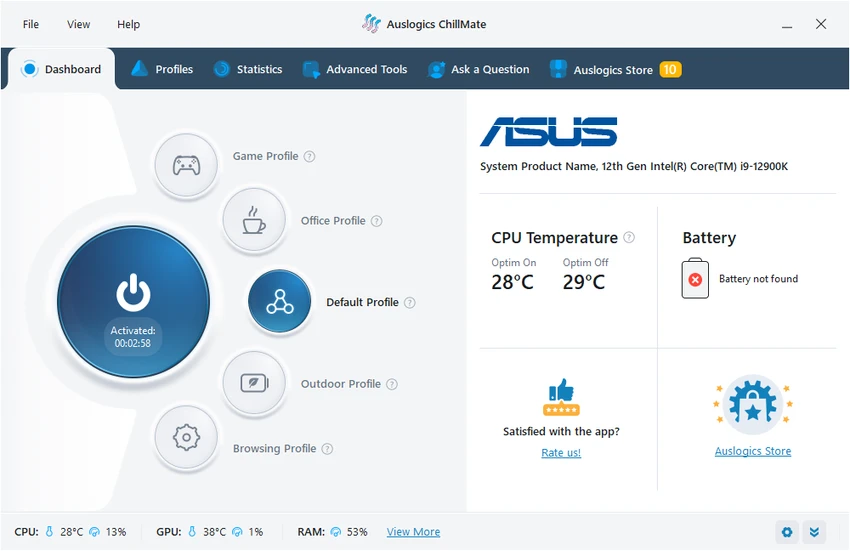
ChillMate is designed to be user-friendly, with a focus on quick access to performance profiles and real-time system metrics. The dashboard provides a clear overview of key hardware statistics, making it easy for users to understand how their system is performing at any given moment.

Switching between optimization modes is straightforward, allowing users to instantly adjust performance based on their current activity. While the software provides detailed monitoring capabilities, it avoids overly technical complexity, making it suitable for non-technical users who want better control over system temperature and power usage.

Who Should Use Auslogics ChillMate?

  • Laptop users experiencing overheating issues.
  • Gamers looking to manage system temperature and fan noise.
  • Users who want to extend laptop battery life.
  • Office and casual users seeking better system stability.
  • Anyone who wants real-time monitoring of CPU and GPU performance.
  • Users who prefer automated optimization instead of manual system tuning.

Conclusion

Auslogics ChillMate is a practical system utility for users who want to monitor and manage laptop temperature, performance, and battery usage without dealing with complex system tuning. Its combination of real-time monitoring and preset optimization profiles makes it especially useful for everyday users and gamers who want to reduce overheating and improve system comfort.

Pros & Cons

✓

Pros

  • Real-time CPU and GPU temperature monitoring.
  • Multiple performance optimization profiles.
  • Helps reduce overheating and fan noise.
  • Battery usage optimization tools included.
  • Easy-to-use interface with simple controls.
  • Provides system performance insights over time.
  • No need for manual undervolting or complex tuning.
✕

Cons

  • Effectiveness depends on hardware and system configuration.
  • Limited transparency on underlying optimization methods.

Frequently Asked Questions

What is Auslogics ChillMate used for?

Auslogics ChillMate is used to monitor laptop temperature and optimize system performance to prevent overheating, reduce fan noise, and improve battery life.

Does ChillMate monitor CPU and GPU temperature?

Yes. ChillMate provides real-time monitoring of both CPU and GPU temperatures, along with system load and other performance metrics.

Can ChillMate improve battery life?

Yes. The software includes battery optimization tools that help reduce power consumption and extend laptop battery life depending on usage mode.

Does ChillMate reduce laptop fan noise?

Yes. By optimizing system performance and temperature, ChillMate can help reduce fan activity and overall noise levels.

Does ChillMate require advanced technical knowledge?

No. ChillMate is designed with simple profiles and an easy interface, so users do not need advanced technical knowledge to use it effectively.

Which Windows versions are supported?

According to the provided information, ChillMate supports Windows 7, 8, 8.1, and 11.

Recommended apps [Freeware]:
  • SoundSwitch 7.1.0 / 7.1.1 Beta 1 SoundSwitch logo a lightweight Windows tool that lets you switch audio devices instantly using customizable hotkeys
  • Wondershare Recoverit 14.0.30 Wondershare Recoverit logo Recover deleted, lost, formatted, or corrupted files from PCs, USB drives, SD cards, and more with Wondershare Recoverit
  • DriverHub 2.1.5 DriverHub logo scans your PC and installs the latest drivers automatically, helping keep hardware updated and stable on Window
  • XnConvert 1.112.0.0 XnConvert logo batch image converter supporting 500 formats with 80+ editing actions and cross-platform compatibility
  • 360 Total Security 11.0.0.1314 360 Total Security logo 360 Total Security provides antivirus protection, malware detection, system cleanup, and online security tools
  • Display Hot Keys 3.0.0 Display Hot Keys logo Switch monitor settings instantly with customizable hotkeys for resolution, refresh rate, scaling, DPI, and multi-display configurations.
Recommended apps [Shareware]:
  • Pano2VR 8.0.4 Pano2VR logo powerful software for building interactive panoramic images and virtual tours for desktop and mobile platforms
  • XnView MP 1.11.5 XnView MP logo a powerful image viewer, editor, and batch converter supporting 500+ image formats on Windows
  • Image for Windows 4.12 Image for Windows logo disk imaging tool for full system backup, restore, and recovery with encryption, compression, and bootable rescue medi
  • PingPlotter 5.27.10 PingPlotter logo network monitoring tool for tracking latency, packet loss, and remote host performance in real time
  • Chris-PC CPU Booster 3.26.0706 Chris-PC CPU Booster logo optimizes CPU usage, prioritizes applications, and helps improve performance for demanding software
  • SysTools EDB Converter 7.0 SysTools EDB Converter logo Convert Exchange database files into multiple formats, recover mailbox data, preview items, and preserve folder structure with ease.