Avast Free Antivirus logo

Avast Free Antivirus 26.6.11050

  • User Rating:
    ★★★★★
    ★★★★★
    0.0 0Votes
  • Requirements:
    Windows
  • Version: 26.6.11050
  • Latest updated: 3 days ago
  • License: Freeware  
  • Publisher: Gen Digital Inc
  • Size: 852 MB
× app stores

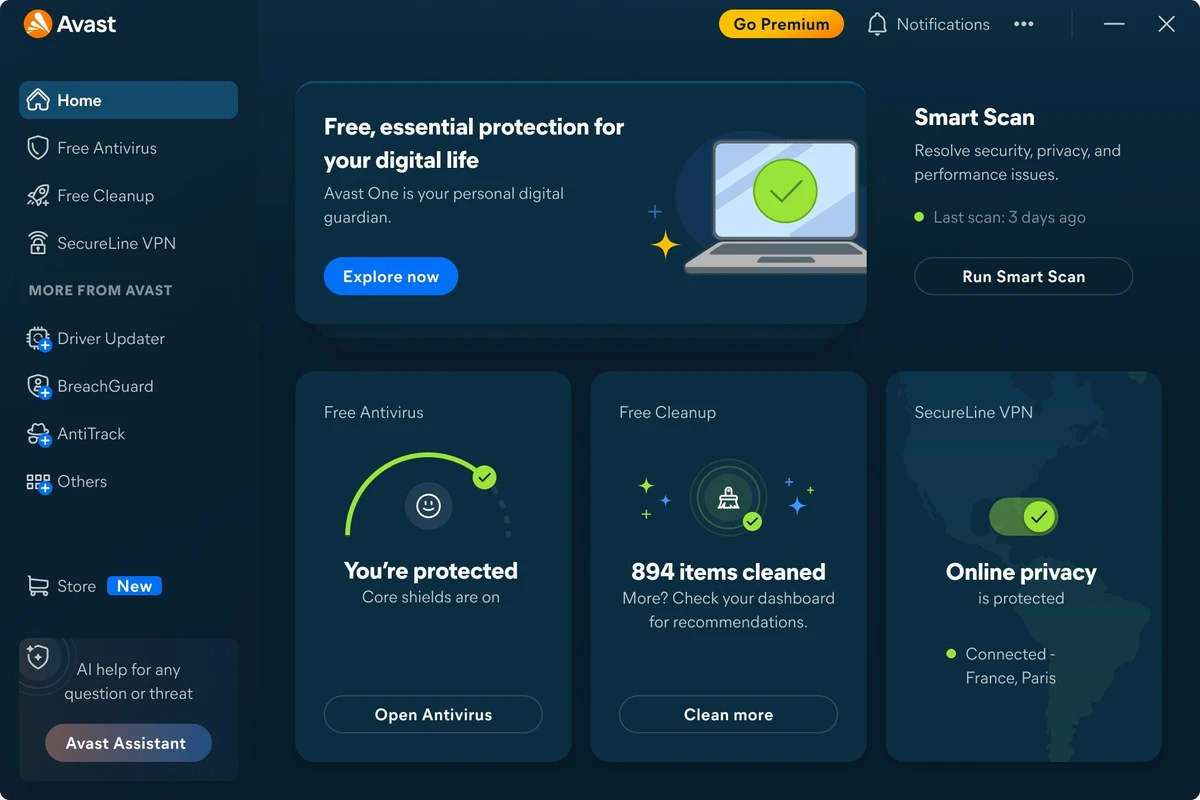
Avast Free Antivirus is a free security solution for Windows that delivers essential protection against malware, phishing attacks, and other online threats. Designed for everyday users, it combines real-time threat detection with a lightweight design that minimizes its impact on system performance. In addition to traditional antivirus protection, Avast includes intelligent scanning tools and AI-powered scam protection, making it a practical choice for users who want dependable security without the complexity of a full security suite.

Key Features of Avast Free Antivirus

  • Real-time protection against viruses, malware, and other threats.
  • Behavior Shield monitors applications for suspicious activity.
  • Smart Scan checks for:
    • Malware
    • Outdated software
    • Risky browser extensions
    • Weak network settings
  • Scam Guardian helps detect phishing attempts and fraudulent websites.
  • Avast Assistant provides guidance when suspicious websites are detected.
  • Web Guard uses AI and machine learning to identify scam websites in real time.
  • Automatic updates to protect against emerging threats.
  • Modern, beginner-friendly interface.
  • Optimized for low system resource usage.

User Experience

Avast Free Antivirus is designed with simplicity in mind. Installation is straightforward, and the interface makes it easy to access scans, security status, and settings without overwhelming less experienced users. One of its strongest features is Smart Scan, which goes beyond traditional malware detection by identifying outdated software, unsafe browser extensions, and potential network security issues. Behavior Shield continuously monitors running applications, helping detect suspicious behavior before it can cause damage.

The addition of Scam Guardian enhances online protection by warning users about phishing pages and suspicious websites. This feature works alongside Web Guard, which analyzes websites using AI to detect emerging scams that may not yet appear in traditional blocklists. Despite these features, Avast remains lightweight enough for everyday use, even on older or entry-level PCs.

Who Should Use Avast Free Antivirus?

  • Home users seeking free antivirus protection.
  • Students and casual PC users.
  • Users with older or lower-spec computers.
  • People who want simple, automatic security.
  • Anyone looking for real-time malware and phishing protection without a paid subscription.

Conclusion

Avast Free Antivirus remains one of the strongest free antivirus solutions available for Windows. Its combination of real-time malware protection, Behavior Shield, Smart Scan, and Scam Guardian delivers comprehensive everyday security while remaining lightweight and easy to use.

Pros & Cons

Pros

  • Strong real-time malware protection.
  • Behavior-based threat detection.
  • Smart Scan checks more than just viruses.
  • Scam Guardian included in the free version.
  • Lightweight and beginner-friendly interface.
  • Minimal impact on system performance.

Cons

  • Promotes paid upgrades within the application.
  • Installer may offer optional bundled components unless they are declined.
  • Some advanced security features are only available in paid editions.

Frequently Asked Questions

What is Avast Free Antivirus used for?

It protects Windows computers against malware, viruses, phishing attacks, and online scams.

Is Avast Free Antivirus really free?

Yes. The core antivirus features are available at no cost, while additional security features are offered in paid editions.

What is Smart Scan?

Smart Scan checks for malware, outdated software, unsafe browser extensions, and potential network security issues.

Does Avast Free Antivirus include phishing protection?

Yes. Scam Guardian and Web Guard help identify phishing websites and online scams.

Does Avast Free Antivirus slow down your PC?

No. It is designed to be lightweight and has minimal impact on everyday system performance.

Recommended apps [Freeware]:
  • Easy System Utility 1.1.65 Easy System Utility logo clean junk files, repair tools, passwords and system optimization.
  • DriversCloud 12.1.6 DriversCloud logo scan system hardware, update drivers, monitor performance, and analyze blue screen errors (BSODs) on Windows.
  • AB Download Manager 1.9.2 AB Download Manager logo Download files with features such as queue management, scheduling, speed control, and browser integration.
  • Quick Clipboard Editor 3.4.0.0 Quick Clipboard Editor logo edit, format, and manage clipboard text with powerful tools for productivity and automation
  • Evernote 11.22.4.22484 Evernote logo Capture, organize, sync, and access notes, tasks, web content, and research across all your devices
  • Adobe Acrobat Reader DC 2026.001.21691 Adobe Acrobat Reader DC logo trusted PDF viewer for reading, printing, and annotating PDFs with strong security and cloud sync support
Recommended apps [Shareware]:
  • Teorex FolderIco 9.3.0 Teorex FolderIco logo Change folder colors or icons in one click and organize your files visually, so you can find everything instantly
  • Gilisoft SnapID 8.8.0 Gilisoft SnapID logo Edit, enhance, retouch, and transform images with powerful tools in Gilisoft SnapID for Windows
  • MacDrive 12.0.1.23 MacDrive logo Access, read, and write Mac-formatted APFS and HFS+ drives on Windows with full support for encrypted volumes and RAID
  • Adobe Media Encoder 2026 Adobe Media Encoder logo a powerful video encoding and media management tool for exporting and transcoding
  • Coolutils PDF Splitter 5.2.0.43 Coolutils PDF Splitter logo split PDF files into individual pages, custom page ranges, or chapters defined by bookmarks
  • Aeon Timeline 3.5.107 Aeon Timeline logo create detailed timelines for writing, projects, legal cases, research and education