HttpMaster Professional logo

HttpMaster Professional 7.0.0

  • User Rating:
    ★★★★★
    ★★★★★
    0.0 0Votes
  • Requirements:
    Windows
  • Version: 7.0.0
  • Latest updated: 3 days ago
  • License: Freeware  
  • Publisher: HttpMaster Team
  • Size: 57 MB
× app stores

HttpMaster Professional is an advanced web development testing tool designed to help developers automate HTTP requests and test web applications or APIs. It allows users to send multiple requests to a specified website, manage structured test projects, and analyze responses in detail.

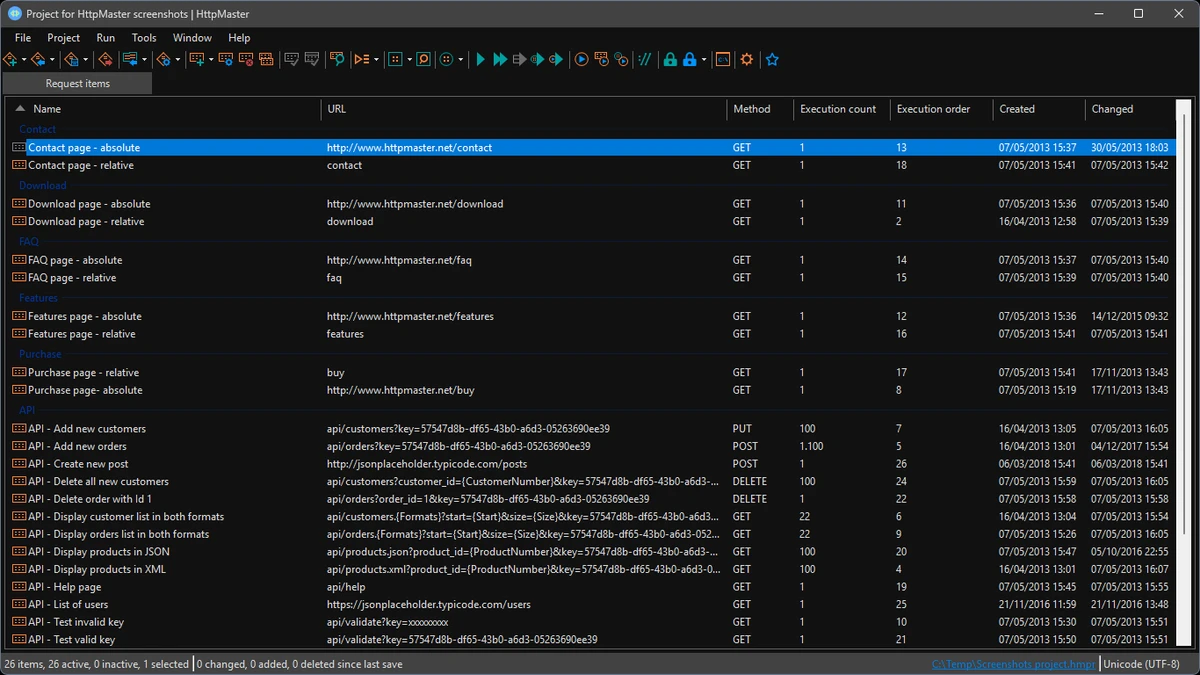
The software is built for professional use, offering a project-based workflow where all requests, parameters, validations, and execution settings are organized in a reusable structure. This makes it especially useful for developers working on complex web applications or API testing scenarios.

Features of HttpMaster Professional

  • Create and manage structured HTTP testing projects.
  • Save projects in .hmpr XML-based format for reuse.
  • Configure global HTTP request properties such as:
    • URL settings
    • Headers
    • Query strings
    • Encoding options
  • Define dynamic parameters with multiple data types and generation rules.
  • Support for automated request chaining between API calls.
  • Custom response validation based on:
    • HTTP status codes
    • Response body conditions
  • Support for multiple request types:
    • GET
    • POST
    • File uploads
    • Multipart form data
  • Ability to build requests automatically from HTML form inputs.
  • Execution control for:
    • Single request
    • Selected requests
    • Entire project
    • Execution groups
  • Conditional execution based on previous request results.
  • Detailed response analysis including:
    • Headers
    • Cookies
    • Response body
    • Execution time and size
  • Built-in viewers for JSON, XML, HTML, and CSS with code folding.
  • Export and reporting options including PDF generation.
  • Command-line interface for automation.
  • Ad hoc HTTP request tool for quick testing.

User Experience

HttpMaster Professional feels like a structured testing environment rather than a simple request tool. The project-based system makes it easier to manage complex API workflows, especially when dealing with multiple endpoints and dependent requests. The ability to define parameters and reuse them across requests is particularly useful when testing dynamic APIs. Request chaining also simplifies workflows where one response feeds data into another request.

While the interface is functional rather than modern-looking, it prioritizes clarity and control. Developers can inspect headers, cookies, and response bodies in detail, which is essential for debugging APIs and web services. The execution monitoring tools and grouped runs help streamline repetitive testing tasks, making it practical for long-term use in development and QA environments.

Who Should Use HttpMaster Professional?

  • Web developers testing APIs and web services.
  • QA engineers performing automated testing.
  • Backend developers working with HTTP requests.
  • Teams building complex request workflows.
  • Users needing structured API testing beyond basic tools.

Conclusion

HttpMaster Professional is a powerful HTTP testing and automation tool designed for serious web development workflows. With support for request chaining, parameterization, execution groups, and detailed response analysis, it provides everything needed for advanced API testing.

Pros & Cons

Pros

  • Powerful HTTP and API testing capabilities.
  • Project-based structure for organized workflows.
  • Supports request chaining and dynamic parameters.
  • Detailed response inspection tools.
  • Supports multiple data formats (JSON, XML, HTML, CSS).
  • Execution groups and automation features.
  • Command-line support for advanced automation.

Cons

  • Interface is more functional than modern in design.
  • Requires learning curve for beginners.
  • Not intended for casual users or non-developers.

Frequently Asked Questions

What is HttpMaster Professional used for?

HttpMaster Professional is used for testing web applications and APIs by sending and managing HTTP requests in a structured workflow.

Does HttpMaster support API automation?

Yes. It supports request chaining, execution groups, parameters, and command-line automation.

Can HttpMaster validate responses?

Yes. It can validate responses using HTTP status codes and custom rules based on response content.

Does it support JSON and XML?

Yes. It includes built-in viewers for JSON, XML, HTML, and CSS data formats.

Who should use HttpMaster Professional?

It is designed for developers, QA engineers, and anyone involved in API or web service testing.

Recommended apps [Freeware]:
  • WifiInfoView 3.00 WifiInfoView logo scans nearby Wi-Fi networks and displays detailed technical information in real time
  • ExplorerPatcher 26100.8457.70.3 ExplorerPatcher logo restores Windows 10-style taskbar, menus, and Explorer behavior on Windows 11.
  • BDtoAVCHD 3.2.0 BDtoAVCHD logo convert Blu-ray and MKV files into AVCHD or MKV for DVD or USB high-definition backups
  • ToDoList 9.2.0 ToDoList logo customizable task manager for Windows with subtasks, reminders, notes, tracking, and project tools
  • Adobe Acrobat Reader DC 2026.001.21691 Adobe Acrobat Reader DC logo trusted PDF viewer for reading, printing, and annotating PDFs with strong security and cloud sync support
  • Brave Browser 1.91.178 Brave Browser logo Browse faster and more privately, block ads, earn BAT rewards, and enjoy Chromium compatibility.
Recommended apps [Shareware]:
  • Adobe Illustrator 2026 Adobe Illustrator logo professional vector graphic editor for creating logos, illustrations, and scalable designs.
  • Topaz Photo 1.6.1 Topaz Photo logo advanced AI to sharpen photos, remove noise, and enhance image quality with ease
  • Disk Savvy 18.2.36 Disk Savvy logo analyze disk space usage, network shares, NAS storage, and generate detailed reports on Windows
  • EF Duplicate MP3 Finder 26.05 EF Duplicate MP3 Finder logo Find and remove duplicate MP3, FLAC, WMA, and OGG audio files using tag-based and similarity analysis
  • Capture One 16.8.2.3615 Capture One logo professional RAW photo editor with advanced color accuracy, tethered shooting, and studio workflow tools for photographers
  • WYSIWYG Web Builder 21.1.0 WYSIWYG Web Builder logo create responsive websites visually with drag-and-drop tools and automatic HTML generation