CareUEyes Pro logo

CareUEyes Pro 2.6.1

  • User Rating:
    ★★★★★
    ★★★★★
    0.0 ★ 0Votes
  • Requirements:
    Windows
  • Version: 2.6.1
  • Latest updated: 3 weeks ago
  • License: Freemium  
  • Publisher: care-eyes
  • Size: 5 MB
× app stores

CareUEyes Pro is a Windows utility designed to reduce eye strain caused by prolonged screen exposure. It works by adjusting screen color temperature and brightness to create a more comfortable viewing experience, especially during long working hours or nighttime computer use. The software focuses on minimizing blue light emissions, which are commonly associated with visual fatigue and sleep disruption. By modifying display warmth and brightness levels, it aims to make screen usage more comfortable in different lighting environments.

In addition to blue light filtering, CareUEyes Pro also provides automatic brightness adjustment based on surrounding light conditions. This helps maintain consistent visual comfort without requiring manual adjustments throughout the day.

Features of CareUEyes Pro

  • Blue light filtering through adjustable color temperature
  • Screen brightness adjustment based on ambient light
  • Reduction of visual flicker without PWM effects
  • Night mode for reduced blue light exposure
  • Eye strain reduction during long screen usage
  • Helps minimize discomfort caused by bright or dark screens
  • Supports healthier sleep patterns by reducing night-time blue light exposure
  • Simple activation and switching between viewing modes
  • Designed for continuous background operation on Windows

Interface and Usability

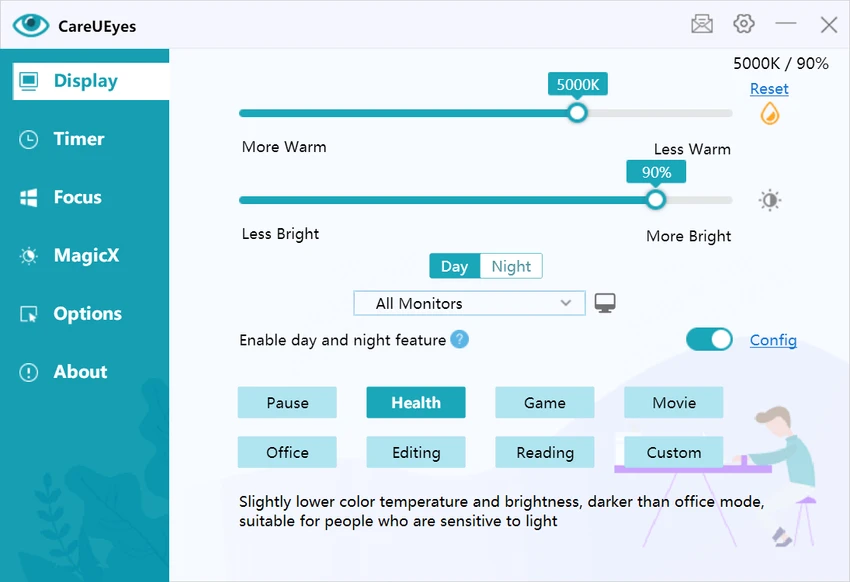
CareUEyes Pro uses a lightweight interface focused on quick adjustments and easy control of display settings. Users can enable or disable blue light filtering and brightness modes with minimal configuration. The software is designed to operate in the background, automatically applying visual adjustments based on user preferences or environmental lighting. Most settings are accessible through simple toggles, making it easy to switch between normal and eye-comfort modes during daily use. Its usability centers on convenience, allowing users to maintain comfortable screen settings without needing to manually adjust monitor controls.

Who Should Use CareUEyes Pro?

  • Office workers spending long hours in front of screens
  • Students studying or working on computers at night
  • Users sensitive to bright screens or blue light exposure
  • Gamers and developers who use monitors for extended periods
  • Anyone looking to reduce eye strain and improve visual comfort

Conclusion

CareUEyes Pro is a practical eye care utility designed to improve screen comfort through blue light filtering and brightness control. It is especially useful for users who spend extended time on computers and want to reduce eye fatigue and improve nighttime viewing comfort.

Pros & Cons

✓

Pros

  • Reduces blue light exposure effectively
  • Adjustable brightness based on environment
  • Helps reduce eye strain and discomfort
  • Simple and easy-to-use interface
  • Runs in the background with minimal interaction
✕

Cons

  • Limited advanced customization options
  • Focused only on display adjustment (not a full productivity tool)

Frequently Asked Questions

What is CareUEyes Pro used for?

CareUEyes Pro is used to reduce eye strain by adjusting screen brightness and filtering blue light on Windows computers.

How does CareUEyes Pro reduce eye strain?

It reduces eye strain by lowering blue light emission and adjusting screen color temperature and brightness to match surrounding lighting conditions.

Can CareUEyes Pro improve sleep quality?

Yes. By reducing blue light exposure at night, it may help support natural melatonin production and improve sleep patterns.

Does CareUEyes Pro adjust brightness automatically?

Yes. It can automatically adjust screen brightness based on ambient lighting conditions to maintain visual comfort.

Is CareUEyes Pro suitable for long computer use?

Yes. It is designed for users who spend long hours in front of screens, such as office workers, students, and professionals.

Recommended apps [Freeware]:
  • Exportizer 10.3.4.822 Exportizer logo view, edit, and export databases to Excel, CSV, SQL, and more with advanced conversion tools.
  • Mozilla Firefox 152.0.6 Mozilla Firefox logo Browse the web securely and quickly with Mozilla Firefox, a customizable browser with strong privacy and add-on support
  • DriverHub 2.1.5 DriverHub logo scans your PC and installs the latest drivers automatically, helping keep hardware updated and stable on Window
  • MultiPack .NET Windows Desktop Installer 2.2 MultiPack .NET Windows Desktop Installer logo Install multiple Microsoft .NET Windows Desktop Runtime versions in one package to improve application compatibility and performance.
  • Fire Toolbox 45.1 Fire Toolbox logo Customize Amazon Fire tablets with tools for app management, interface changes, backups, troubleshooting, and Android feature support.
  • Notepad++ 8.9.7 Notepad++ logo Edit code and plain text with a fast, lightweight editor featuring syntax highlighting, multiple tabs, plugins, and support for many programming languages.
Recommended apps [Shareware]:
  • Text Edit Plus 16.5 Text Edit Plus logo a lightweight text editor with text analysis, word frequency statistics, and document editing tools
  • TubeMate 6.4.9 TubeMate logo downloads online videos, converts media formats, extracts audio, and manages high-quality video downloads
  • TweakNow Gallery 1.3.5 TweakNow Gallery logo a fast Windows photo viewer and organizer with slideshow and built-in image conversion tools
  • Modern CSV 2.4.3 Modern CSV logo high-performance CSV editor for Windows with fast large-file handling, multi-cell editing, filtering, and sorting tools
  • Macro Commander Pro 2.8.7 Macro Commander Pro logo Automate repetitive tasks using macros, scripting, scheduling, and powerful data entry tools
  • String-O-Matic 36.0 String-O-Matic logo advanced search and replace across multiple files, supporting regex, Unicode, and bulk file renaming for Windows users