


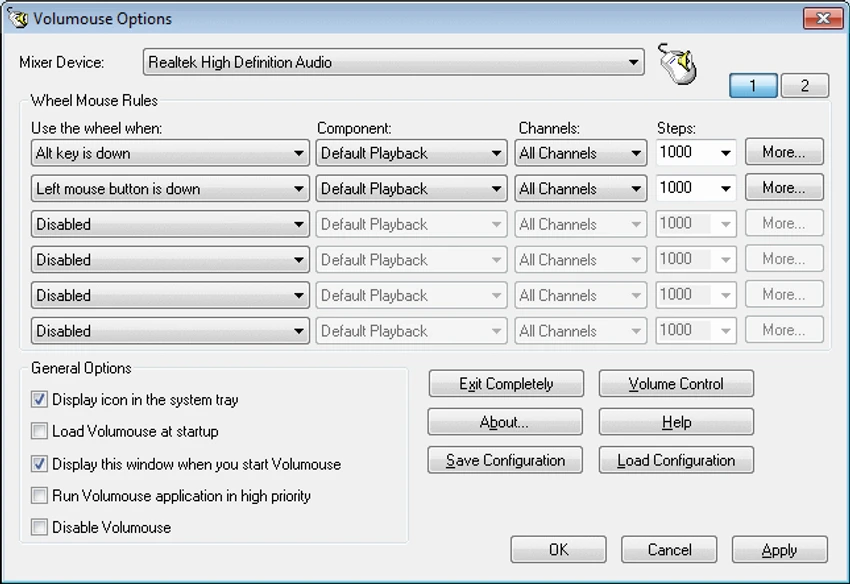

Volumouse is a lightweight Windows utility that provides a faster way to adjust system sound volume using a mouse wheel. Instead of relying on traditional volume controls or keyboard shortcuts, the software allows users to change audio levels by scrolling the wheel on their mouse when specific conditions are met. The main idea behind Volumouse is simple: users can create custom rules that determine when the mouse wheel should control volume instead of performing its normal scrolling function. For example, the wheel can adjust sound volume while holding the Alt key, pressing a mouse button, or moving the cursor over the taskbar.
When none of the configured conditions are active, the mouse wheel continues working normally for standard scrolling tasks. This allows Volumouse to add extra functionality without interfering with everyday mouse usage. The application is designed as a small and practical utility that runs alongside Windows and provides convenient volume control options. It supports various Windows versions and works with systems equipped with a wheel mouse and sound card.
For users who frequently adjust audio levels while working, browsing, or watching media, Volumouse offers a simple way to make volume control more accessible without changing existing habits.
Features of Volumouse
- Control system volume using a mouse wheel
- Create custom rules for volume adjustment
- Use keyboard keys as activation conditions
- Use mouse buttons as volume control triggers
- Enable volume control when the cursor is over specific areas such as the taskbar
- Keep normal mouse scrolling behavior when conditions are not active
- Lightweight background utility
- Supports multiple Windows versions
Interface and Usability
Volumouse focuses on functionality rather than a complex interface. The application allows users to configure rules that define when mouse wheel actions should control sound volume. The rule-based approach provides flexibility because users can choose conditions that fit their workflow. For example, someone may prefer holding a keyboard key while scrolling, while another user may prefer activating volume control with a mouse button.
Once configured, Volumouse works quietly in the background and does not change normal mouse behavior unless the selected conditions are triggered. This makes it convenient for users who want additional volume controls without replacing existing Windows audio features. The setup process may require some experimentation to find the most comfortable combination of triggers, but the overall concept is simple and practical.
Who Should Use Volumouse?
- Users who frequently change audio volume
- People who prefer mouse-based controls
- Media viewers who want faster volume adjustments
- Users looking for small Windows customization utilities
- Anyone wanting additional functionality from a mouse wheel
Conclusion
Volumouse is a simple but useful Windows utility that turns the mouse wheel into an additional volume control tool. Its customizable rules allow users to adjust sound levels quickly while keeping regular scrolling functionality unchanged. The software does not attempt to replace Windows audio settings but instead adds a convenient shortcut for users who want more control over volume adjustments. Its lightweight design makes it suitable for everyday use without consuming significant system resources.


