Ref-n-write logo

Ref-n-write 7.2

  • User Rating:
    ★★★★★
    ★★★★★
    0.0 ★ 0Votes
  • Requirements:
    Windows
  • Version: 7.2
  • Latest updated: 3 weeks ago
  • License: Free Trial  
  • Publisher: Astute Digital Solutions
  • Size: 6 MB
× app stores

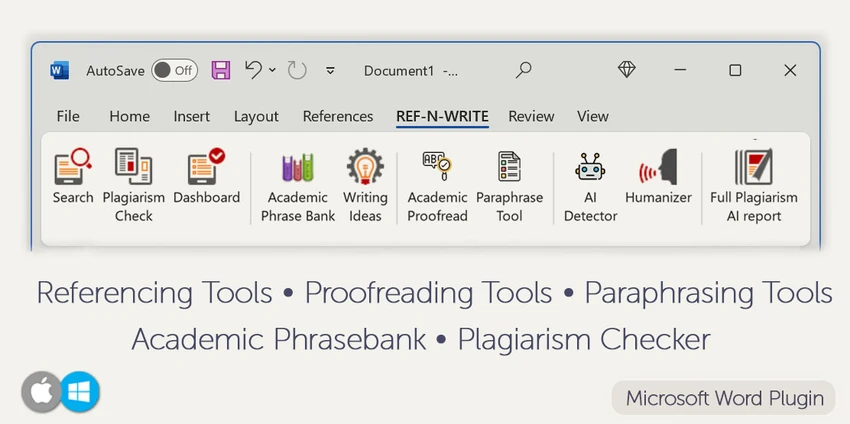
REF-N-WRITE is a Microsoft Word add-in created to help students, researchers, and academics write better English documents directly inside Microsoft Word. After using the software, I found its biggest advantage is keeping useful writing resources available while drafting, allowing me to search previous documents, reference existing content, and discover academic phrases without leaving Word. The software focuses on imitation learning by encouraging users to learn from well-written examples and previously written materials. It also combines paraphrasing, rewording, plagiarism checking, and cross-referencing tools into a single workspace, making it particularly useful for research papers, dissertations, journal articles, and other academic documents.

Key Features of REF-N-WRITE

  • Search and cross-reference previous documents while writing
  • Extensive academic phrase bank
  • Paraphrasing tool for academic writing
  • Rewording tool
  • Writing ideas generator
  • Plagiarism checker, including self-plagiarism detection
  • Import reference materials for easier cross-referencing
  • Reuse previous writing content
  • Works as a Microsoft Word add-in
  • Supports Microsoft Word 2013, 2016, 2019, 2021, and Microsoft 365
  • Compatible with Windows 10 and Windows 11

Interface and Usability

REF-N-WRITE integrates directly into Microsoft Word, making it easy to access while writing without switching between multiple applications. Since it functions as a Word add-in, the workflow feels familiar for anyone already comfortable with Microsoft Word. Searching previous documents, accessing academic phrases, and using writing assistance tools can all be done from within the writing environment. Because the software builds on Word rather than replacing it, the learning curve is relatively approachable for students and researchers who regularly write academic documents

Who Should Use REF-N-WRITE?

  • PhD students
  • Master's students
  • Academic researchers
  • Postdoctoral researchers
  • University lecturers
  • Scientific paper authors
  • Non-native English speakers
  • Anyone writing academic essays, dissertations, or research papers in Microsoft Word

Conclusion

REF-N-WRITE is a practical writing companion for academic users who spend most of their time in Microsoft Word. Instead of replacing your writing process, it enhances it by providing quick access to academic phrases, previous documents, paraphrasing tools, and plagiarism checking from one workspace. Its emphasis on improving academic English makes it especially valuable for non-native English speakers and researchers preparing papers or dissertations. If your work involves frequent academic writing in Microsoft Word, REF-N-WRITE is worth considering as a productivity tool to streamline drafting and improve writing quality.

Pros & Cons

✓

Pros

  • Seamlessly integrates with Microsoft Word for an uninterrupted writing workflow.
  • Includes a comprehensive academic phrase bank for formal and scholarly writing.
  • Lets you search and cross-reference previous documents while writing.
  • Offers built-in paraphrasing and rewording tools to improve academic writing.
  • Includes plagiarism and self-plagiarism checking.
  • Well suited for research papers, dissertations, scientific articles, and academic essays.
  • Helps non-native English speakers write in a more natural academic style.
✕

Cons

  • Requires the desktop version of Microsoft Word.
  • Not a standalone writing application.

Frequently Asked Questions

What is REF-N-WRITE used for?

REF-N-WRITE is a Microsoft Word add-in designed to help users improve academic writing. It provides tools for paraphrasing, rewording, searching previous documents, accessing academic phrases, and checking for plagiarism while writing research papers, essays, and theses.

Does REF-N-WRITE work with Microsoft Word?

Yes. REF-N-WRITE is specifically built as a Microsoft Word add-in and supports Microsoft Word 2013, 2016, 2019, 2021, and Microsoft 365 desktop versions.

Who is REF-N-WRITE designed for?

The software is intended for students, researchers, academics, PostDocs, and non-native English speakers who need assistance writing academic documents such as journal articles, dissertations, scientific papers, and theses.

Can REF-N-WRITE help with paraphrasing?

Yes. REF-N-WRITE includes both paraphrasing and rewording tools that help users rewrite content into a more academically appropriate style while maintaining the intended meaning.

Does REF-N-WRITE include plagiarism checking?

Yes. The software includes plagiarism checking features, including self-plagiarism detection, helping writers identify reused content and reduce the risk of academic misconduct.

What are the system requirements for REF-N-WRITE?

REF-N-WRITE requires Windows 10 or Windows 11 and the desktop version of Microsoft Word included with Microsoft Office or Microsoft 365. Supported Word versions include 2013, 2016, 2019, 2021, and Microsoft 365.

Recommended apps [Freeware]:
  • WSCC - Windows System Control Center 10.0.4.0 WSCC - Windows System Control Center logo Windows utility manager that installs, organizes, and runs Sysinternals and system tools from one central interface
  • Daum PotPlayer 1.7.22979 Daum PotPlayer logo a free media player for Windows with broad format support, built-in codecs, subtitles, and customization
  • SQLite 3.53.3 SQLite logo compact, reliable embedded SQL database engine with zero configuration and serverless design
  • Kalmuri 4.2.5 Kalmuri logo screen capture and recording tool that supports screenshots, MP4 recording, and multiple export formats with hotkey support
  • VirtualDJ 2026 Build 9482 VirtualDJ logo mix music, video, and karaoke with AI stems, controllers, streaming, and pro DJ tools
  • Duplicate & Same Files Searcher 10.8.2 Duplicate & Same Files Searcher logo finds duplicate files, detects NTFS links, and helps manage storage with advanced file tools
Recommended apps [Shareware]:
  • SkyDemon 4.3.1 SkyDemon logo Plan flights with real-time aeronautical data, dynamic charts, NOTAMs, METAR, TAF, and intelligent route planning using SkyDemon
  • HTML Compiler 2026.7 HTML Compiler logo convert HTML apps into secure Windows executables using Chromium-based runtime
  • Fast Video Cutter Joiner 7.1.4.0 Fast Video Cutter Joiner logo a lightweight video editing tool for quickly cutting, trimming, and joining videos
  • Vehicle Manager 4.10.2000.1 Vehicle Manager logo tracks vehicle maintenance, expenses, fuel usage, parts, and fleet data
  • Actual File Folders 1.15.5 Actual File Folders logo Speed up folder navigation and access frequently used locations faster with a Windows tool designed for file dialogs.
  • Cisdem Duplicate Finder 5.0.0 Cisdem Duplicate Finder logo Find duplicate files and similar images with high accuracy, organize scan results, and safely remove unnecessary files to free up storage.