


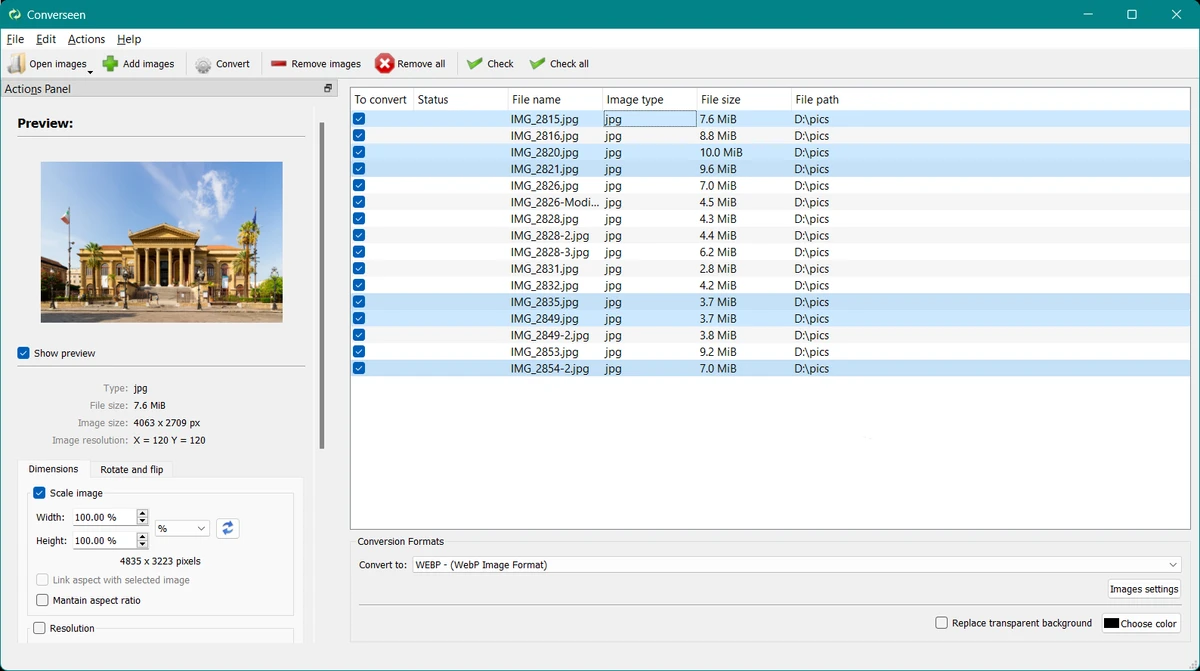

Converseen is a free cross-platform batch image processing application designed to help users convert, resize, rotate, and manage large numbers of images quickly. Available for Windows, Linux, macOS, FreeBSD, and other operating systems, the software provides a simple way to process multiple image files at the same time instead of editing each image individually. The application is powered by ImageMagick, a widely used image manipulation library, allowing Converseen to support more than 100 image formats. Supported formats include popular options such as JPEG, PNG, GIF, TIFF, SVG, WebP, HEIC/HEIF, JPEG-2000, DPX, and EXR, along with many other image types.
Converseen is designed for users who need efficient batch processing. With a single workflow, users can convert multiple images, adjust their size, change resolution, rotate or flip files, and rename groups of images. The software also provides options for compressing images for web use and selecting resampling filters when resizing.
Beyond standard image conversion, Converseen includes additional features such as converting complete PDF documents into image files and extracting images from Windows icon files. Users can control output settings including image format, dimensions, resolution, and filenames. With its combination of broad format support, batch processing capabilities, and free availability, Converseen offers a practical solution for users who frequently work with large collections of images.
Features of Converseen
- Convert multiple images at the same time
- Resize one or many images in a batch process
- Support for more than 100 image formats
- Convert PDF documents into image files
- Rotate and flip images
- Compress images for web pages
- Rename multiple images using numbering or prefixes/suffixes
- Adjust image size, resolution, and filename settings
- Select resampling filters for image resizing
- Extract images from Windows icon files
- Available for Windows, Linux, macOS, FreeBSD, and other systems
Interface and Usability
Converseen focuses on making batch image processing accessible through a straightforward interface. Instead of handling images one by one, users can add multiple files and apply conversion or editing actions across the entire selection.
The workflow is practical for common tasks such as changing image formats, resizing collections of photos, or preparing images for websites. The ability to adjust output settings such as resolution, dimensions, and file names provides useful control over the final results. The software’s support for many image formats makes it flexible for different workflows, while its batch processing approach helps save time when managing large numbers of files.
Because Converseen offers a wide range of conversion options, new users may need some time to become familiar with all available settings. However, the main functions are designed to be accessible for everyday image processing tasks.
Who Should Use Converseen?
- Photographers managing large image collections
- Web designers preparing images for websites
- Content creators working with different image formats
- Users converting PDFs into image files
- Professionals who need batch image processing tools
- Linux and cross-platform users looking for free image software
Conclusion
Converseen is a useful free image processing tool for anyone who needs to convert, resize, or manage multiple images efficiently. Its batch processing features, broad format support, and cross-platform availability make it a practical choice for photographers, designers, and everyday users.
The combination of ImageMagick support and simple processing tools gives Converseen the flexibility to handle many common image tasks without requiring separate applications. If you need a free tool for batch image conversion and editing, Converseen is worth trying.


