Argente Malware Cleaner logo

Argente Malware Cleaner 3.0.8.4

  • User Rating:
    ★★★★★
    ★★★★★
    0.0 ★ 0Votes
  • Requirements:
    Windows
  • Version: 3.0.8.4
  • Latest updated: 2 weeks ago
  • License: Freemium  
  • Publisher: Argente
  • Size: 54 MB
× app stores

Argente Malware Cleaner is a lightweight, on-demand malware scanning utility included with the Argente Utilities suite. Rather than replacing a traditional antivirus program, it serves as a complementary security tool that helps detect and remove potentially harmful files from critical areas of your system. After using it, I found its straightforward approach particularly appealing for quick malware checks without unnecessary complexity. With multiple scan modes, customizable scanning options, and a built-in Restore Center for creating system restore points, Argente Malware Cleaner offers a practical way to perform additional security scans whenever needed.

Features of Argente Malware Cleaner

  • On-demand malware scanning for Windows systems
  • Detects and removes potentially harmful files
  • Scans critical system areas commonly targeted by malware
  • Three scanning modes, including a customizable option
  • Simple Scan focuses on memory and startup files
  • Custom Scan allows selection of memory, startup items, critical system files, and the C drive
  • Displays real-time scan statistics and detection results
  • Restore Center for creating system restore points
  • Easy one-click scan initiation
  • Designed to complement existing antivirus software

Interface and Usability

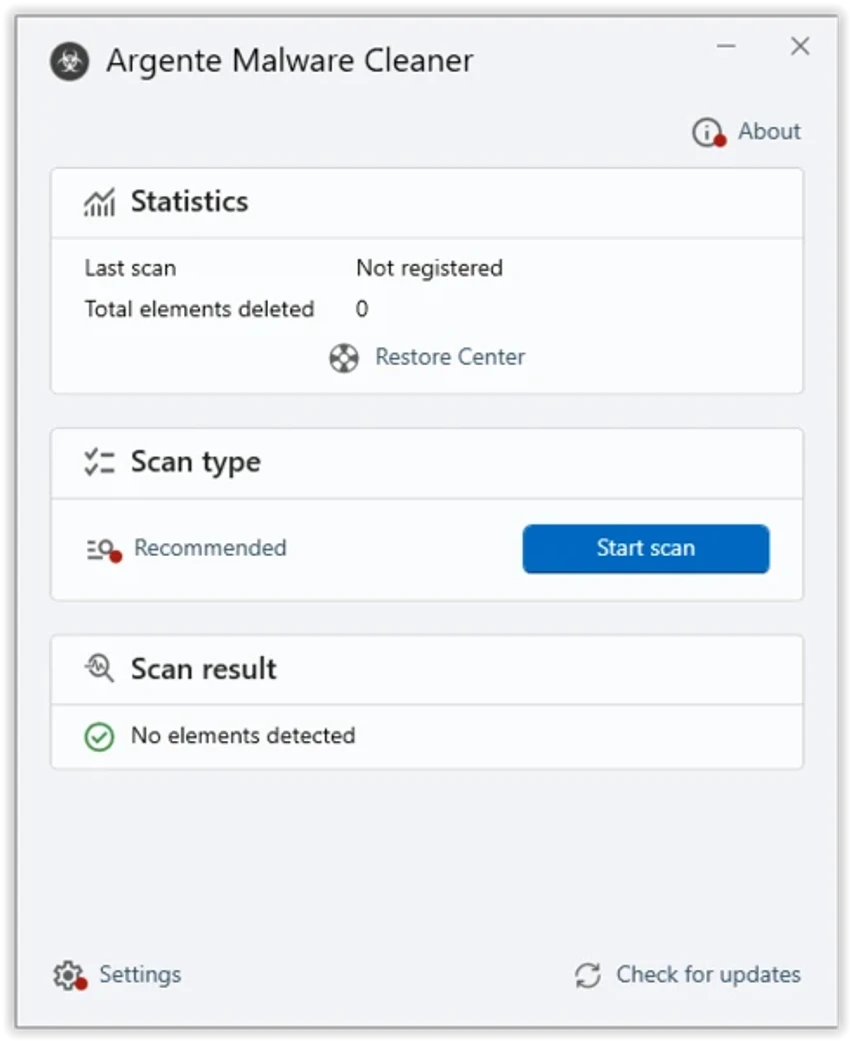
Argente Malware Cleaner features a clean and uncomplicated interface that makes starting a scan as simple as clicking a button. During testing, scan progress is clearly displayed with statistics showing the number of scanned items and detected threats, making it easy to monitor the process. The available scan modes are logically organized, allowing both quick checks and more targeted inspections depending on your needs. The inclusion of the Restore Center also provides additional confidence before making changes to the system.

Who Should Use Argente Malware Cleaner?

  • Users who want a second-opinion malware scanner
  • Windows users seeking an additional security layer
  • Anyone looking for a lightweight malware removal utility
  • Users who already have antivirus software installed
  • Individuals troubleshooting suspected malware infections
  • Users who prefer simple, on-demand security tools

Conclusion

Argente Malware Cleaner is a practical choice for users who want an additional layer of malware detection alongside their primary antivirus software. Its simple interface, flexible scan modes, and Restore Center make it suitable for routine security checks or investigating suspicious system behavior. If you're looking for a lightweight on-demand malware scanner rather than a complete security suite, Argente Malware Cleaner is a worthwhile addition to your Windows security toolkit.

Pros & Cons

✓

Pros

  • Lightweight and easy to use
  • Effective on-demand malware detection
  • Multiple scanning modes
  • Customizable scan targets
  • Built-in Restore Center for creating restore points
  • Complements existing antivirus software
  • Clear scan progress and detection statistics
✕

Cons

  • Does not provide real-time protection
  • Not intended to replace a full antivirus solution
  • Focuses primarily on on-demand malware detection

Frequently Asked Questions

What is Argente Malware Cleaner used for?

Argente Malware Cleaner is an on-demand security tool designed to scan your computer for malware and remove potentially harmful files. It focuses on critical system areas that are commonly targeted by malicious software.

Does Argente Malware Cleaner replace antivirus software?

No. Argente Malware Cleaner is not intended to replace a full antivirus solution. It works as a complementary scanner that provides additional malware detection when needed.

What scan modes are available?

The application offers three scan modes, including a Simple Scan for memory and startup files, more comprehensive scanning options, and a Custom Scan that lets you choose specific areas such as memory, startup items, critical system files, and the C drive.

Can I create a restore point before removing threats?

Yes. Argente Malware Cleaner includes a Restore Center that allows you to create a system restore point before making changes, making it easier to recover your system if necessary.

Does Argente Malware Cleaner provide real-time protection?

No. It performs scans only when you manually start them and does not continuously monitor your system for threats.

Who should use Argente Malware Cleaner?

It is best suited for users who already have antivirus software installed and want an additional on-demand scanner to detect malware that may have been missed during routine security checks.

Recommended apps [Freeware]:
  • FastCopy 5.11.3 FastCopy logo a lightweight Windows tool for ultra-fast file copying, syncing, and error-resilient data transfer
  • Power-user 1.7.85.410 Power-user logo Office add-in offering templates, icons, charts, maps, and diagrams to boost productivity in PowerPoint, Excel, and Word
  • Opera GX 133.0.5932.56 Opera GX logo Chromium-based gaming browser featuring CPU, RAM, and network limiters, built-in VPN, ad blocker, and gaming integrations.
  • R-Photo 2.0.180048 R-Photo logo Restore media from HDDs, SSDs, SD cards, USB drives, RAID, and more
  • HFS: HTTP File Server 3.2.1 HFS: HTTP File Server logo Share files over the internet with HFS HTTP File Server. Easy setup, bandwidth control, virtual file system, and user management
  • Syncthing 2.1.2 Syncthing logo Sync files securely between devices with decentralized peer-to-peer sharing, TLS encryption, and full control over your data.
Recommended apps [Shareware]:
  • DP Animation Maker 3.5.51 DP Animation Maker logo a simple Windows tool for creating animated images, GIFs, and videos with effects, objects, and music.
  • TubeDownload Pro 7.5.7 TubeDownload Pro logo a Windows video downloader that supports HD downloads, playlists, speed boosts, and format conversion
  • R-Studio 9.5 Build 191810 R-Studio logo powerful data recovery software for recovering deleted, formatted, or damaged files across multiple file systems
  • EmEditor 26.2.0 EmEditor logo a fast Windows code editor with large file support, syntax highlighting, regex search, and powerful editing tools
  • Google Satellite Maps Downloader 8.419 Google Satellite Maps Downloader logo downloads satellite map tiles from Google Maps for offline viewing, GIS projects, and map export
  • Actual Window Minimizer 8.15.4 Actual Window Minimizer logo adds minimize-to-tray functionality to Windows, letting you hide applications in the system tray with one click