CudaText logo

CudaText 1.234.6.0

  • User Rating:
    ★★★★★
    ★★★★★
    0.0 0Votes
  • Requirements:
    Windows
  • Version: 1.234.6.0
  • Latest updated: 2 weeks ago
  • License: Open Source  
  • Publisher: CudaText
  • Size: 12 MB
× app stores

CudaText is a lightweight, cross-platform text and source code editor designed for developers who work with multiple programming languages and coding projects. Built with Lazarus, the application provides a fast editing environment with support for a wide range of programming and markup languages.

The software includes syntax highlighting support for many commonly used languages such as C++, JavaScript, CSS, Python, C, Java, HTML, PHP, and XML. It supports more than 160 lexers from SynWrite, allowing developers to work with different file types while maintaining readable code formatting.

CudaText focuses on providing useful developer features while keeping the application lightweight. It includes tools such as code folding, code structure views, multiple selections, split views, command panels, minimaps, and customizable keyboard shortcuts. These features help users manage larger files and multiple coding tasks more efficiently. The editor also supports plugins written in Python, allowing users to extend its functionality according to their workflow. Additional features such as regular expression search and replace, JSON-based configuration, automatic completion, and multiple encoding support provide flexibility for different development environments.

With its combination of speed, customization options, and broad language support, CudaText is designed for developers who need a practical source code editor without the heavier resource requirements of a full integrated development environment.

Features of CudaText

  • Lightweight cross-platform code and text editor
  • Syntax highlighting for many programming languages
  • Support for more than 160 lexers
  • Code tree structure navigation
  • Multiple selections for editing
  • Python-based plugin support
  • Tabbed user interface
  • Split editing views
  • Command palette
  • Code folding
  • Minimap display
  • Custom keyboard shortcuts
  • Regular expression search and replace
  • JSON-based configuration options
  • Automatic completion for HTML and CSS
  • HTML tag support with Tab key shortcuts
  • HTML color code highlighting
  • Image viewing support for PNG, BMP, JPEG, GIF, and ICO formats

Interface and Usability

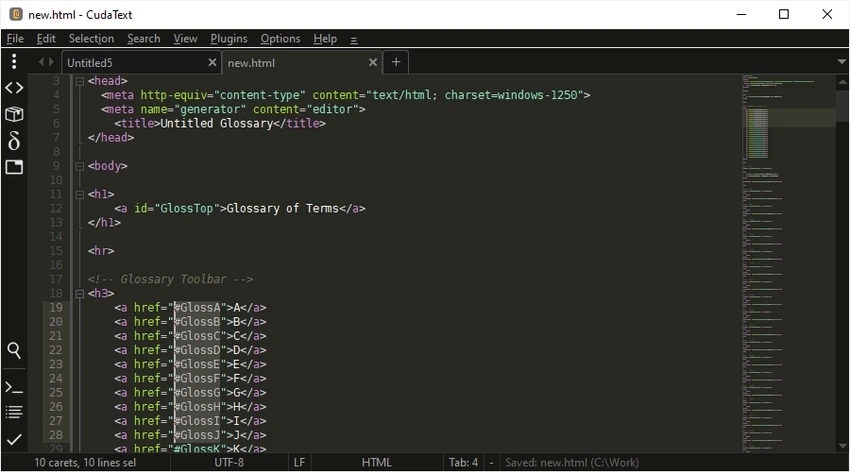
CudaText provides a clean editing environment focused on coding productivity. The interface includes common editor features such as tabs, split views, line numbering, and customizable panels, making it suitable for working with multiple files and projects. The syntax highlighting system helps improve code readability across different programming languages, while features like code folding and minimap navigation make it easier to handle larger files.

The editor also provides customization options through settings and plugins. Developers who prefer a personalized workflow can adjust shortcuts, add extensions, and configure the editor according to their needs. Because CudaText focuses on editing rather than providing a complete development environment with built-in debugging tools, it works best for users who already have a preferred development workflow.

Who Should Use CudaText?

  • Software developers working with multiple programming languages
  • Web developers editing HTML, CSS, and JavaScript
  • Programmers looking for a lightweight editor
  • Users who prefer customizable coding tools
  • Developers managing multiple source files and projects

Conclusion

CudaText is a capable source code editor that combines a lightweight design with a strong collection of developer-focused features. Its support for many programming languages, syntax highlighting options, plugins, and customizable interface make it a practical choice for users who want a flexible editing environment.

Pros & Cons

Pros

  • Lightweight and fast performance
  • Supports many programming languages
  • Includes extensive syntax highlighting support
  • Provides useful code editing features
  • Supports plugins and customization options

Cons

  • Requires some coding knowledge to use effectively
  • Does not provide the full feature set of a complete IDE

Frequently Asked Questions

What is CudaText used for?

CudaText is used for editing text files and source code. It supports many programming languages and provides features designed for developers, including syntax highlighting and code navigation tools.

Which programming languages does CudaText support?

CudaText supports many languages, including C++, JavaScript, CSS, Python, C, Java, HTML, PHP, and XML. It also supports more than 160 lexers.

Does CudaText support plugins?

Yes. CudaText supports plugins written in Python, allowing users to extend the editor’s functionality.

Is CudaText an IDE?

CudaText is primarily a code and text editor rather than a full IDE. It focuses on editing features, syntax support, and customization rather than providing a complete development environment.

Can CudaText edit HTML and CSS files?

Yes. CudaText includes HTML and CSS editing features such as automatic completion, HTML tag support, and color code highlighting.

Is CudaText suitable for beginners?

CudaText can be used by beginners learning programming, but users will benefit from having basic coding knowledge to take advantage of its developer-focused features.

Recommended apps [Freeware]:
  • FluentTweaker 26.06.02 FluentTweaker logo a Windows utility for safe, reversible system tweaks focused on UI, privacy, and performance control.
  • Tixati 3.43 Tixati logo a fast, ad-free BitTorrent client offering advanced peer control, bandwidth management, and detailed swarm analysis
  • AIMP 5.40.2722 AIMP logo a lightweight audio player with high-quality sound, playlist tools, equalizer, and audio conversion features
  • StarDesk 1.4.1 StarDesk logo remote desktop solution offering low-latency connections, file transfer, remote assistance, Quick Launch, and remote device management.
  • Advanced Trigonometry Calculator 2.1.7 Advanced Trigonometry Calculator logo Solve advanced trigonometry, scientific notation, complex numbers, and equations with Advanced Trigonometry Calculator
  • Mypal 78.0.3 Mypal logo Lightweight browser built for Windows XP, offering secure browsing, Firefox-based compatibility, and a familiar interface.
Recommended apps [Shareware]:
  • Roboform 9.9.8.0 Roboform logo a secure password manager using AES-256 encryption, autofill, and cross-device sync for safer login management
  • BootIt Bare Metal 2.12 BootIt Bare Metal logo combines partition management, multi-boot support, and disk imaging into one powerful tool for Windows users
  • FastKeys 6.07 FastKeys logo Windows automation tool for shortcuts, text expansion, mouse gestures, macros, and workflow automation
  • Artweaver Plus 8.1.6.4131 Artweaver Plus logo a digital painting tool with realistic brushes, layers, and teamwork features for artists
  • Actual File Folders 1.15.5 Actual File Folders logo Speed up folder navigation and access frequently used locations faster with a Windows tool designed for file dialogs.
  • SecureCRT 9.7.3 Build 3916 SecureCRT logo Secure remote connections with SSH, Telnet, scripting, session management, and secure file transfer tools for professionals.