XRecode logo

XRecode 3 v1.184

  • User Rating:
    ★★★★★
    ★★★★★
    0.0 0Votes
  • Requirements:
    Windows
  • Version: 3 v1.184
  • Latest updated: 1 week ago
  • License: Freeware  
  • Publisher: Xrecode
  • Size: 35 MB
× app stores

XRECODE3 is a feature-rich audio conversion and extraction tool designed for Windows users who need support for a wide range of audio formats. It also handles audio extraction from video files and offers CD ripping capabilities, making it a versatile solution for managing audio files.

Overview of XRECODE3

XRECODE3 focuses on simplifying audio conversion tasks while maintaining broad format compatibility. It supports popular formats such as MP3, FLAC, WAV, AAC, OGG, and many more, as well as less common codecs and container formats. Beyond basic conversion, it also allows users to extract audio from video files and rip Audio CDs. The software supports multi-core processing for faster conversions and includes command-line support for advanced workflows.

Features of XRECODE3

  • Supports a wide range of audio formats including MP3, FLAC, WAV, AAC, OGG, and more
  • Converts audio files between multiple formats efficiently
  • Extracts audio from video files such as MP4, MKV, AVI, FLV, and others
  • CD ripping functionality for audio discs
  • Multi-core CPU support for faster batch conversions
  • Built-in metadata editor with cover art support
  • CUE sheet support for splitting and organizing audio tracks
  • Ability to merge multiple audio files into a single output with CUE generation
  • Command-line parameter support for advanced users
  • Portable mode support for flexible usage

User Experience

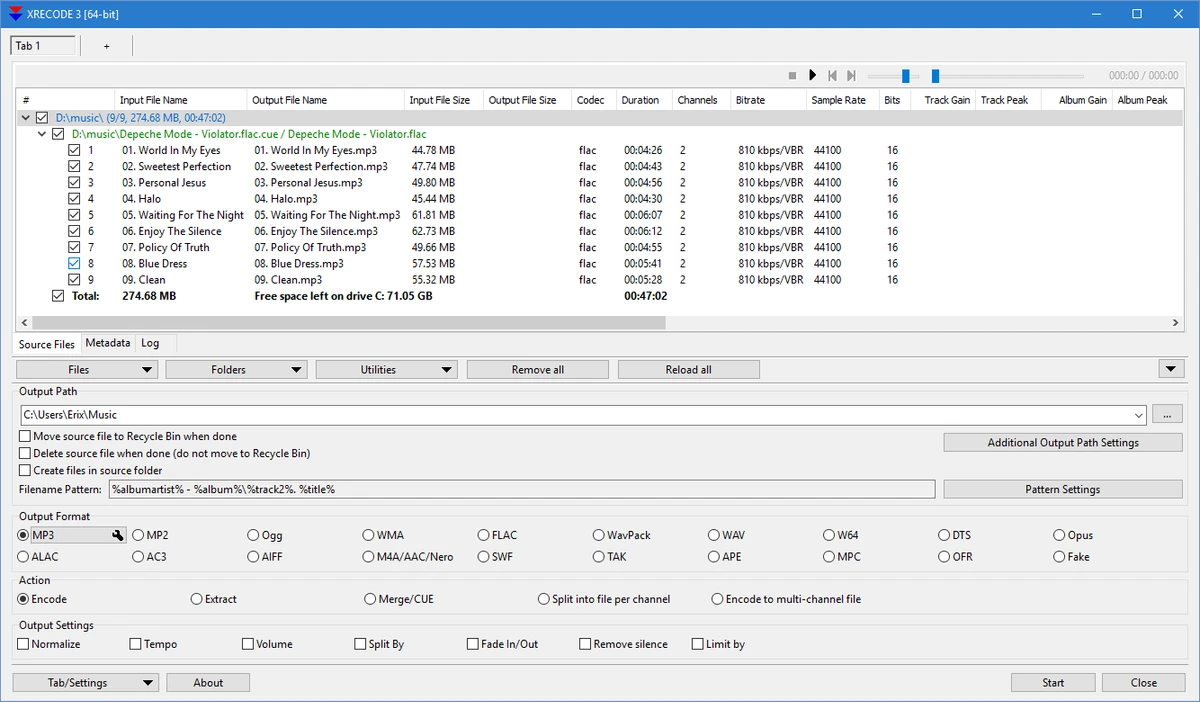
In practical use, XRECODE3 feels like a tool built for efficiency and batch processing. The interface is straightforward, focusing more on functionality than visual design. Users handling large music libraries will appreciate its ability to process multiple files simultaneously using multi-core CPU support. The inclusion of metadata editing and CUE support also helps keep audio collections well organized. Its command-line compatibility makes it suitable for advanced users or automation workflows, while still remaining accessible for everyday conversion tasks.

Who Should Use XRECODE3?

  • Users who frequently convert audio files between formats
  • Music collectors managing large audio libraries
  • Professionals needing CD ripping and audio extraction tools
  • Advanced users who prefer command-line automation
  • Anyone working with mixed media formats (audio + video extraction)

Conclusion

XRECODE3 is a powerful and practical audio conversion tool for Windows users who need broad format support and efficient batch processing. While its interface is not the most modern, its performance and feature set make it a reliable choice for both casual and advanced audio management tasks.

Pros & Cons

Pros

  • Wide format support for audio conversion
  • Efficient batch processing with multi-core support
  • CD ripping and video audio extraction included
  • Built-in metadata and cover art editing
  • Command-line support for advanced workflows

Cons

  • Windows-only software
  • Interface is functional but not modern or visually polished
  • Advanced features may feel complex for beginners

Frequently Asked Questions

What is XRECODE3 used for?

XRECODE3 is used to convert audio files between formats, extract audio from videos, and rip audio CDs.

Does XRECODE3 support video audio extraction?

Yes, it can extract audio from common video formats such as MP4, MKV, AVI, and FLV.

Can XRECODE3 handle batch conversion?

Yes, it supports multi-file batch processing using multi-core CPU optimization.

Is XRECODE3 suitable for beginners?

It is usable by beginners, but some features like command-line support are better suited for advanced users.

Recommended apps [Freeware]:
  • StaxRip 2.52.4 StaxRip logo powerful Windows GUI for video/audio encoding using FFmpeg, x265, AviSynth+, VapourSynth, and more.
  • Mozilla Firefox 152.0.3 Mozilla Firefox logo Browse the web securely and quickly with Mozilla Firefox, a customizable browser with strong privacy and add-on support
  • Digital Clock 5.2.2 Digital Clock logo customizable desktop clock app with skins, alarms, opacity control, and system tray support
  • Recuva 1.55.133 Recuva logo recover deleted files from PCs, USB drives, memory cards, and damaged or formatted disks
  • Subtitle Edit 5.0.0 Subtitle Edit logo a free subtitle editor for creating, syncing, translating, and fixing subtitles on Windows
  • F-Secure Uninstallation Tool 19.3.15 F-Secure Uninstallation Tool logo completely removes F-Secure security products, including files, services, and registry entries from Windows
Recommended apps [Shareware]:
  • Quick Heal AntiVirus Pro 26.1.0.2 Quick Heal AntiVirus Pro logo real-time malware protection, ransomware defense, and email security
  • Remote Desktop Manager 2026.2.9.0 Remote Desktop Manager logo manage RDP, SSH, VNC, and virtual machines from one secure centralized platform
  • ExamDiff Pro 17.0.1.4 ExamDiff Pro logo a Windows file comparison tool for code review, folder sync, and document diffing with merge support.
  • ThunderSoft Watermark Remover 6.3.0 ThunderSoft Watermark Remover logo removes watermarks, logos, and unwanted objects with easy selection and photo editing tools
  • Allavsoft 3.29.3.9669 Allavsoft logo video downloader and converter for batch downloads, HD quality, and audio extraction on Windows.
  • Coolutils PDF Splitter 5.2.0.43 Coolutils PDF Splitter logo split PDF files into individual pages, custom page ranges, or chapters defined by bookmarks