DXVA Checker logo

DXVA Checker 4.8.0

  • User Rating:
    ★★★★★
    ★★★★★
    0.0 ★ 0Votes
  • Requirements:
    Windows
  • Version: 4.8.0
  • Latest updated: 2 weeks ago
  • License: Freeware  
  • Publisher: Bluesky Software
  • Size: 3 MB
× app stores

DXVA Checker is a Windows utility designed to analyze and verify hardware video acceleration capabilities through DXVA (DirectX Video Acceleration). The software provides detailed information about decoder devices, processor devices, supported video acceleration modes, and the compatibility of installed video decoders.

The application is mainly intended for users who need to inspect how their system handles hardware-assisted video decoding. It can display information about decoder devices and processor devices using DXVA1, DXVA2, DXVA-HD, and Direct3D 11 technologies. DXVA Checker allows users to check whether registered DirectShow and Media Foundation decoders support DXVA acceleration for specific media files or video formats. It can also display supported DXVA modes and provide options to test video playback performance using available decoders.

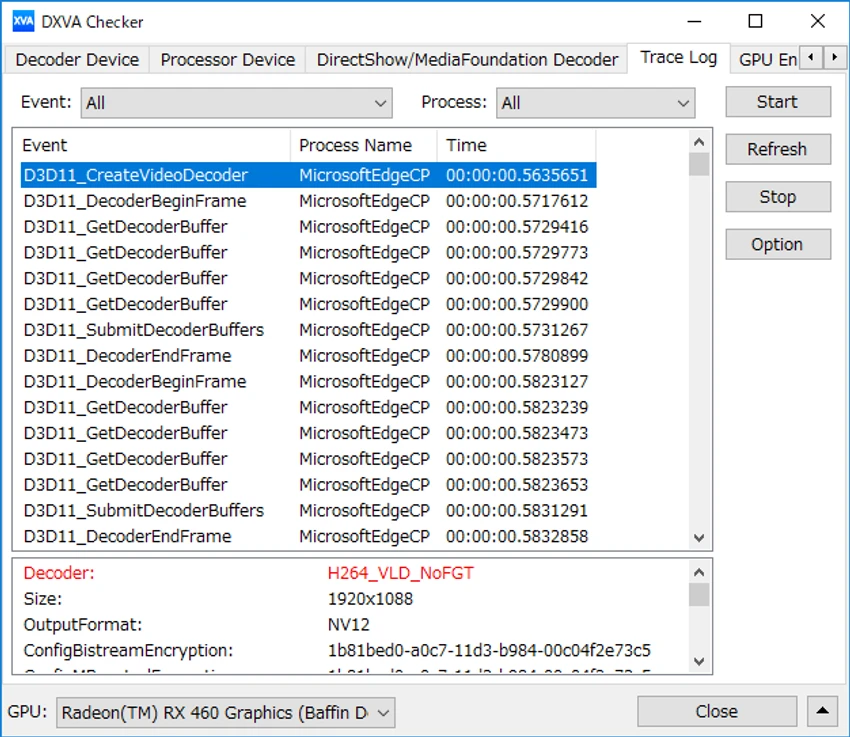
The tool includes diagnostic features for monitoring DXVA API calls through trace logs and checking GPU engine usage on Windows 10 and Windows 11. This makes it useful for identifying which GPU engines are active during video processing and understanding hardware acceleration behavior. DXVA Checker also provides information about decoder device support for graphics hardware from manufacturers including AMD, Intel, NVIDIA, and Qualcomm. It is a specialized utility designed primarily for users who want detailed technical information about their video playback hardware and decoder configuration.

Features of DXVA Checker

  • Display decoder device information
  • Show processor device information for DXVA1, DXVA2, DXVA-HD, and Direct3D 11
  • Check DirectShow decoder DXVA compatibility
  • Check Media Foundation decoder DXVA compatibility
  • Display supported DXVA modes
  • Test video playback using selected decoders
  • Measure CPU and DXVA decoding performance
  • Modify DXVA settings for supported decoders
  • Monitor DXVA API calls through trace logs
  • Display GPU engine usage on Windows 10 and Windows 11
  • Provide GPU device support information
  • Supports AMD, Intel, NVIDIA, and Qualcomm GPUs

Interface and Usability

DXVA Checker is designed as a technical diagnostic tool rather than a general media application. Its interface focuses on presenting detailed hardware and decoder information, making it useful for users who want to understand how video acceleration works on their system.

The application organizes information around decoder devices, processor devices, and system components. Users can examine whether specific decoders support DXVA and identify available acceleration modes for different video formats. The tool is particularly valuable when troubleshooting video playback performance or checking whether a system is using hardware decoding correctly. However, because it provides detailed technical information, it is better suited for advanced users, developers, and enthusiasts familiar with video codecs and GPU acceleration.

Who Should Use DXVA Checker?

  • Video playback enthusiasts
  • Users troubleshooting hardware acceleration issues
  • Developers working with DirectShow or Media Foundation
  • Users testing GPU video decoding capabilities
  • System administrators analyzing multimedia performance
  • Anyone who needs detailed information about DXVA support

Conclusion

DXVA Checker is a specialized diagnostic application for examining hardware video acceleration on Windows systems. Its ability to inspect DXVA support, analyze decoders, monitor GPU usage, and test decoding performance makes it a useful tool for technical users who need detailed playback information.

Pros & Cons

✓

Pros

  • Provides detailed DXVA and decoder information
  • Supports multiple hardware acceleration technologies
  • Checks DirectShow and Media Foundation decoder compatibility
  • Includes GPU usage monitoring
  • Useful for troubleshooting video playback issues
  • Supports major GPU manufacturers
✕

Cons

  • Designed mainly for advanced users
  • Technical information may be difficult for beginners to interpret
  • Not intended as a general-purpose media player

Frequently Asked Questions

What is DXVA Checker used for?

DXVA Checker is used to analyze hardware video acceleration support on Windows. It helps users check decoder devices, DXVA compatibility, and GPU-based video processing capabilities.

What does DXVA mean?

DXVA stands for DirectX Video Acceleration. It is a Windows technology that allows compatible graphics hardware to assist with video decoding and processing.

Can DXVA Checker test video decoder performance?

Yes. DXVA Checker can play videos using selected decoders and measure CPU-based or DXVA-based decoding performance.

Does DXVA Checker support modern GPUs?

Yes. The tool provides device information and support status for AMD, Intel, NVIDIA, and Qualcomm GPUs.

Can DXVA Checker check DirectShow and Media Foundation decoders?

Yes. The application can analyze registered DirectShow and Media Foundation decoders to determine DXVA compatibility and supported acceleration modes.

Is DXVA Checker suitable for beginners?

DXVA Checker is mainly designed for advanced users who need technical information about video acceleration, codecs, and decoder behavior. Beginners may find some of the displayed information difficult to interpret.

Recommended apps [Freeware]:
  • AnyDesk 9.7.10 AnyDesk logo fast remote desktop access with secure connections, file sharing, and remote support for Windows users
  • Avast Free Antivirus 26.6.11050 Avast Free Antivirus logo real-time malware protection, phishing defense, and scam detection with minimal impact on Windows performance
  • FreeFileSync 14.10 FreeFileSync logo open-source tool for folder synchronization, file comparison, and efficient backups
  • Textadept 13.0 Textadept logo Write and edit code efficiently with Textadept, a lightweight, portable, and customizable cross-platform text editor
  • CustomFolder 4.0.0 CustomFolder logo customize folder icons with colors, emblems, and styles for better organization and visibility
  • MiTeC Certificate Information 1.5.0 MiTeC Certificate Information logo Inspect digital certificates and file properties with a lightweight utility that supports executable, installer, and certificate file formats.
Recommended apps [Shareware]:
  • HWMonitor Pro 1.58 HWMonitor Pro logo extends HWMonitor with remote monitoring, logging graphs, and improved sensor interface tools.
  • Roboform 9.9.8.0 Roboform logo a secure password manager using AES-256 encryption, autofill, and cross-device sync for safer login management
  • Yamicsoft Windows Manager 2.3.9 Yamicsoft Windows Manager logo optimizes, cleans, secures, and customizes Windows 10 and 11 with over 40 tools.
  • F-Rename 3.001 F-Rename logo Rename multiple files in seconds with F-Rename using custom patterns, dates, numbers, and MP3 metadata on Windows
  • String-O-Matic 36.0 String-O-Matic logo advanced search and replace across multiple files, supporting regex, Unicode, and bulk file renaming for Windows users
  • Actual Window Guard 8.15.4 Actual Window Guard logo organizes windows, manages positioning, sizing, and rules to improve productivity on Windows desktops