RadioCaster logo

RadioCaster 3.7.2.0

  • User Rating:
    ★★★★★
    ★★★★★
    0.0 0Votes
  • Requirements:
    Windows
  • Version: 3.7.2.0
  • Latest updated: 1 day ago
  • License: Free Trial  
  • Publisher: DJSoft
  • Size: 12.3 MB
×

RadioCaster is a Windows-based audio broadcasting program designed to stream any sound source from your computer or external devices directly to online radio servers. It enables users to take analog inputs, system playback audio, or existing streams and broadcast them globally with minimal setup. Built for simplicity and flexibility, it focuses on turning almost any audio source into a live internet radio stream while offering control over formats, encoding, and listener tracking.

Overview

RadioCaster acts as a bridge between local audio sources and online streaming platforms. Whether you're working with traditional analog inputs, system audio, or existing internet radio feeds, the software allows you to broadcast them in real time. It supports major streaming protocols such as Icecast and Shoutcast, making it compatible with a wide range of radio hosting environments. At the same time, it includes built-in tools for audio processing and streaming management, giving users more control over how their broadcast sounds and performs.

The software is positioned as an accessible solution for both hobbyists and semi-professional broadcasters who want a straightforward way to go live online.

Features of RadioCaster

  • Broadcast any audio from computer inputs or playback devices
  • Support for analog audio sources and system audio capture
  • Stream transcoding for network audio feeds
  • Multiple output formats: MP3, AAC+, FLAC, OGG, OPUS, WMA
  • Compatibility with Icecast 2, Shoutcast v1/v2, and Windows Media Services
  • Built-in streaming server for direct broadcasting
  • Integrated DSP tools including equalizer and compressor
  • Support for VST and Winamp DSP plugins
  • Real-time broadcasting statistics (listeners, peak listeners)
  • Simple configuration and user-friendly interface

User Experience

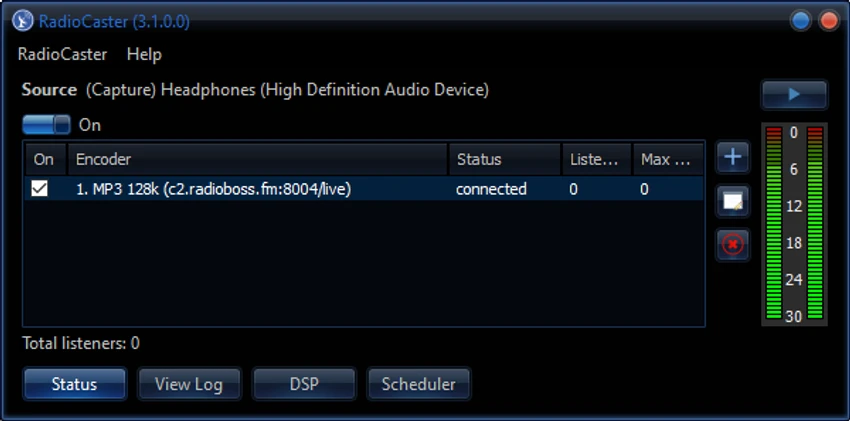
Using RadioCaster feels straightforward, especially during initial setup. The configuration process is designed to be quick, allowing users to select an audio source, choose an output format, and connect to a streaming server without deep technical steps. Once running, the interface focuses on monitoring and control rather than complexity. Users can view listener statistics in real time and adjust audio processing settings like equalization and compression when needed.

System Requirements:

  • Hardware (minimal): CPU 2 Ghz 2 cores; 1 GB RAM; 1 GB hard disk space
  • Operating System: Windows 11, Windows 10, Windows 8.1, Windows 7 (SP1+), Windows Server 2019, Windows Server 2016, Windows Server 2012 R2; 32- or 64-bits.

Conclusion

RadioCaster is a practical and flexible solution for anyone looking to stream audio online without complex setup. With broad format support, compatibility with major streaming servers, and useful built-in audio processing tools, it provides a solid foundation for online broadcasting.

Pros & Cons

Pros

    • Supports almost any audio source, including analog input
    • Wide format support for streaming (MP3, AAC+, FLAC, and more)
    • Works with major streaming servers like Icecast and Shoutcast
    • Built-in DSP tools improve audio quality
    • Simple setup and user-friendly interface

Cons

    • No provided advanced analytics beyond basic listener stats
    • Limited technical detail about advanced production workflows in the data
    • No official rating or review score included

Frequently Asked Questions

What is RadioCaster used for?

RadioCaster is used to broadcast computer or external audio sources live over the internet.

Can it stream analog audio sources?

Yes, it supports analog inputs as well as digital playback audio from your computer.

Which streaming platforms does it support?

It works with Icecast, Shoutcast v1/v2, and Windows Media Services, plus compatible servers.

Does it support audio effects?

Yes, it includes built-in DSP tools such as equalizer and compressor, along with plugin support.

Recommended apps [Freeware]:
  • IObit Driver Booster 13.4.0.234 IObit Driver Booster logo updates outdated drivers automatically to boost system stability and gaming performance.
  • EarthTime 6.33.4 EarthTime logo displays world clocks, weather, and local times for 120,000+ cities with customizable alarms and maps.
  • All in One Runtimes 2.5.0 All in One Runtimes logo Package essential Windows runtime environment packages to improve software compatibility and system stability.
  • Visual Studio Code 1.124.2 Visual Studio Code logo Free and powerful code editor from Microsoft with extensions, debugging, Git support, and multi-language development
  • NewFileTime 8.28 NewFileTime logo a lightweight Windows utility that lets users change file creation, modification, and access timestamps easily
  • Exportizer 10.3.4.822 Exportizer logo view, edit, and export databases to Excel, CSV, SQL, and more with advanced conversion tools.
Recommended apps [Shareware]:
  • Sync Breeze 18.2.32 Sync Breeze logo fast and reliable file synchronization tool for local drives, NAS devices, and enterprise storage systems.
  • DBConvert Studio 4.3.1 DBConvert Studio logo simplifies database migration and synchronization across multiple database platforms.
  • Topaz Photo 1.6.1 Topaz Photo logo advanced AI to sharpen photos, remove noise, and enhance image quality with ease
  • Send Anywhere 24.6.0 Send Anywhere logo free cross-platform file-sharing tool that transfers files of any size without registration.
  • Teorex FolderIco 9.2.2 Teorex FolderIco logo Change folder colors or icons in one click and organize your files visually, so you can find everything instantly
  • AVG Driver Updater 26.5.10990.0 AVG Driver Updater logo automatically scan and update outdated drivers to improve PC performance and stability on Windows.