Geometric Glovius logo

Geometric Glovius 6.7.0.324

  • User Rating:
    ★★★★★
    ★★★★★
    0.0 ★ 0Votes
  • Requirements:
    Windows
  • Version: 6.7.0.324
  • Latest updated: 3 weeks ago
  • License: Commercial  
  • Publisher: Geometric
  • Size: 137 MB
× app stores

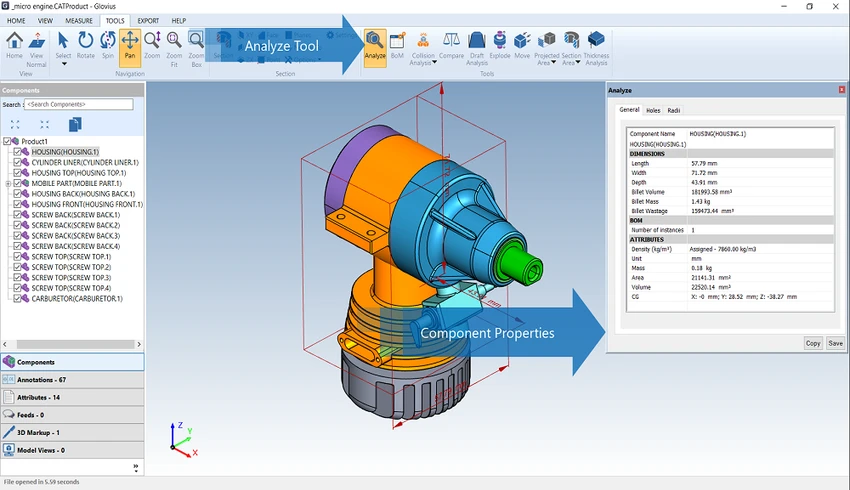
Geometric Glovius is a professional 3D CAD viewer that enables engineers, designers, manufacturers, and project teams to view, analyze, and share CAD models without requiring the original CAD application. During my evaluation, I found that its biggest strength is broad compatibility with industry-standard CAD formats while providing practical review and measurement tools in a clean, modern interface.

Rather than focusing on CAD design or modeling, Glovius is built for reviewing existing models. It supports a wide range of native and neutral CAD formats, allowing users to inspect assemblies, measure geometry, compare revisions, and export models into several widely used formats. Its combination of visualization, analysis, and collaboration features makes it useful throughout engineering, manufacturing, and product development workflows.

Features of Geometric Glovius

  • Supports viewing 3D models from numerous CAD formats, including:
    • CATIA
    • NX
    • STEP
    • IGES
    • JT
    • Pro/ENGINEER
    • Creo
    • SolidWorks
    • Inventor
    • Solid Edge
  • Modern and easy-to-use interface.
  • View complete product structures and assemblies.
  • Hide, show, move, and search individual components.
  • View, search, sort, filter, hide, and display PMI (Product Manufacturing Information).
  • Search and inspect model attributes.
  • Export Bill of Materials (BOM) tables.
  • Perform accurate:
    • Linear measurements
    • Angular measurements
    • Radial measurements
  • Create dynamic cross-sections using multiple section planes.
  • Supports section caps and outlines.
  • Compare two CAD models and visualize differences in 3D.
  • Export models to:
    • 3D PDF
    • STL
    • OBJ
    • 3DS
    • Glovius Mobile format
  • Includes a full API SDK for integration and automation.
  • Mobile applications available for iOS and Android.

Interface and Usability

One of the first things I noticed about Glovius is its clean and modern interface. Navigation is straightforward, making it easy to inspect assemblies, search components, and switch between visualization and measurement tools.

The review tools are organized logically, allowing users to measure geometry, create section views, inspect PMI, and compare models without unnecessary complexity. Whether reviewing a single part or a large assembly, the workflow remains intuitive and efficient. The availability of companion mobile apps also makes it easier to access shared models when away from a desktop workstation.

Who Should Use Geometric Glovius?

  • Mechanical engineers.
  • Product designers.
  • Manufacturing teams.
  • Quality assurance professionals.
  • Project managers reviewing engineering models.
  • Suppliers and customers who need to inspect CAD files.
  • Organizations that need a lightweight CAD viewer instead of a full CAD system.

System Requirements

  • Operating System
    • Windows 10
    • Windows 11

Conclusion

Geometric Glovius is a capable 3D CAD viewer designed for professionals who need to inspect, analyze, and share engineering models without relying on the original CAD software. Its broad format compatibility, precise measurement tools, dynamic sectioning, and model comparison capabilities make it well suited for design reviews, manufacturing, quality control, and technical collaboration.

Pros & Cons

✓

Pros

  • Supports numerous industry-standard CAD formats
  • Clean and modern interface
  • Accurate measurement tools
  • Powerful section view capabilities
  • 3D model comparison with visual difference detection
  • BOM export functionality
  • Supports PMI viewing and filtering
  • Multiple export formats, including 3D PDF and STL
  • Full API SDK available
✕

Cons

  • Intended for viewing and reviewing rather than creating or editing CAD models
  • No official release notes provided for the latest version

Frequently Asked Questions

Is Geometric Glovius a CAD design application?

No. Glovius is a 3D CAD viewer and review tool. It is intended for viewing, analyzing, measuring, and comparing CAD models rather than creating or editing them.

Which CAD file formats does Glovius support?

Glovius supports many widely used CAD formats, including CATIA, NX, STEP, IGES, JT, Pro/ENGINEER, Creo, SolidWorks, Inventor, and Solid Edge.

Can Glovius measure 3D models accurately?

Yes. It includes tools for taking precise linear, angular, and radial measurements directly from supported 3D models.

Does Glovius allow model comparison?

Yes. Users can compare two versions of a CAD model and visualize geometric differences directly within the 3D environment, making it useful for design reviews and revision tracking.

Can I export models from Glovius?

Yes. Glovius supports exporting models to several formats, including 3D PDF, STL, OBJ, 3DS, and the Glovius Mobile format.

Does Geometric Glovius include developer tools?

Yes. The software includes a full API SDK, allowing developers and organizations to integrate Glovius functionality into custom workflows and applications.

Recommended apps [Freeware]:
  • NirLauncher Package 1.30.24 NirLauncher Package logo a portable Windows utility suite with 180+ NirSoft tools for system, network, and recovery tasks
  • darktable 5.6.0 darktable logo a free open-source RAW photo editor and photography workflow tool for professional image management
  • Hasleo Disk Clone 5.8.2.1 Hasleo Disk Clone logo clone disks, migrate Windows systems, and transfer partitions with fast and reliable tools.
  • Mozilla Thunderbird 152.0.1 Mozilla Thunderbird logo secure email client with spam filtering, RSS support, and advanced tools for managing multiple accounts
  • Advanced Trigonometry Calculator 2.1.7 Advanced Trigonometry Calculator logo Solve advanced trigonometry, scientific notation, complex numbers, and equations with Advanced Trigonometry Calculator
  • Winget-AutoUpdate 2.12.0 Winget-AutoUpdate logo Automatically update Windows applications with scheduled Winget tasks, notifications, app filters, and detailed update logs.
Recommended apps [Shareware]:
  • DBConvert Studio 4.3.1 DBConvert Studio logo simplifies database migration and synchronization across multiple database platforms.
  • NOD32 Antivirus 19.2.7.0 NOD32 Antivirus logo Protect your PC with ESET NOD32 Antivirus, offering real-time malware defense, fast scans, and low system impact
  • Actual Title Buttons 8.15.4 Actual Title Buttons logo adds extra window controls like transparency, always-on-top, minimize to tray, and advanced window management features
  • Actual Window Rollup 8.15.4 Actual Window Rollup logo adds a roll-up button to Windows, letting you collapse windows into title bars for faster workspace management
  • AnyViewer 5.8.0 AnyViewer logo Access and control computers remotely with smooth connections, file transfers, chat, and security tools for flexible work.
  • SmartGit 26.1.045 SmartGit logo Manage Git repositories easily with visual history, merging tools, platform integrations, and customizable workflows.