Alternate Archiver logo

Alternate Archiver 4.780

  • User Rating:
    ★★★★★
    ★★★★★
    0.0 ★ 0Votes
  • Requirements:
    Windows
  • Version: 4.780
  • Latest updated: 2 weeks ago
  • License: Freeware  
  • Publisher: Alternate Tools
  • Size: 5 MB
× app stores

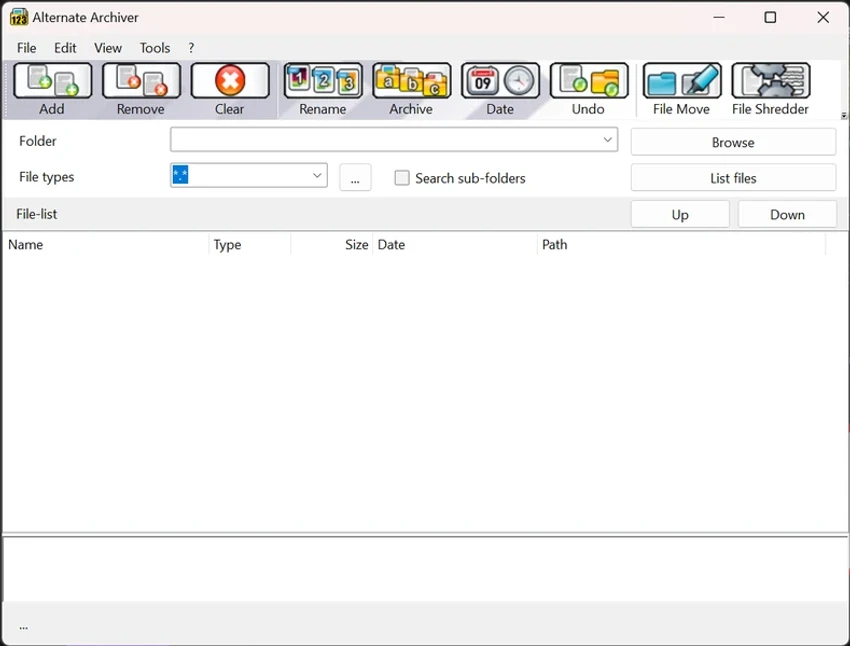
Alternate Archiver is a lightweight Windows file management utility designed to help users organize, rename, archive, and manage large groups of files more efficiently. Instead of handling documents, images, videos, music, and folders individually, the software allows multiple file operations to be completed in a single workflow. During my experience with Alternate Archiver, I found it useful for reducing file clutter by combining batch renaming, structured archiving, and file organization tools in one compact application. Its Windows Explorer integration makes accessing the program convenient, while drag-and-drop support provides an easy way to add files and folders. The software is especially suitable for users who regularly manage large collections of files and need a simple alternative to standard Windows file tools.

Features of Alternate Archiver

  • Rename multiple files at the same time using different naming options.
  • Archive files into a sorted folder matrix for better organization.
  • Manage documents, pictures, videos, songs, folders, and other file types.
  • Send selected files to specific recipients through email without creating separate messages.
  • Integrates with Windows Explorer context menu for quick right-click access.
  • Supports drag-and-drop file and folder management.
  • Compress multiple files.
  • Includes a file deletion option for permanently removing sensitive information.
  • Provides additional tools such as:
    • File Move
    • File Shredder
    • Directory tools
    • DLL Analyzer
    • Splitter
    • FTP tools
    • EXE packer tools

Interface and Usability

Alternate Archiver focuses on functionality rather than visual complexity. The interface is designed around practical file management tasks, making it straightforward for users who need quick access to archiving and organization features. The Windows Explorer integration is one of the most convenient parts of the experience. Being able to send files directly to the application through the right-click menu reduces unnecessary steps when organizing data. Drag-and-drop support also makes adding files and folders simple, especially when working with multiple items.

Because the program combines several file utilities in one package, users may need some time to explore all available tools. However, the main functions such as renaming and archiving are easy to understand.

Who Should Use Alternate Archiver?

  • Users who frequently organize large numbers of files.
  • People who need batch file renaming tools.
  • Users managing personal photo, video, or document collections.
  • Anyone looking for a lightweight file organization utility.
  • Windows users who want quick archive operations from Explorer.
  • Users who need additional file management tools in one application.

Conclusion

Alternate Archiver provides a practical solution for users who want better control over their files without relying only on Windows Explorer. Its combination of batch renaming, archive organization, compression, and additional file tools makes it a useful utility for everyday file management.

Pros & Cons

✓

Pros

  • Lightweight installation size.
  • Easy batch file renaming.
  • Helps organize files into structured archives.
  • Windows Explorer context menu integration.
  • Supports drag-and-drop operations.
  • Includes multiple additional file management utilities.
  • Simple solution for reducing file clutter.
✕

Cons

  • Some additional tools may require time to explore.
  • Requires .NET Framework 2.0.

Frequently Asked Questions

What is Alternate Archiver used for?

Alternate Archiver is a Windows utility designed for managing files through features such as batch renaming, archiving, organizing, compressing, and deleting files.

Can Alternate Archiver rename multiple files at once?

Yes. The software allows users to rename multiple files simultaneously using different naming options.

Does Alternate Archiver integrate with Windows Explorer?

Yes. Alternate Archiver can be accessed through the Windows Explorer context menu, allowing users to perform archive operations with a simple right-click.

Can Alternate Archiver compress files?

Yes. The program includes file compression capabilities along with its archiving and organization functions.

Does Alternate Archiver support drag and drop?

Yes. Users can drag and drop files and folders directly into the application for easier management.

What additional tools are included in Alternate Archiver?

In addition to archiving features, Alternate Archiver includes tools such as File Move, File Shredder, Directory utilities, DLL Analyzer, Splitter, FTP tools, and EXE packer tools.

Recommended apps [Freeware]:
  • Android Studio 2026.1.2.10 Android Studio logo Google’s official IDE for Android, offering intelligent coding, fast emulators, and cloud integration.
  • Hasleo Backup Suite 5.8.2.2 Hasleo Backup Suite logo Windows backup software for system restore, disk imaging, and cloning with emergency recovery support
  • SecretDNS 3.9.2 SecretDNS logo Improve online privacy with encrypted DNS requests and SNI protection while reducing access issues through secure network features.
  • Volumouse 2.21 Volumouse logo Adjust Windows sound volume quickly using mouse wheel shortcuts with customizable rules and simple background controls.
  • Password Secure 1.2026.07.10 Password Secure logo Securely store and manage your login credentials offline with AES-256 encryption, automatic backups, and portable password storage.
  • VidMasta 30.7 VidMasta logo Search, preview, and manage movie downloads with advanced filtering, subtitles, trailers, and detailed title information.
Recommended apps [Shareware]:
  • Foxit PDF Editor 2026.1.2 Foxit PDF Editor logo complete PDF solution for businesses, offering advanced editing, collaboration, and document security features.
  • VX Search 18.2.34 VX Search logo a powerful rule-based file search tool with advanced filtering, reporting, and network search capabilities.
  • VovSoft Domain Checker 10.4 VovSoft Domain Checker logo check domain availability, perform WHOIS lookups, and analyze multiple domains in batch mode
  • Capture One 16.8.3.3630 Capture One logo professional RAW photo editor with advanced color accuracy, tethered shooting, and studio workflow tools for photographers
  • PDF Eraser 1.9.9.1 PDF Eraser logo a Windows tool for removing text, images, and pages from PDFs with editing and rotation features
  • Dup Scout 18.2.38 Dup Scout logo finds, analyzes, reports, and removes duplicate files across disks, networks, and NAS storage devices