Audio Tag Manager logo

Audio Tag Manager 2.0

  • User Rating:
    ★★★★★
    ★★★★★
    0.0 ★ 0Votes
  • Requirements:
    Windows
  • Version: 2.0
  • Latest updated: 2 weeks ago
  • License: Freeware  
  • Publisher: TkoSoft
  • Size: 6 MB
× app stores

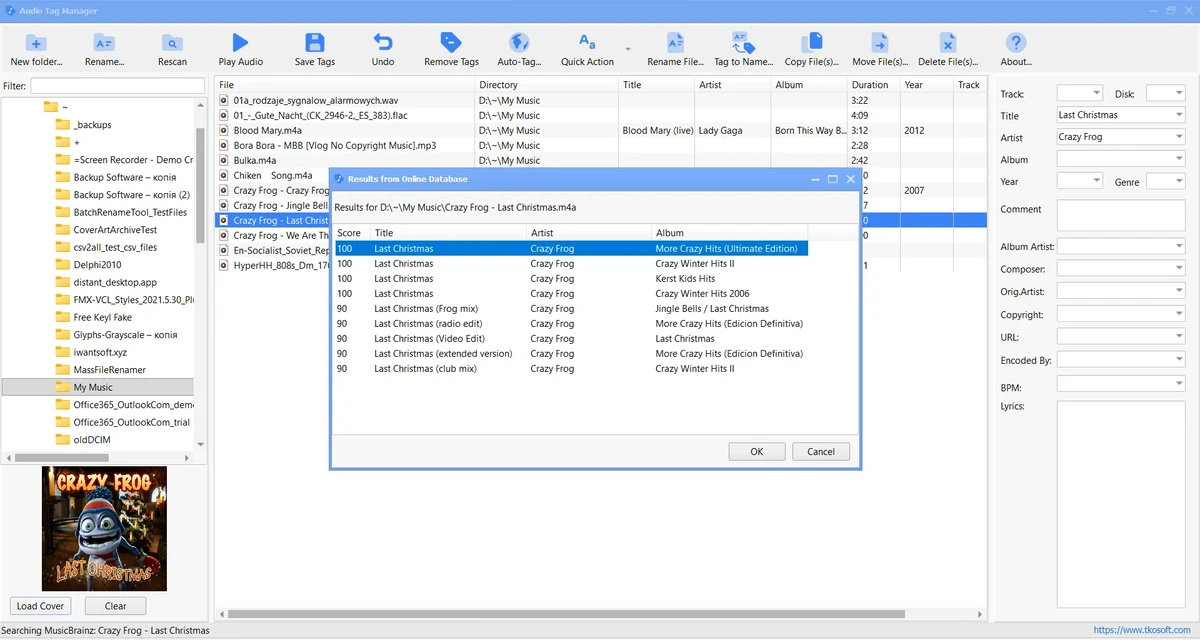
Audio Tag Manager is a free Windows application designed to help users edit, organize, and clean their digital music collections. The software focuses on managing audio metadata, allowing users to update song information, rename files, and maintain a more structured music library. During my experience with the application, I found it useful for handling collections where file names or metadata are inconsistent. It supports popular audio formats including MP3, FLAC, OGG, APE, M4A, WMA, and WAV, while providing tools for batch editing, automatic tagging through MusicBrainz, cover artwork management, and customizable cleaning presets. For users who want a simple way to improve the organization and accuracy of their music files, Audio Tag Manager offers a practical set of features without unnecessary complexity.

Features of Audio Tag Manager

  • Free audio tag editor for Windows
  • Supports MP3, FLAC, OGG, APE, M4A, WMA, and WAV
  • Edit common tags: title, artist, album, year, track, genre, and comment
  • Edit extended metadata: album artist, composer, BPM, URL, copyright, encoded by, and lyrics
  • Batch edit tags for multiple audio files
  • Rename files using metadata-based patterns
  • Auto-Tag music files using MusicBrainz online metadata
  • Manage album cover art — load, replace, or clear embedded cover images
  • Built-in presets for common tag-cleaning actions
  • Create custom presets for your own cleanup workflows
  • Free for personal and commercial use

Interface and Usability

Audio Tag Manager is designed around practical music library management rather than complicated editing workflows. The interface provides direct access to common tasks such as changing metadata, renaming files, and applying cleanup operations.

The batch editing functionality is particularly useful when working with multiple albums or large collections. Instead of updating tracks individually, users can select multiple files and apply changes together. The preset system also helps speed up repetitive cleanup tasks, especially when fixing inconsistent naming or formatting. The MusicBrainz Auto-Tag feature adds convenience for files with missing or incomplete information. It can help identify tracks and fill in metadata, reducing the amount of manual entry required.

Who Should Use Audio Tag Manager?

  • Music collectors organizing large audio libraries.
  • Users who need to fix incorrect or missing metadata.
  • People managing MP3, FLAC, or other digital music collections.
  • Users who want to rename files based on song information.
  • Anyone looking for a free Windows audio tag editor.
  • Users who want simple MusicBrainz-based automatic tagging.

Conclusion

Audio Tag Manager provides a straightforward solution for users who want better control over their music collections. With support for multiple audio formats, batch tag editing, automatic MusicBrainz lookup, and flexible cleanup presets, it makes organizing large libraries much easier.

Pros & Cons

✓

Pros

  • Free audio tag editing software.
  • Supports multiple popular audio formats.
  • Batch metadata editing saves time.
  • File renaming based on tags.
  • MusicBrainz integration for automatic tagging.
  • Customizable cleanup presets.
  • Supports album artwork management.
  • Helps create a cleaner music library.
✕

Cons

  • Focused on metadata management rather than full audio editing.

Frequently Asked Questions

What is Audio Tag Manager used for?

Audio Tag Manager is used to edit, organize, clean, and rename music files by modifying their metadata and applying consistent file naming rules.

Which audio formats does Audio Tag Manager support?

The software supports MP3, FLAC, OGG, APE, M4A, WMA, and WAV audio files.

Can Audio Tag Manager edit multiple files at once?

Yes. Users can select multiple audio files and apply metadata changes in batches.

Can Audio Tag Manager automatically add music information?

Yes. The Auto-Tag feature can search MusicBrainz for possible matches and apply metadata such as title, artist, album, album artist, and year.

Can I rename music files using their tags?

Yes. Audio Tag Manager can rename files using tag information such as artist, title, album, track number, year, genre, and composer.

Does Audio Tag Manager support album artwork?

Yes. The software allows users to load, replace, or remove cover art for supported audio files.

Recommended apps [Freeware]:
  • Far Manager 3.0 Build 6699 Far Manager logo Manage files efficiently with Far Manager's fast text-based interface, plugins, and archive support
  • O&O ShutUp10++ 3.2.1111 O&O ShutUp10++ logo control Windows privacy, telemetry, updates, and system settings with a simple portable interface
  • WifiInfoView 3.00 WifiInfoView logo scans nearby Wi-Fi networks and displays detailed technical information in real time
  • MSI Dragon Center 2.0.156.0 MSI Dragon Center logo monitor CPU, GPU, and RAM, optimize gaming performance, and control RGB and system settings on MSI PCs
  • Opera GX 133.0.5932.56 Opera GX logo Chromium-based gaming browser featuring CPU, RAM, and network limiters, built-in VPN, ad blocker, and gaming integrations.
  • DipTrace 5.3.0.1 DipTrace logo Design schematics, create multilayer PCB layouts, verify circuits, and generate manufacturing files with integrated design tools.
Recommended apps [Shareware]:
  • EF Commander 26.06 EF Commander logo a feature-rich Windows file manager with FTP, media tools, archiving, and advanced file control
  • Duplicate Finder 2026 v418 Duplicate Finder logo remove duplicate photos and videos by scanning files using MD5 hashing for accurate results.
  • LINQPad 9.9.10 LINQPad logo .NET development environment for C#, F#, and VB with database querying, scripting, debugging, and AI-assisted coding tools
  • Garden Planner 3.8.86 Garden Planner logo Create professional garden layouts easily with drag-and-drop tools for plants, paths, fences, objects, and printable designs.
  • UFS Explorer Professional Recovery 10.21.1 UFS Explorer Professional Recovery logo Professional data recovery software with RAID reconstruction, file system analysis, and advanced recovery tools for complex storage devices.
  • MassTube 22.1.0.216 MassTube logo Download online videos and convert audio into multiple formats with an easy-to-use tool designed for fast offline viewing and listening.