


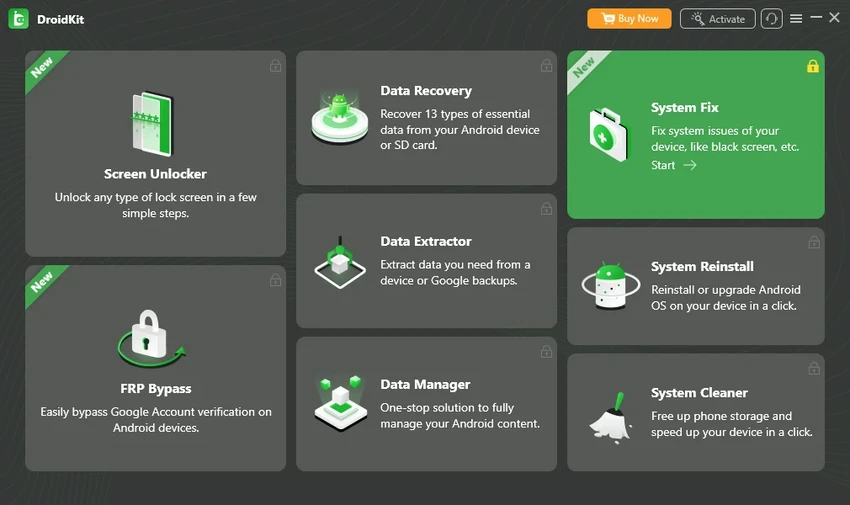

DroidKit is an all-in-one Android toolkit designed to solve a wide range of Android-related problems. Whether you're locked out of your device, need to recover deleted files, repair system issues, reinstall Android, or manage your phone's data, DroidKit brings multiple tools together in a single application. Its straightforward interface and guided workflows make many common Android maintenance tasks easier without requiring root access.
Features of DroidKit
- Remove all types of Android screen locks, including PIN, password, pattern, fingerprint, and face unlock
- Bypass Google Factory Reset Protection (FRP) lock
- Recover deleted Android data without requiring a backup
- Deep Recovery mode for more comprehensive storage scanning
- Extract data from compatible broken Android devices
- Repair Android system issues without rooting the device
- Manage photos, videos, music, contacts, apps, and other files
- Reinstall or upgrade Android using an official ROM matched to the device
- Clean junk files, caches, APK files, and large files to free storage space
- Recover data from Google backups, WhatsApp backups, Google Photos, Contacts, and Calendar
- Recover files from formatted SD cards (Windows only)
- Supports Android phones and tablets running Android 6.0 or later
User Experience
After using DroidKit, I found that one of its biggest strengths is the way it combines several Android utilities into a single application. Instead of installing separate tools for screen unlocking, data recovery, system repair, and device management, everything is available from one dashboard. The recovery and repair tools are organized with step-by-step instructions, making navigation straightforward even for users with limited technical experience. Features such as screen unlocking, FRP bypass, and Android system repair are presented as guided processes rather than requiring manual commands.
The built-in data management tools are also convenient for transferring photos, videos, contacts, music, and other files between an Android device and a computer. Being able to preview and organize content before transferring helps simplify routine device management. For users dealing with deleted files, DroidKit offers both Quick Recovery and Deep Recovery modes. Quick Recovery performs a faster scan, while Deep Recovery searches more thoroughly for deleted data that has not yet been overwritten.
Another practical feature is Android system reinstallation. Rather than manually locating firmware and flashing tools, DroidKit automatically matches an official ROM for supported devices and guides users through the installation process without requiring root access. Overall, the software provides an organized experience by bringing Android maintenance, recovery, repair, and management tools together in one place.
Who Should Use DroidKit?
- Users locked out of their Android phones
- People recovering deleted photos, messages, contacts, or other important files
- Owners of devices experiencing Android system problems
- Users who need to manage Android content from a Windows PC
- Anyone looking for an all-in-one Android maintenance and recovery solution
Conclusion
DroidKit delivers a broad collection of Android maintenance tools in a single package. From screen unlocking and FRP bypass to data recovery, system repair, storage cleanup, and device management, it covers many of the most common Android issues without requiring root access.


