


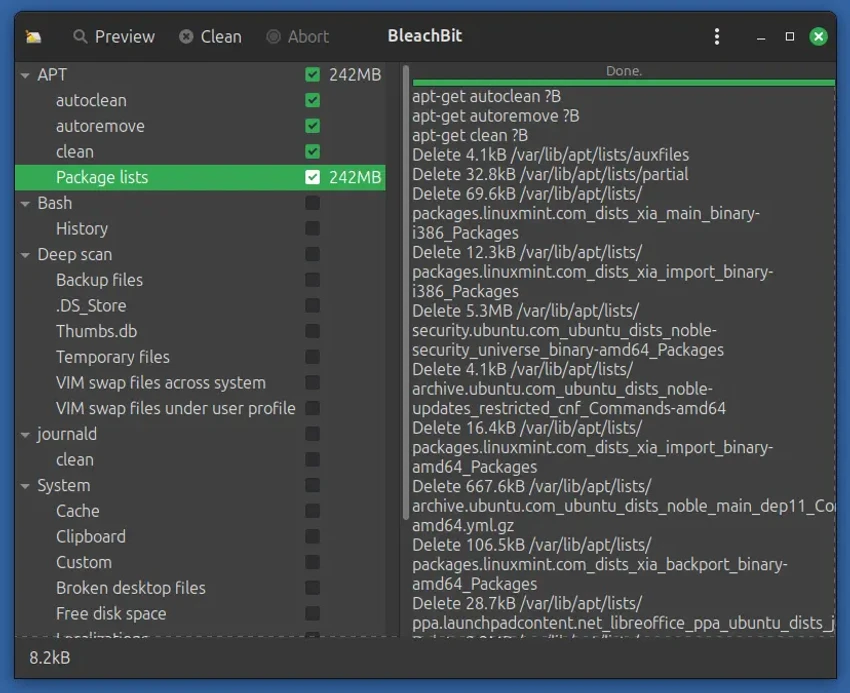

BleachBit is a lightweight, open-source utility designed to clean unnecessary files from your computer and protect sensitive data. It helps free up disk space by removing cache, logs, temporary files, and application leftovers while also offering privacy-focused cleaning features. It is widely used by users who want more control over what gets deleted compared to automated “one-click optimizer” tools.
Overview
BleachBit focuses on system cleanup and privacy protection by scanning and removing unnecessary data across the operating system and installed applications. It supports cleaning web browsers, system logs, application caches, and various temporary files that accumulate over time. In addition to basic cleanup, it provides secure deletion tools that help prevent recovery of sensitive files. Users can preview reclaimable space before executing any cleaning actions, making the process more transparent and controlled.
Features of BleachBit
- Clean system junk files (temporary files, logs, cache, etc.)
- Remove browser data (cookies, history, cache, session data)
- Supports Firefox and Chrome cleaning
- Delete application traces (Office, VLC, WinRAR, Windows Explorer history)
- Preview disk space before cleaning
- Shred files to prevent recovery
- Wipe free disk space for deeper privacy protection
- Portable version available (no installation required)
- Command-line interface for automation and scripting
- Custom cleaners via CleanerML
- Support for extended cleaners via winapp2.ini
- Free, open-source, and adware-free
User Experience
Using BleachBit feels straightforward and functional. The interface is minimal, showing a list of cleaning categories with checkboxes, allowing users to decide exactly what should be removed. The preview feature is especially useful, as it shows how much disk space can be freed before any changes are made. This reduces the risk of accidental deletion and gives users more confidence when performing system cleanup.
Advanced users benefit from features like file shredding, free space wiping, and command-line support, while beginners can stick to simple browser and system cleanup options.
Conclusion
BleachBit is a reliable and transparent system cleaning tool that prioritizes privacy and control. Its open-source nature, combined with powerful cleanup and secure deletion features, makes it a strong alternative to commercial system optimizers.


