


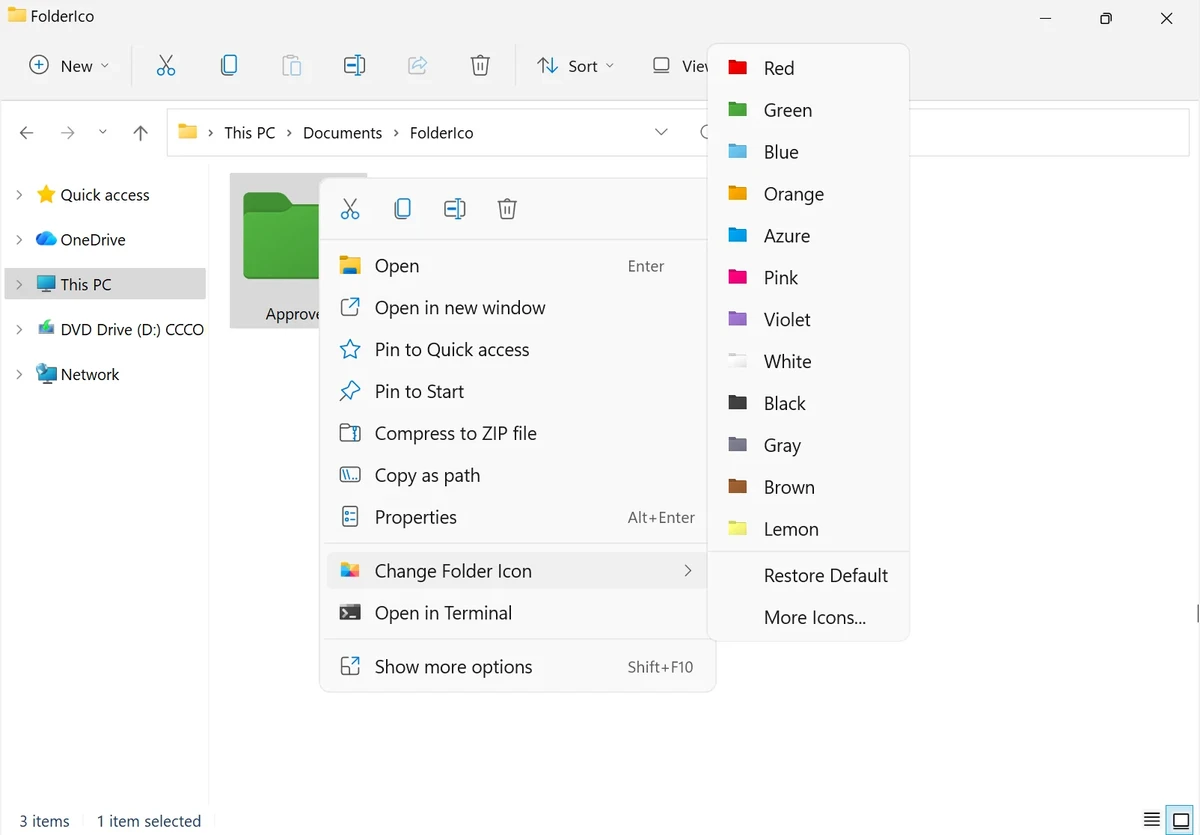

FolderIco by Teorex is a lightweight Windows utility designed to customize folder icons by adding colors and visual labels. Instead of relying on standard yellow folders, it helps users organize files more intuitively by assigning different colors to folders based on priority or category.
Overview
FolderIco integrates directly into Windows Explorer, allowing users to change folder icons through a simple right-click menu. It focuses on visual organization by replacing traditional folder icons with colored alternatives, making it easier to identify important directories at a glance.
The tool is designed to be minimal and efficient, using native Windows functionality without running background processes. It is primarily aimed at users who want a simple visual system for organizing files without changing folder structure or using complex file management software.
What you can do with FolderIco?
- Change folder icons
- Apply folder colors
- Create custom folder designs
- Use built-in folder icon libraries
Features of FolderIco
- One-click folder icon color customization
- Integration with Windows Explorer right-click menu
- Assign colors to folders for visual organization
- Priority-based folder classification (e.g., red for important, green for personal)
- Lightweight application with no background memory usage
- Uses native Windows icon system for performance efficiency
- Quick visual identification of folders
- Simple installation and usage workflow
User Experience
Using FolderIco feels seamless because it operates directly inside Windows Explorer. After installation, users can right-click any folder and immediately apply a new color icon without opening a separate interface.
The simplicity is the main strength of the tool. It does not require configuration or learning complex settings. Instead, it focuses on speed and visual clarity, which can significantly improve workflow for users who manage large numbers of folders.
Conclusion
FolderIco is a straightforward and efficient tool for improving folder organization through color coding. It enhances Windows Explorer by making important folders easier to identify at a glance, without adding system overhead or complexity.


