HP Easy Start logo

HP Easy Start 17.5.11

  • User Rating:
    ★★★★★
    ★★★★★
    0.0 ★ 0Votes
  • Requirements:
    Windows
  • Version: 17.5.11
  • Latest updated: 2 weeks ago
  • License: Freeware  
  • Publisher: HP Development Company
  • Size: 27 MB
× app stores

HP Easy Start is a printer setup and driver installation utility designed to simplify the process of connecting and configuring HP printers on Windows computers. Developed for users of all technical levels, the application helps detect compatible HP printers and installs the necessary drivers to ensure proper communication between the printer and operating system.

The software is especially useful when setting up new HP printers, as it guides users through the installation process instead of requiring manual driver searches. HP Easy Start can detect printers connected through USB cables as well as devices available over Ethernet and local Wi-Fi networks, making it suitable for both home users and business environments with shared printers.

Printer drivers are essential because they allow Windows to communicate correctly with specific printer models and access their full functionality. HP Easy Start simplifies this process by identifying the connected printer and downloading the appropriate drivers designed for that device and operating system version.

With its guided setup process, automatic printer detection, and support for modern Windows systems, HP Easy Start provides a convenient way to prepare HP printers for everyday printing tasks without complicated manual configuration.

Features of HP Easy Start

  • Simplifies HP printer driver installation
  • Automatically detects compatible HP printers
  • Supports USB-connected printers
  • Supports Ethernet network printers
  • Supports local Wi-Fi printer connections
  • Downloads drivers matched to specific HP printer models
  • Helps Windows recognize and manage HP printers
  • Provides guided setup instructions
  • Suitable for home and business printer deployments
  • Supports modern Windows operating systems
  • Available in multiple languages
  • Optimized for current HP printer models

Interface and Usability

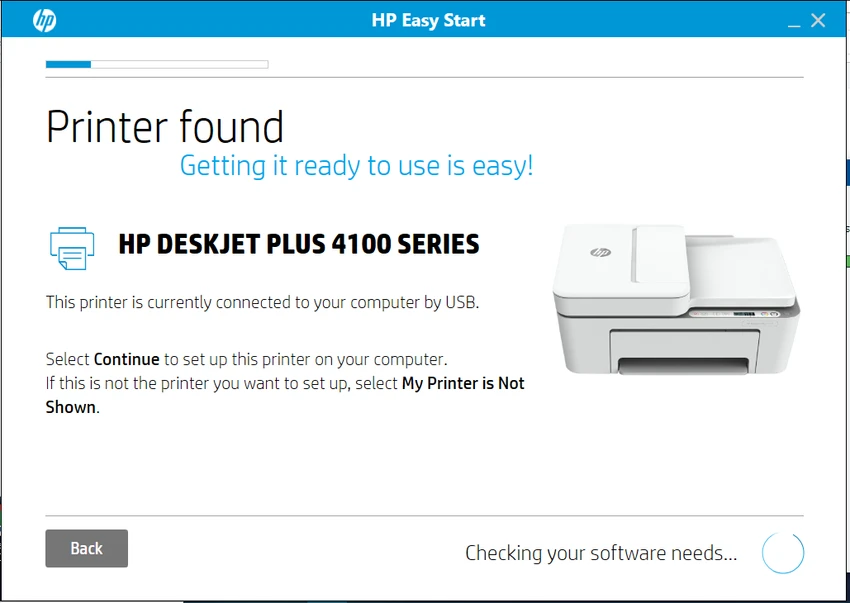
After using HP Easy Start, I found the setup process straightforward and beginner-friendly. The application focuses on guiding users through each step rather than presenting complicated technical options. During installation, it asks questions about the printer connection method, including USB, Ethernet, or wireless network connections.

The automatic detection feature makes setup easier by identifying nearby compatible HP printers. If a printer is not immediately found, the application provides an alternative option to help users continue troubleshooting the connection process.

For users who are unfamiliar with printer drivers or network configuration, HP Easy Start reduces the complexity of installation. Advanced users may find the guided approach less flexible than manual driver installation, but for most HP printer setups, the simplified workflow is practical and efficient.

Who Should Use HP Easy Start?

  • Home users setting up HP printers
  • Users installing a new HP printer on Windows
  • Small businesses managing HP printer connections
  • Organizations deploying multiple network printers
  • Anyone who wants an easier alternative to manual driver installation

Conclusion

HP Easy Start provides a convenient way to install and configure HP printers on Windows computers. By automatically detecting devices and downloading the correct drivers, it removes many of the challenges associated with manual printer setup. Its support for USB, Ethernet, and wireless connections also makes it useful for both personal and shared office printer environments.

Pros & Cons

✓

Pros

  • Easy guided printer setup process
  • Automatically detects compatible HP printers
  • Supports USB, Ethernet, and Wi-Fi connections
  • Downloads appropriate printer drivers automatically
  • Designed for users with limited technical experience
  • Supports modern HP printer models
  • Free utility from HP
✕

Cons

  • Limited to HP printers
  • 64-bit Windows only

Frequently Asked Questions

What is HP Easy Start used for?

HP Easy Start is used to set up HP printers on Windows computers by detecting compatible devices and installing the required printer drivers.

Does HP Easy Start install printer drivers automatically?

Yes. HP Easy Start can identify the connected HP printer model and download the appropriate drivers needed for proper operation.

Can HP Easy Start connect to wireless printers?

Yes. HP Easy Start supports HP printers connected through local Wi-Fi networks, as well as USB and Ethernet connections.

Does HP Easy Start work with all printers?

No. HP Easy Start is designed specifically for HP printers and does not support printers from other manufacturers.

Is HP Easy Start easy for beginners to use?

Yes. The application provides step-by-step instructions and automatic printer detection, making it suitable for users with limited technical experience.

What operating systems does HP Easy Start support?

HP Easy Start is designed for modern Windows operating systems and requires a 64-bit system according to the provided information.

Recommended apps [Freeware]:
  • MakeMKV 1.18.4 MakeMKV logo disc ripper that converts DVD and Blu-ray discs into MKV files while preserving audio, video, subtitles, and metadata
  • QontrolPanel 1.18.2 QontrolPanel logo system tray audio tool for quickly switching output devices, managing inputs, and controlling app volume on Windows
  • StarDesk 1.4.1 StarDesk logo remote desktop solution offering low-latency connections, file transfer, remote assistance, Quick Launch, and remote device management.
  • Textadept 13.0 Textadept logo Write and edit code efficiently with Textadept, a lightweight, portable, and customizable cross-platform text editor
  • HWiNFO 8.50 HWiNFO logo Analyze hardware components, monitor system sensors, generate detailed reports, and evaluate PC performance with a free diagnostic tool.
  • CudaText 1.234.6.0 CudaText logo Edit code efficiently with a lightweight editor supporting many programming languages, syntax highlighting, plugins, and customization.
Recommended apps [Shareware]:
  • DSLR Remote Pro 3.31.5 DSLR Remote Pro logo Windows software for Canon DSLR control, photo booth creation, live view, HDR capture via USB connection
  • Ideal Remote 26.8 Ideal Remote logo Manage Windows, macOS, and Linux systems remotely with IDEAL REMOTE, featuring secure remote access and built-in administration tools
  • Freemake Video Converter 6.0.1.3 Freemake Video Converter logo Convert videos, burn DVDs, create slideshows, and edit media with Freemake Video Converter for Windows
  • Actual Window Menu 8.15.4 Actual Window Menu logo adds advanced commands like transparency, always-on-top, minimize to tray, and resize options to the Windows system menu
  • PerfectXL Risk Finder 1.2.12 PerfectXL Risk Finder logo analyzes Excel files, detects spreadsheet risks, finds errors, and improves model reliability
  • Argente Malware Cleaner 3.0.8.4 Argente Malware Cleaner logo Detect and remove malware with flexible scan modes, restore point creation, and an easy-to-use on-demand security scanner.