Clean Space logo

Clean Space 2026 v721

  • User Rating:
    ★★★★★
    ★★★★★
    0.0 0Votes
  • Requirements:
    Windows
  • Version: 2026 v721
  • Latest updated: 1 day ago
  • License: Freeware  
  • Publisher: Clean Space LTD
  • Size: 9 MB
×

Clean Space is a Windows system utility designed to remove unnecessary files, commonly referred to as “electronic garbage,” from your computer. It focuses on freeing disk space, reducing system clutter, and improving privacy by deleting temporary files, logs, caches, and browsing traces. The tool is aimed at users who want deeper cleanup capabilities than standard built-in Windows disk tools.

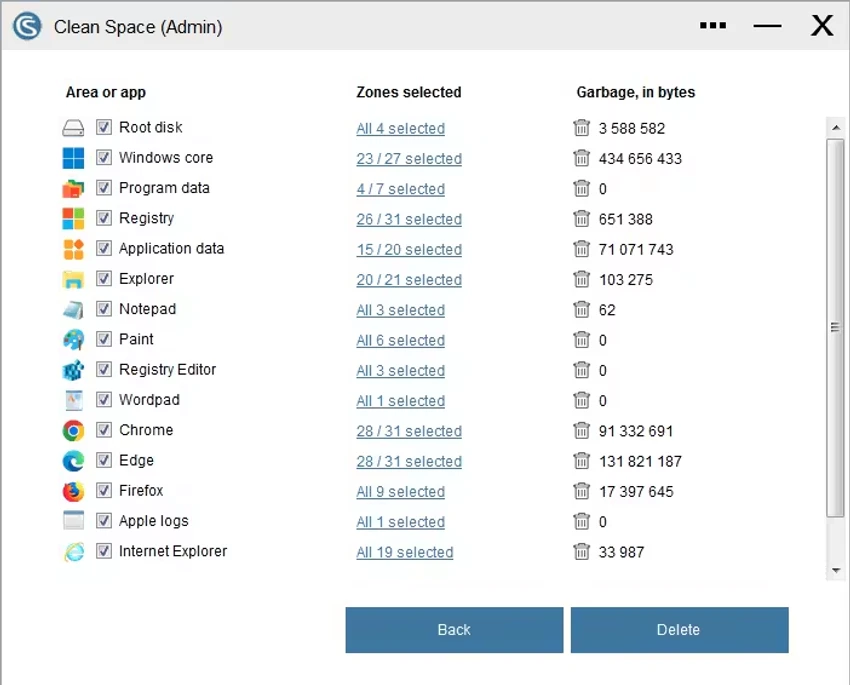
Clean Space works by scanning different areas of the operating system and installed applications to identify temporary files and stored data that are no longer needed for regular operation. This includes browser cache, system logs, temporary internet files, registry entries, and other background data created during everyday use. Over time, these files can accumulate and consume significant storage space while also potentially exposing traces of user activity. In addition to freeing storage, Clean Space also emphasizes privacy protection by removing data that could reveal user behavior history.

Features of Clean Space

  • Removes system and application cache files
  • Cleans temporary internet files and browser data
  • Deletes Windows logs and system traces
  • Removes index.dat and similar tracking files
  • Cleans registry entries related to activity history
  • Frees disk space from accumulated “junk” data
  • Privacy protection through removal of user activity traces
  • Secure deletion methods designed to prevent recovery
  • Cleans data from multiple applications (Windows OS, browsers, and more)
  • Focus on long-term system maintenance and optimization

Clean Space is designed as a straightforward maintenance tool that scans the system for unnecessary files and allows users to remove them efficiently. The process is centered around freeing disk space and reducing background clutter without requiring advanced technical knowledge. For everyday users, it provides a clear way to reclaim storage and reduce system buildup. However, because it performs deep cleaning operations, users should understand what is being removed to avoid deleting data they may still need.

Conclusion

Clean Space is a focused system cleanup and privacy tool that helps remove unnecessary files generated during daily computer use. By clearing cache, logs, and temporary data, it can help improve storage availability and reduce digital traces left behind by applications.

Pros & Cons

Pros

    • Deep system and application cleanup
    • Helps free significant disk space
    • Privacy-focused data removal
    • Covers cache, logs, and temporary files
    • Simple and direct usage workflow

Cons

    • No performance or safety ratings provided
    • Advanced cleaning may require user caution
    • Limited transparency on specific cleaning rules

Frequently Asked Questions

What is Clean Space used for?

Clean Space is used to remove unnecessary system files, caches, logs, and other temporary data to free space and improve privacy.

Does Clean Space improve performance?

It may improve performance indirectly by freeing disk space and reducing system clutter.

Is Clean Space safe to use?

Yes, but users should review cleaning options carefully to avoid deleting important data.

What does Clean Space delete?

It deletes temporary files, browser cache, logs, registry entries, and other system-generated data.

Which Windows versions are supported?

It supports Windows 7, 8, 10, and 11 (x64 only).

Recommended apps [Freeware]:
  • DirPrintOK 7.61 DirPrintOK logo fast and portable tool to print or export directory contents in XLS, HTML, CSV, or TXT formats.
  • Garmin Express 7.29.0.0 Garmin Express logo manage Garmin GPS devices with map updates, backups, software updates, and device registration
  • CS Easy Unlocker 1.1.5.0 CS Easy Unlocker logo unlock restricted folders and fix “Access Denied” errors with a simple one-click tool.
  • Zortam Mp3 Media Studio 33.95 Zortam Mp3 Media Studio logo Manage, tag, rip, organize, convert, and play MP3 files with the all-in-one Zortam Mp3 Media Studio
  • FluentTweaker 26.06.02 FluentTweaker logo a Windows utility for safe, reversible system tweaks focused on UI, privacy, and performance control.
  • NirLauncher Package 1.30.24 NirLauncher Package logo a portable Windows utility suite with 180+ NirSoft tools for system, network, and recovery tasks
Recommended apps [Shareware]:
  • Audio Transcoder 2.12.24 Audio Transcoder logo all-in-one audio converter and CD ripper supporting MP3, FLAC, AAC, WMA, and more
  • Adobe Illustrator 2026 Adobe Illustrator logo professional vector graphic editor for creating logos, illustrations, and scalable designs.
  • Screenpresso 2.2.13 Screenpresso logo a versatile screen capture and video recording tool with editing and annotation features.
  • COAA PlanePlotter 6.7.5.9 COAA PlanePlotter logo a Windows tool that decodes live aircraft data like ADS-B and ACARS and displays real-time radar-style tracking
  • Total Audio Converter 6.1.0.296 Total Audio Converter logo convert MP3, WAV, FLAC, AAC and more with batch processing, CD ripping, and Windows integration.
  • Kettler World Tours 3.0.4.20 Kettler World Tours logo Train indoors with real-world routes, GPS integration, and online racing using Kettler World Tours